Working with Employee and Resource Availability

Contents
The topics in this section explain how to work with employee and trade availability on schedules in APM.
Once you have created schedules, you can use them to calculate and view the availability of your employees and trades.
One of the key factors in developing a schedule is matching the work that needs to be done with the employees available to perform the work. Scheduling too much or too little work for a maintenance group can result in ineffective use of your tradespeople. It is also important to match the trades required to perform the work with the trades of the people available. For example, if you do not have any welders available, there is no point in scheduling work that requires the use of a welder.
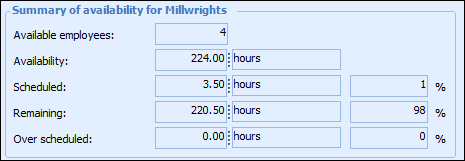
APM tracks the current availability status of both trades and employees. As you add or remove tasks on a schedule, APM calculates the remaining availability of trades or employees for that schedule. For example, if you add a task that requires a welder for 4 hours, APM reduces the availability of the welder trade by 4 hours.
APM summarizes this availability information on the schedule worksheets.
This feature provides an immediate and accurate picture of how much work can still be added to the schedule.
Note: When working with employee availability, you might want to view availability graphs for assigned employees rather than for trade. You can do this by selecting the schedule’s Availability view, Employee Availability tab.