Repairing Failed Units Using the External or Off-site Repair Process

Contents
Use requisitions, work orders, and purchase orders to track external repairs. You can indicate that a requisition or purchase order line is a repair order and select the resource and unit to be repaired. You can select only units with a status of Repair On Site, Awaiting Repair Action, or Returned.
Standard purchasing functions such as approvals can be used with off-site repair purchase orders.
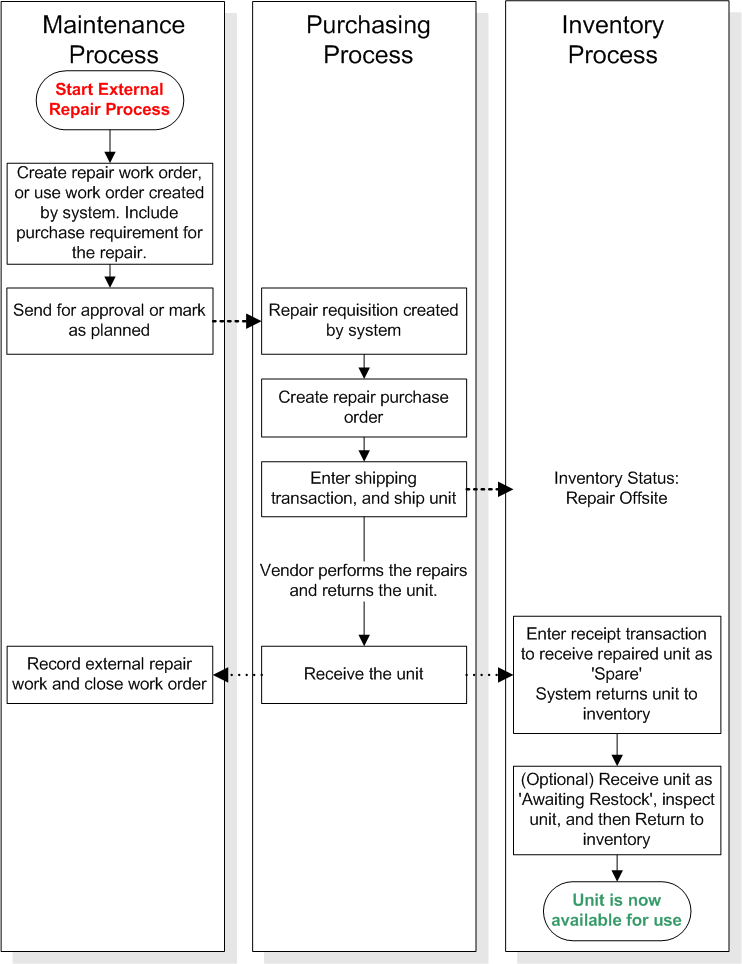
The following steps outline the off-site repair process, starting from the point where the unit swap has been completed.
Follow the steps in this procedure to complete an external repair. If necessary, follow the links for more detailed instructions on any step. The statuses of the units are shown. Statuses are the same for units linked to assets and units that are not linked, unless otherwise indicated.
This topic assumes that you have already replaced (swapped) the failed unit. If you have not yet completed the swap, please see Swapping a Repairable Spare.

To Repair a Unit Externally

1.
If a work order for the repair was not automatically created, create one now. You can do this manually, or using the Move to Repair Shop method.
Note: This will set the unit’s status to ‘Repair On Site’. The status will be changed to ‘Repair Off Site’ when you ship the unit to the repair supplier.
Please see Moving a Serialized Unit to the Repair Shop.
2.
To add a requirement, please see Adding a Purchase Requirement for Off-site Repair to a Repair Work Order.
3.
4.
For more information, please see Creating Purchase Orders from a Work Order.
5.
6.
Please see Creating Shipping Transactions.
7.
Please see Receiving Repaired Resource Units.
8.
Please see Returning Serialized Inventory Units to Inventory.
9.
Note: Depending on the serialized resource settings, the system may automatically mark the work order as being completed.