Creating Off-site Repair Requisitions

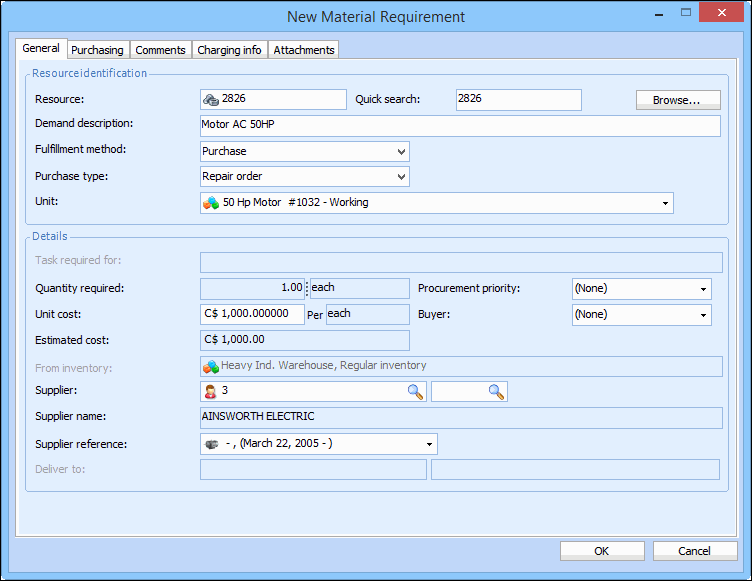
When you create a requisition for an off-site repair, you must specify the resource unit on the requisition. In order to create a repair requisition, the supplier resource must be set up to be used for repair orders.
Note: If the system automatically created a repair work order, or you have created one manually, the external repair requirement may already exist on the work order. In this case, the system will create a requisition once the work order is approved or marked as planned.

To Create an Off-site Repair Requisition
1.
From the site’s Requisitions view, select the Requisitions tab, and then the Requisitions tab. By default, this tab lists all open requisitions for the site and below.
2.
Click New. The Requisition window appears, open to the Properties view.
3.
4.
In the Title box, enter a title for the requisition.
5.
Select the Charging tab, and then browse to select the work order, asset, or account from the selector dialog, and then click OK.
6.
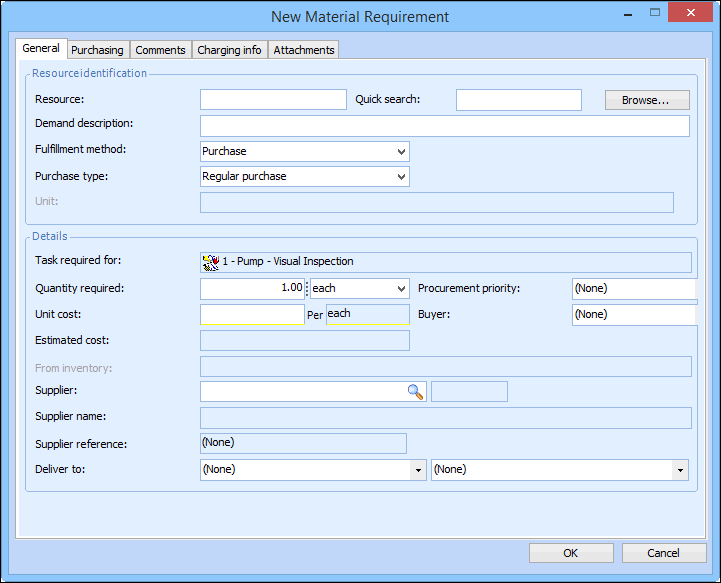
Select the appropriate type resource from the New list. The applicable New Requirement dialog appears.
7.
Enter the number of the resource being repaired, or click Browse to search for it. When you select a serialized resource, the Unit list becomes available.
8.
In the Fulfillment method box, select Purchase.
9.
In the Purchase Type box, select Repair Order. The Unit is now available.
10.
From the Unit list, select the unit that you want to repair.
Note: If you select a unit that has not been issued from inventory (e.g. ‘Spare’), you will need to issue the unit before you can create the Ship unit for repair transaction.
11.
Click OK to save and close the New Requirement dialog. The item appears in the list of items to requisition.
12.
13.
When you are finished, Save and Close the Requisition window.