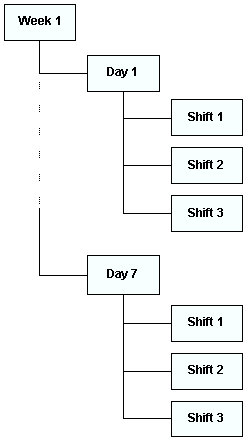
Concepts Tasks Settings Creating Availability Schedules Contents Creating a Schedule from Scratch Setting Schedule Properties Creating Schedules from a Template Adding Child Schedules Using the Schedule Hierarchy The topics in this section explain how to create schedules in APM. When you need to schedule work order tasks for a period of time, you will need to create a new schedule or a new set of schedules. You can create schedules from scratch or from schedule templates. You can organize a set of schedules as a hierarchy. The hierarchy structure allows you to quickly see how the schedules are related to each other. When you use a set of schedule templates to create a set of schedules, the new schedules are automatically organized in a hierarchy. For example, using a set of schedule templates you can create a weekly schedule, 7 daily schedules, and 21 or more shift schedules in one step. Below is a diagram of a typical set of schedules in a hierarchy. Once you create a set of schedules, you can perform functions between each schedule in the hierarchy. These functions include: • Transferring tasks from a parent to a child schedule. For example, you can transfer tasks from a weekly to a daily, or from a daily to a shift. • Moving tasks between peers. For example, you can move open work from the previous day to the next day’s schedule. You can add new or existing schedules to a hierarchy or move schedules around in the hierarchy at any time.