
Creating Assemblies

Contents
Assemblies are component assets that also include component assets. A component asset is simply an asset that is moved to and from various locations. Component assets are installed in component locations, as shown in the following diagram.
Whenever you use assemblies, you need to put the component’s locations (locations B and C in this example) in the physical hierarchy as children of the component location (location A). The physical hierarchy represents the static relationships between assets. Since components can move from one asset to another, they do not belong in the hierarchy. Component locations, on the other hand, do not change, so they are included.
Assemblies are fairly common in most industries. For example, an oil rig (Asset 1) has a generator set (Asset 2) as a component. The generator set, in turn, has a motor (Asset 3) and a pump (Asset 4) as components. The oil rig needs to collect costs and work history data for all of its installed components, so it includes component locations for the generator set (Location A), motor (Location B), and pump (Location C).
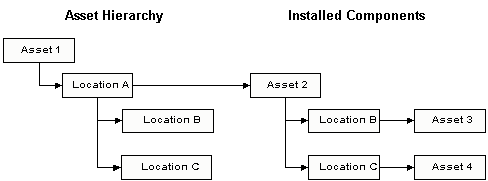
The two hierarchies depicted in the diagram (Asset Hierarchy and Installed Components) are called parallel hierarchies. In APM, you can have up to two levels in your parallel hierarchies, as shown in the diagram. The two location B’s and the two location C’s are called parallel component locations. You can have as many parallel component locations as necessary. The parallel component locations on the physical hierarchy are called the outer component locations. The parallel component locations on the installed components hierarchy are called the inner component locations.
 
The topics in this section explain how to create assemblies in APM.