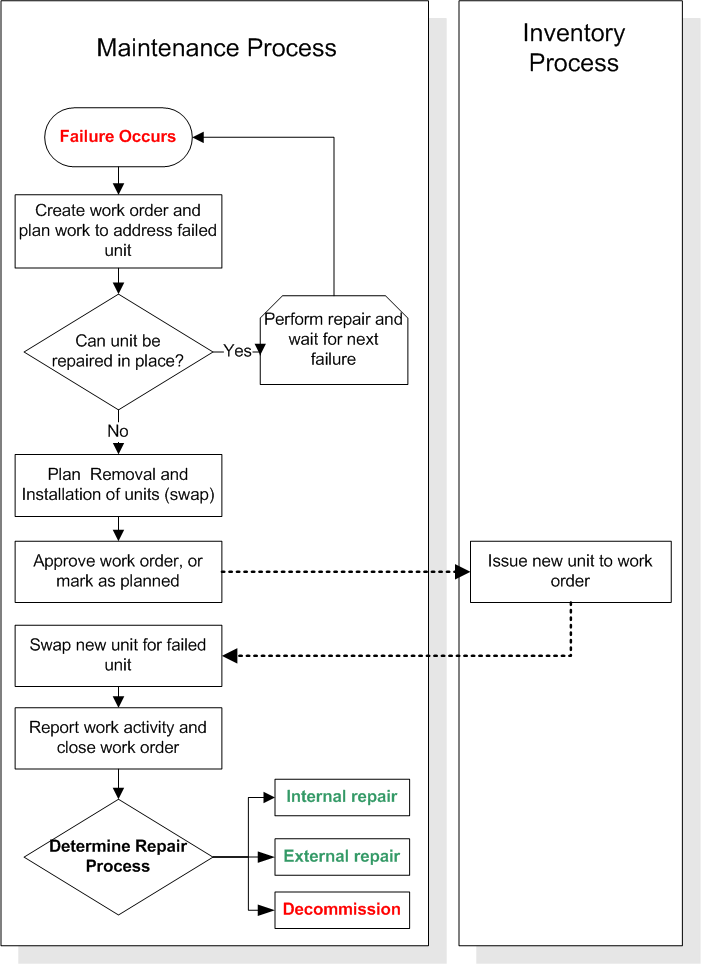
Concepts Tasks Settings Repairing Failed Units Contents Swapping a Repairable Spare Repairing Failed Units Using the Internal or On-site Repair Process Repairing Failed Units Using the External or Off-site Repair Process Any component asset or inventory item can be sent out for repairs. However, if a component asset has been linked to a serialized resource unit, you can track the status and repair history for that particular component. You can also track the status and repair history of inventory units that are not linked to assets. When a serialized resource unit fails, you can repair it in place, or you can remove it from the location for repair and install a working unit in its place. When you remove a serialized resource unit to repair it, you must record the information for the remove and install (swap) in APM. Typically, this is done using a work order. Whether you are using an internal or external repair process, you should create a work order to manage the repair process. The system can create a repair work order automatically, if this option has been set up on the resource. If the unit cannot be repaired, you can change the status of the unit to Decommissioned after it has been returned to inventory. You can only decommission “inventoried units”. This is because when the unit is returned to inventory, the cost of the unit gets credited to the holding account. The topics in this section explain the process for swapping serialized units, as well as the repair process for both internal and external repairs.