
Work Order Statuses

When managing work orders and tasks, it is important to understand their statuses. The status identifies the stage at which each document is in its lifecycle from creation to closure. The status of a work order can also determine which actions can be performed on the work order at that time. For example, if a work order has been marked as planned, the planning information for the work order is locked unless the work order is redrafted.

How Statuses are Used

The following table lists all of the statuses that a work order can have and when each status is used:
When all of the work order’s tasks are scheduled, the work order also has this status.
When the first indicator reading is entered or a labor or service transaction is charged to a work order task.

Statuses and the Work Order Life Cycle

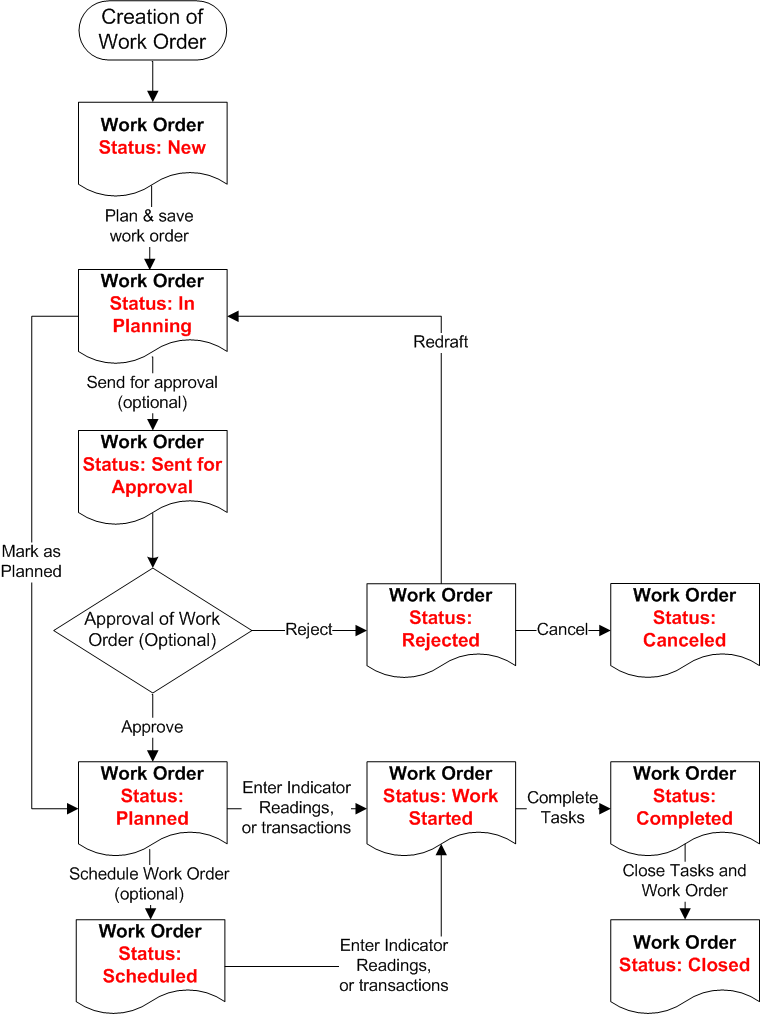
As you complete the work planning process, the system applies an appropriate status for each task and work order, as shown in the following diagram.
Each task on a work order can have a different status. When work order tasks have different statuses, APM calculates an appropriate status for the work order. For example, if task 1 has a Work in Progress status, but task 2 has a Planned status, the work order status is Work in Progress.
Note that you can mark individual work order tasks as being “Planned” while the work order is “In planning”. When you mark the entire work order as “Planned”, all of its tasks are also “Planned”.
The status of each task and work order helps you to manage your work backlog. For example, if you are viewing a list of work orders for an asset, you can filter and sort the list based on the work status on each work order.
TOP

Activity Restrictions Based on Work Order Status
Depending on where a work order is in its life cycle and its current status, some work order activities or options might be unavailable. The list of available activities and options is also different depending on the approval settings and unplanned work order policy setting for the site.
The following table lists which activities are available for each status in a typical implementation.
Report Activity (enter timecards, transactions, indicator readings) 1
Report Activity (enter timecards, transactions, indicator readings) 1.
Report Activity (enter timecards, transactions, indicator readings)

1
This activity is allowed when the Allow Activity on Unplanned Work Orders option is selected (unless the work order status is Closed or Canceled).

2
Only if the work order has been approved or marked as planned.