
Introduction to Work Document Change Requests

Change requests specify updates to be performed on work documents in the external CMMS (for example, SAP) that manages assets and work. AssetWise Enterprise Interoperability (AWEIS) conveys requests to the CMMS and returns updates for the interop documents in APM. APM supports work document change requests for work orders and work requests.
For example, you can use work document change requests to:
Change requests can also request that any of the user fields or reference numbers be updated. The user fields consist of 10 string fields, five date fields, five check boxes, and five reference numbers that are defined in the site interoperability profile.
Note: Support for user-defined fields interop work documents is generally available in APM. To use it, you must first enable feature 48. In the Enterprise window, select the Features view and the Enabled Features tab. Click Browse, select “Support for user defined fields with AssetWise Interoperability”, and click OK. If APM is running as a smart client, click Refresh Enabled Features on the server. Then restart the client to use the functionality.
Note: Support for work document change requests is generally available in APM. To use it, you must first enable feature 77. In the Enterprise window, select the Features view and the Enabled Features tab. Click Browse, select “Support for AssetWise Interoperability Work Document Change Requests”, and click OK. If APM is running as a smart client, click Refresh Enabled Features on the server. Then restart the client to use the functionality.
This introduction explains:
For related information, see:

Work Document Change Request Process

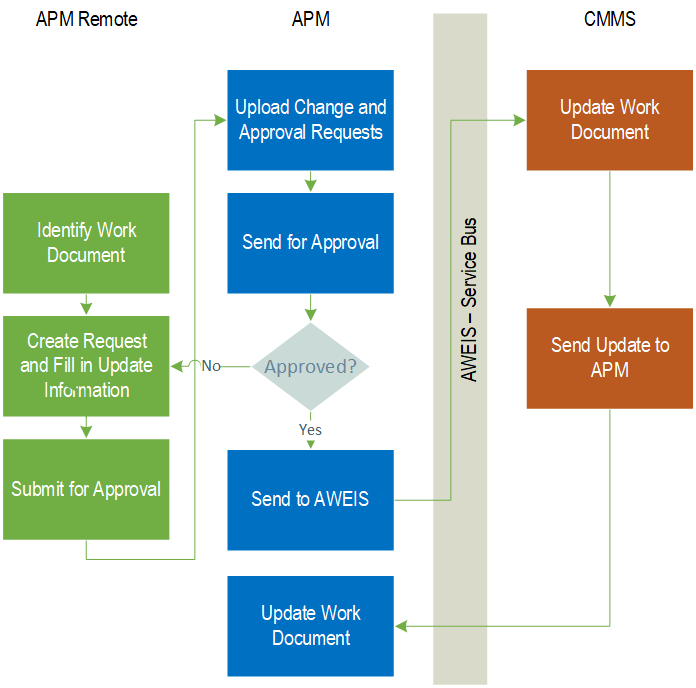
The process begins when you identify an interop work order or work request that needs to be updated and create the change request. The process ends when the work document is updated in the CMMS and then in APM.
The following illustration shows the work document change request process when it originates in APM Remote and includes the approval process.

Create the Request

Site window, Work Management view, Change Requests tab
Checksheet window if the checksheet references a work order or work request (check the Properties view, Source tab). Click the Tools menu and click New Work Order Change Request or New Work Request Change Request
Note: Work document change requests can also be generated by APM when all of the checksheets associated with the work document have been completed. See Automatic Work Document Change Request Creation.

Approve and Submit the Request

Update the Work Document

Automatic Work Document Change Request Creation

APM provides a way to automate the creation of work document change requests when all of the checksheets for a work order or request are completed.
The functionality is based on checksheet statuses. When the status of a checksheet is updated as “processed”, a change request can be created to set the status of the originating work order to complete. The request is sent to the CMMS, where the work order’s status is updated. A Sync Work Order message is sent to APM and the interop work order’s status is updated.
For more information, see Defining Change Request Creation Settings.

Setting up APM for Work Document Change Requests
Setting up APM for work document change requests involves the following tasks:
See Setting up Work Document Change Request Types
See Setting up Work Document Change Request Statuses
See Defining Change Request Creation Settings
See Approvals Settings
See Setting up APM Outbound Events