
Sending a Work Document Change Request for Approval

APM supports the approval process for work document change requests. The approval process is typically used to vet requests before they are sent to AWEIS.
A work order or work request change request can be sent for approval when:
For information about setting up the approval process, see Document Approvals.
For related information, see Setting up Work Document Change Request Types.
This topic explains how to send a new or existing work document change request for approval.

To Send a New Change Request for Approval

1.
2.
At the bottom of the New Properties Change Request dialog, select Send for approval with route and choose the approval route. For example:
When the request is saved, it then becomes available to the first approver on the route.

To Send an Existing Work Document Change Request for Approval
1.
2.
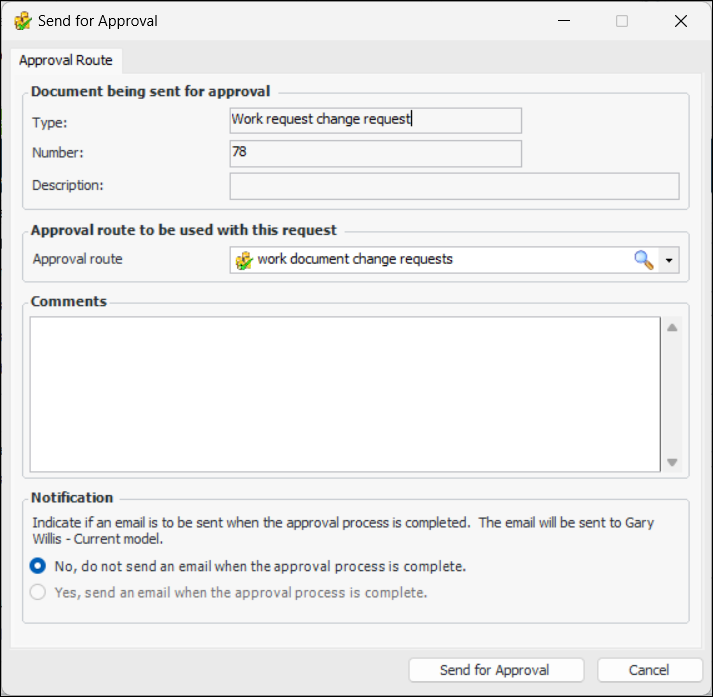
Click the Change Request menu and then Send for Approval. The Send for Approval dialog appears. For example:
3.
4.
Enter a comment, if you wish. Requester comments are displayed in the site’s Approvers view, Requests tab, as well as in the Approval Request window in the Request Info tab.
5.
Note: Employees can be notified by email only if their email addresses have been entered in their employee properties.
6.
Click Send for Approval to send the request to the first approver on the route. The change request’s approval status changes to “Waiting for approval”.
Tip: To see the status of the approval request, open the Change Request window, select the History view and then the Approvals tab.