What’s New in APM 7.21

Some of the enhancements made to AssetWise Performance Management (APM) in release 7.21 pertain to APM when AssetWise Enterprise Interoperability (AWEIS) has been implemented to exchange data with an external CMMS. For example, anomaly risk assessment relies on AWEIS to synchronize data between anomaly events in APM and an external AA&T system. This release also introduces the first phase of enhancements to improve quantitative RBI in your workflow.

Contents

Anomaly Risk Assessment and Integration
Asset Management
Configuring the APM Environment
Construction Management
Fluid Condition Tracking
Inspection Management
Performance and Stability Enhancements
Personnel Management
Standard Tasks
Strategy Development Analysis

Anomaly Risk Assessment and Integration

This release introduces support for integrating APM with an external Anomaly Assessment and Tracking (AA&T) system. With the help of AWEIS and other middleware, anomaly events are sent to the AA&T system, which then becomes the master system for the events. Information, including event statuses, is sent to APM to keep the two systems synchronized.
An anomaly event is created in APM when a user acknowledges an indicator alarm and assesses the risk associated with the anomaly (alarm). Actionable items typically result in the creation of requests for work and anomaly events.
Note: Support for anomaly risk assessment is available for preview. You must first enable feature 108 to use the functionality in APM. In the Enterprise window, select the Features view and the Enabled Features tab. Click Browse, select “Anomaly risk assessment” and click OK. If APM is running as a smart client, click Refresh Enabled Features on the server. Then restart the client to use the functionality.

Alarm Acknowledgment Process

The alarm acknowledgment process involves these steps:
1.
2.
3.
4.
5.
6.
7.
8.

Anomaly Risk Assessment in APM

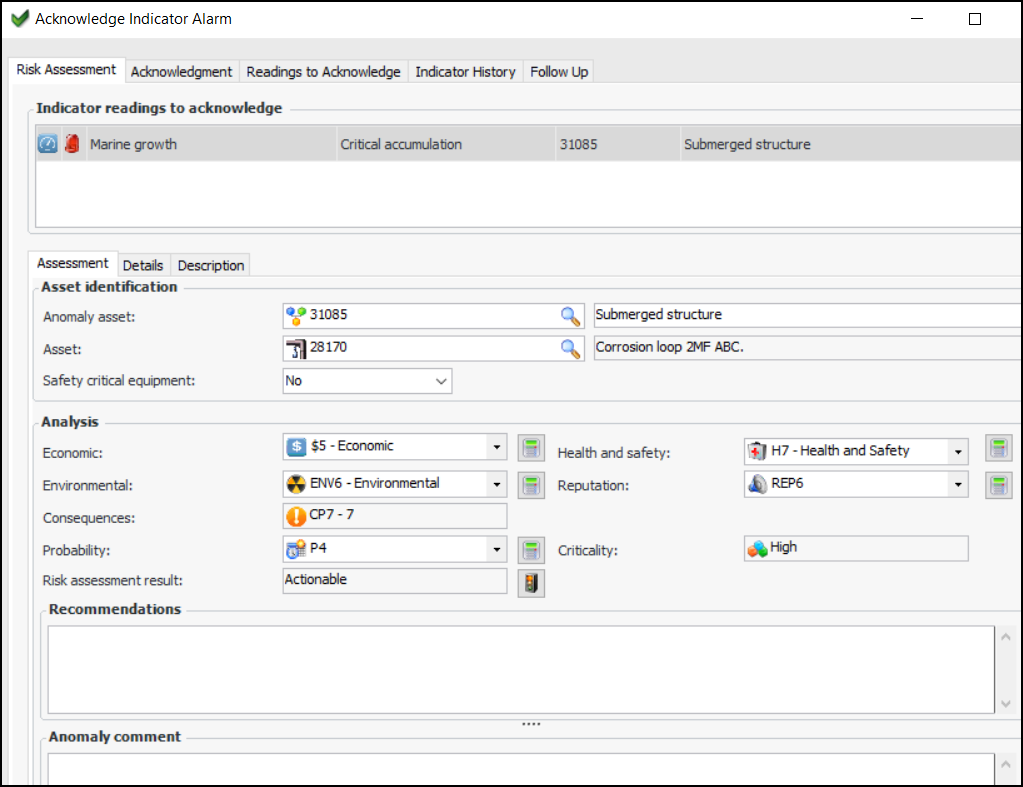
The Risk Assessment tab has been added in the Acknowledge Indicator Alarm window. For example:
Risk assessment involves the following steps:

Setting up APM for Anomaly Risk Assessment

Before you can exchange data pertaining to anomaly events with the external Anomaly Assessment and Tracking (AA&T) system, you must configure settings and value lists for your organization.
Note: AssetWise Enterprise Interoperability (AWEIS) must be configured to communicate with your CMMS to support anomaly integration.
Set up anomaly risk assessment settings – In Inspection Management, Performance Management, or Work Management settings, select the Risk Assessment tab and enable risk assessment for alarm acknowledgments at the site. Then add the following value lists:

Asset Management

The following enhancements were made to asset specifications.

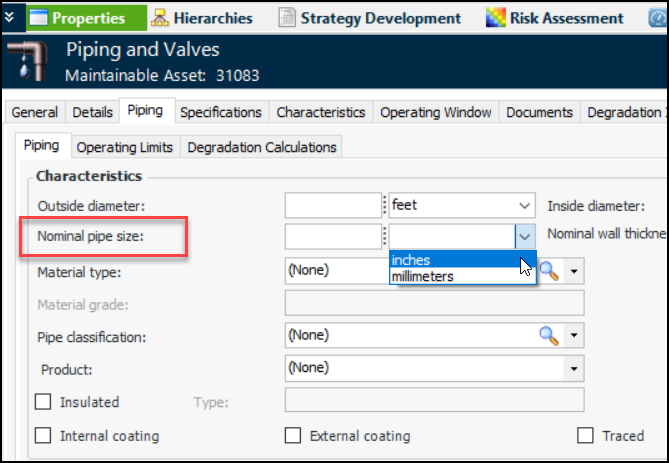
Oil and Gas Specifications – Piping

The “Nominal pipe size” attribute was added to asset specifications. For example:

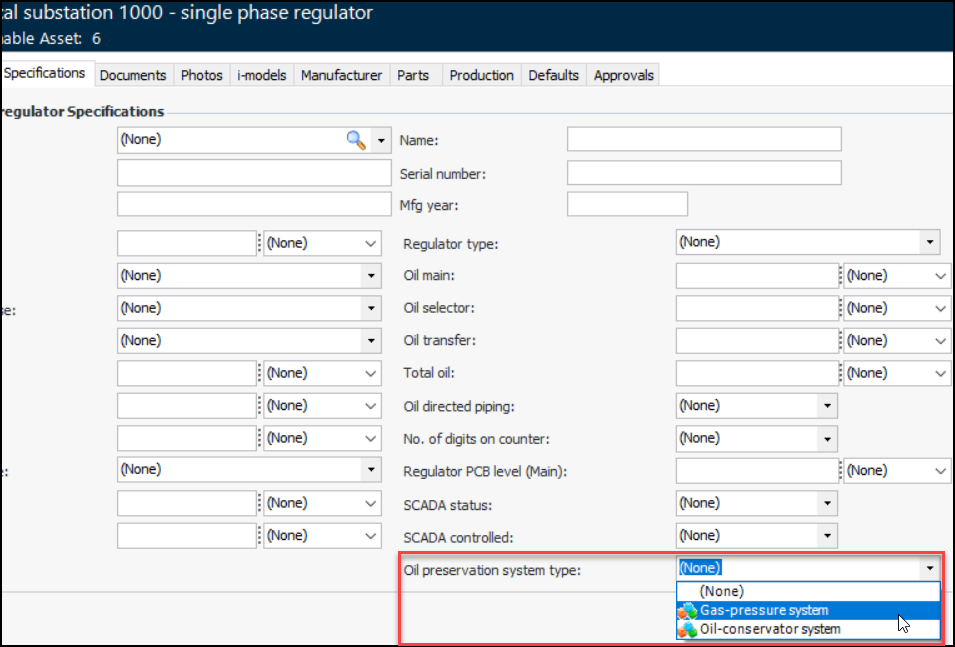
Electrical Substation Specifications – Oil Preservation Systems

The Oil Preservation Systems value list has been added to asset specifications on site. The following specification panels now include Oil preservation system type:
For example, when one of the asset specifications panels is assigned to an asset type, the Specifications tab for assets of that type looks like this:

Electrical Substation Specifications – Vacuum Bottle

For the LTC asset type, the specification panels used for asset specifications, asset change requests, and construction forms have been updated to include Vacuum Bottle, which can have a value of “Yes” or “No”.

Configuring the APM Environment

SES Licensing

As of version 7.21, APM dropped support for SELECTserver licensing in favor of Bentley Subscription Entitlement Service (SES). With SES, product activation is managed by user sign-in through the CONNECTION Client, which must be installed on every computer that runs APM server or thick-client instances.

Construction Management

The following enhancements were introduced in this release.

Construction Form Status – Control Form Deletion

The new Form can be deleted option on the construction form status record allows you to control whether or not construction forms can be deleted.
See Setting up Statuses for Construction Forms.

Asset Specifications – Rating (MVAR)

For Shunt Reactor assets, the Rating (MVAR) field on construction forms now accepts numeric values, rather than text.

Fluid Condition Tracking

This version introduces the following changes.

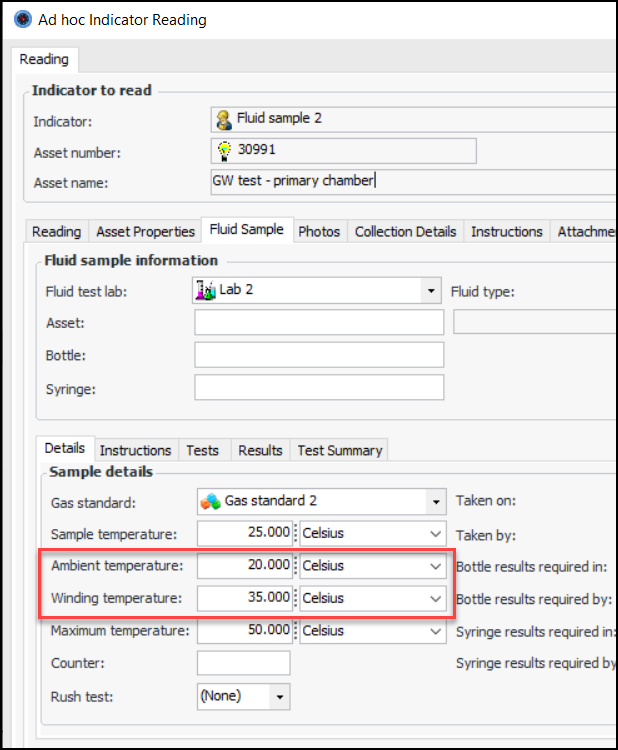
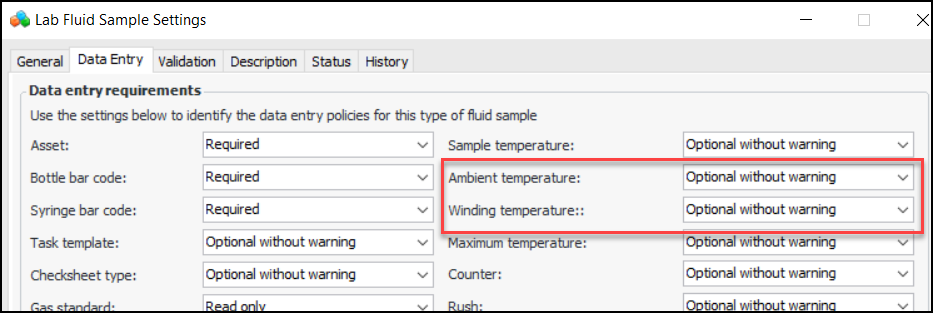
Ambient and Winding Temperature

Ambient and winding temperature are available when you record a fluid sample on an indicator reading. For example:
The sample settings determine whether the values are required or optional. For example:

Sample Temperature

The label for this field changed from “Temperature” to “Sample temperature”.

Inspection Management

This release introduces the following enhancements.

Checksheet Planning View

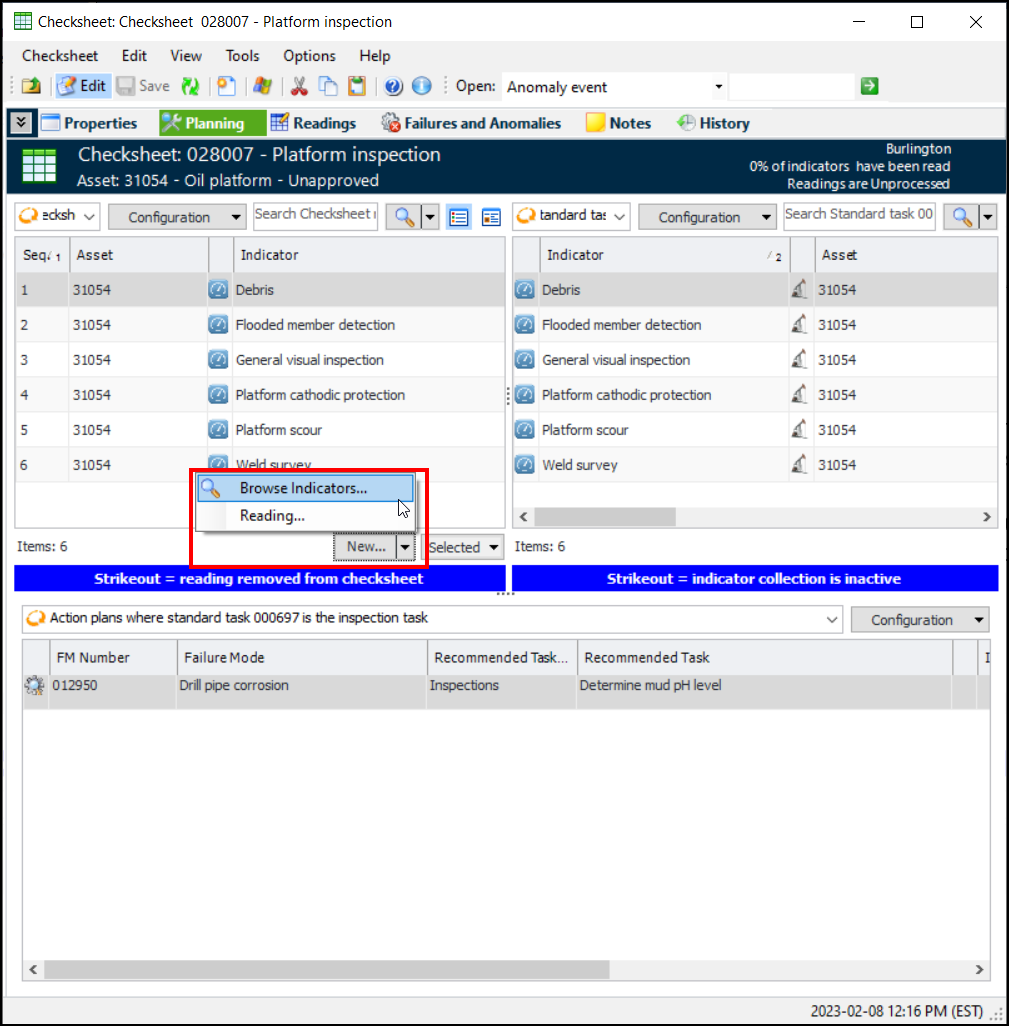
Select the new Planning view in the Checksheet window to view lists of the readings to be entered, indicators assigned to the standard task from which the checksheet was generated, and maintenance action plans that cite the checksheet’s standard task as the inspection task.
Use the New list to browse for indicators to add or to add a new reading for the selected indicator. Use the Selected list to remove the selected indicator from the checksheet. For example:
To display the Planning view, enable it on the checksheet type and checksheet status. Note that the feature is only available on checksheets generated from standard tasks.
See Setting up Checksheet Types.

Support for Videos in Checksheets

You can now link a video file to a checksheet and then identify start and end times for the excerpts that apply to particular readings, including measurement point readings.
Note: Support for checksheet videos is generally available. To use this functionality, you must first enable feature 114. In the Enterprise window, select the Features view and the Enabled Features tab. Click Browse, select “Ability to identify start and end locations on a video on indicator and measurement point reading” and click OK. If APM is running as a smart client, click Refresh Enabled Features on the server. Then restart the client to use the functionality.
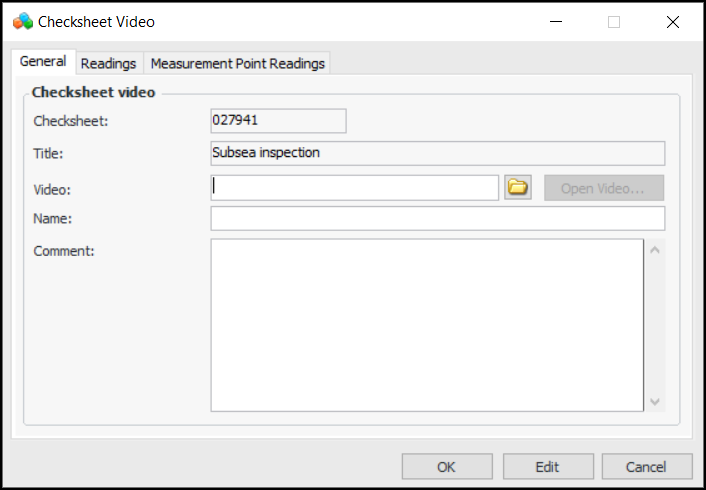
In the Checksheet window, select the Properties view and Videos tab. Click New to open the Checksheet Video dialog:
Browse to locate the file and provide the path to a shared location. Provide a name to identify the file and information or instructions. The Readings and Measurement Point Readings tabs will display the items that reference the video.
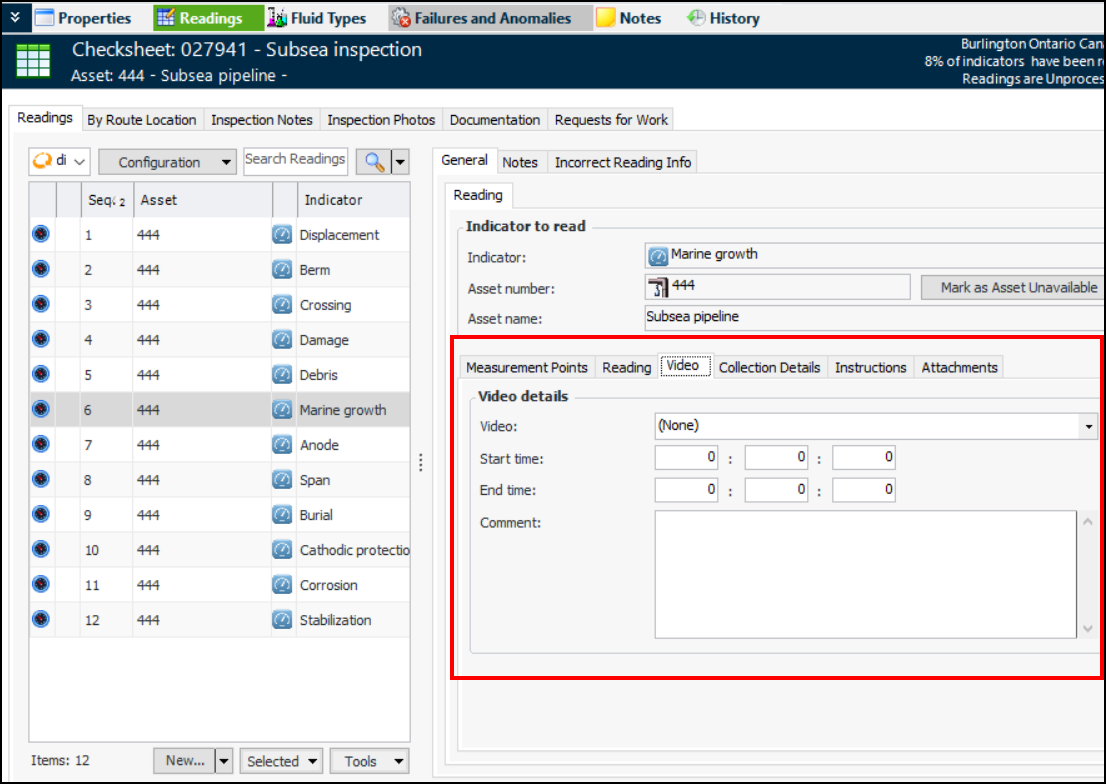
To reference a video in a checksheet reading, identify the file name and, optionally, enter the start and end time for the excerpt that applies to the reading. For example:
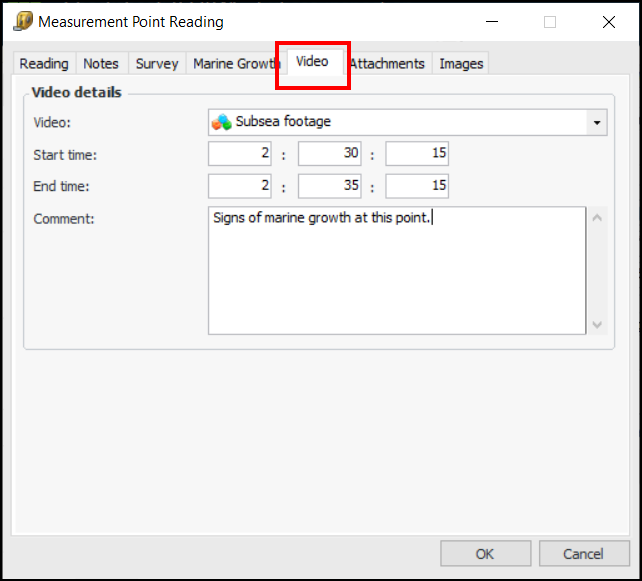
You can also open a measurement point reading and identify the video:
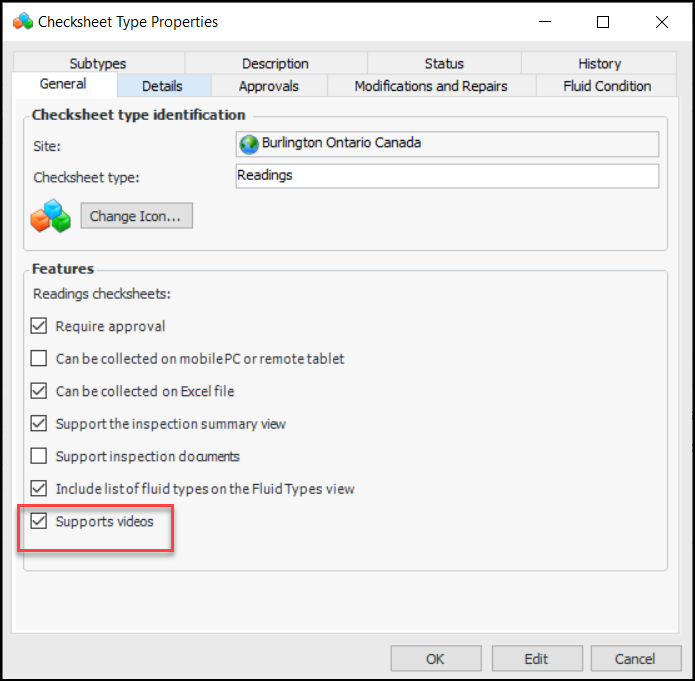
The checksheet’s Checksheet type determines if videos are supported:
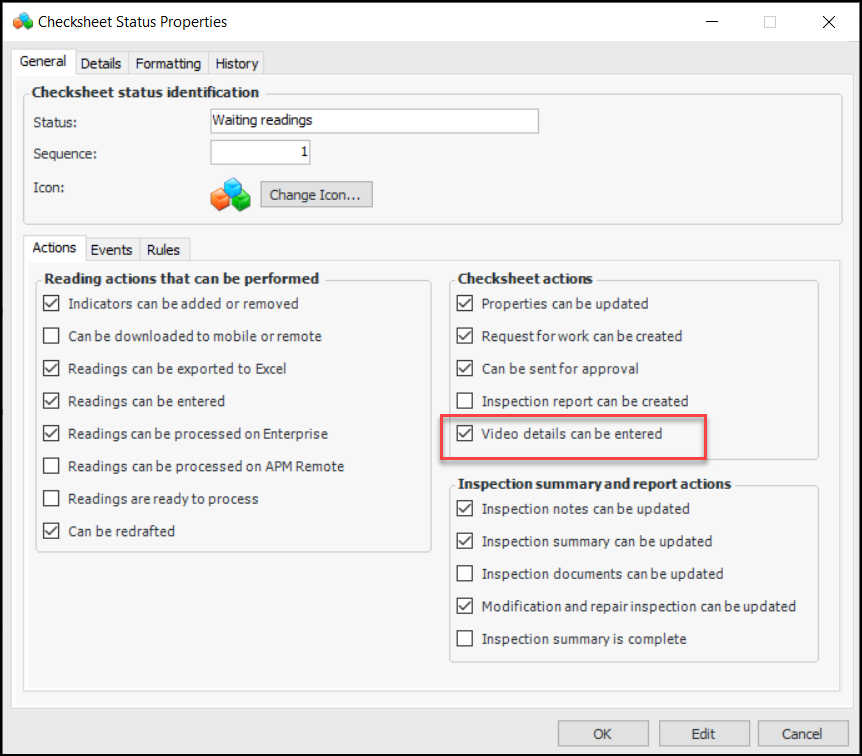
The Checksheet status can be used to control whether video details can be entered:
Note that video support is available only in APM enterprise; it is not supported in APM Mobile applications or APM Remote.
See Setting up Checksheet Statuses.

Performance and Stability Enhancements

Overall APM performance gains have been achieved when handling an enterprise that uses a single time zone. ODC processing has been optimized when Server Manager is in use. The time required to create an EXPLinkSession has been reduced by decreasing the number of objects brought into memory.

Personnel Management

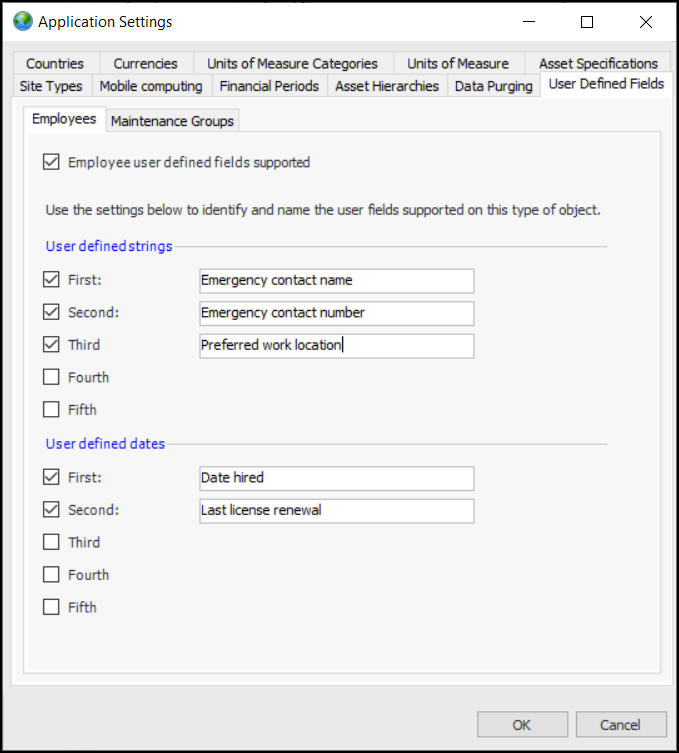
This release introduces user-defined fields on employees and maintenance groups. At the enterprise level, you can define as many as five strings and five dates that will be displayed in employee or maintenance group records.
For example, in the Application Settings window, select the User Defined Fields and Employees tabs. After enabling support for user-defined fields, select the fields and dates and provide their labels:
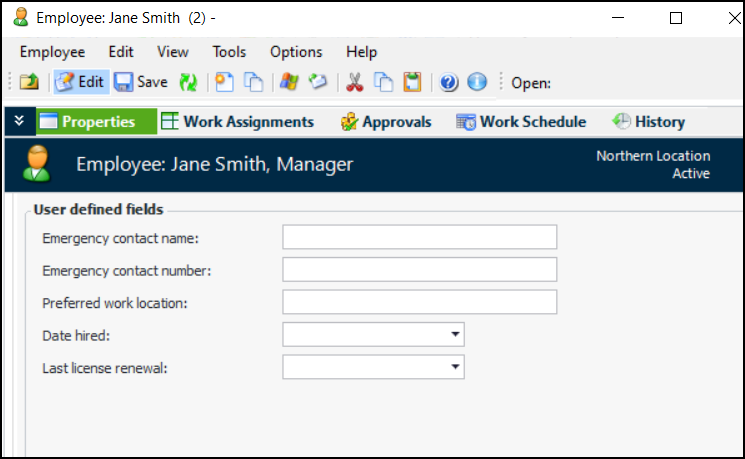
In a Site window, select the Personnel view and open an Employee window. In the Properties view, select the User Defined Fields tab. For example:
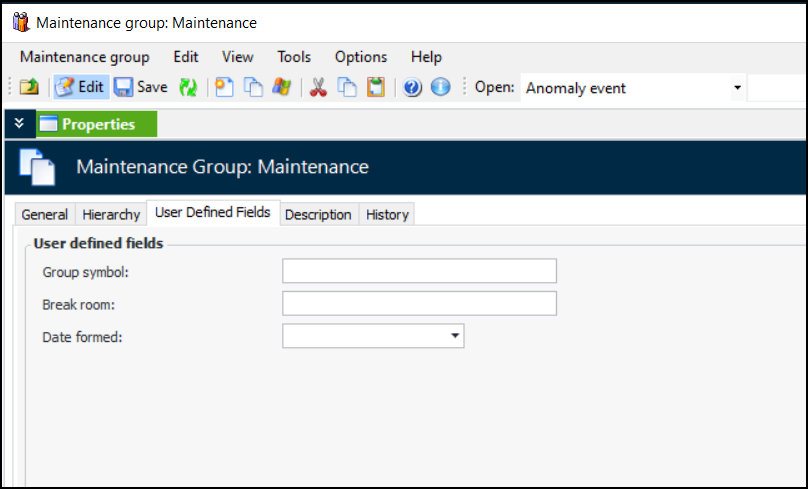
Here is an example for a maintenance group:
For more information, see Setting up User-Defined Fields for Employees and Maintenance Groups.

Standard Tasks

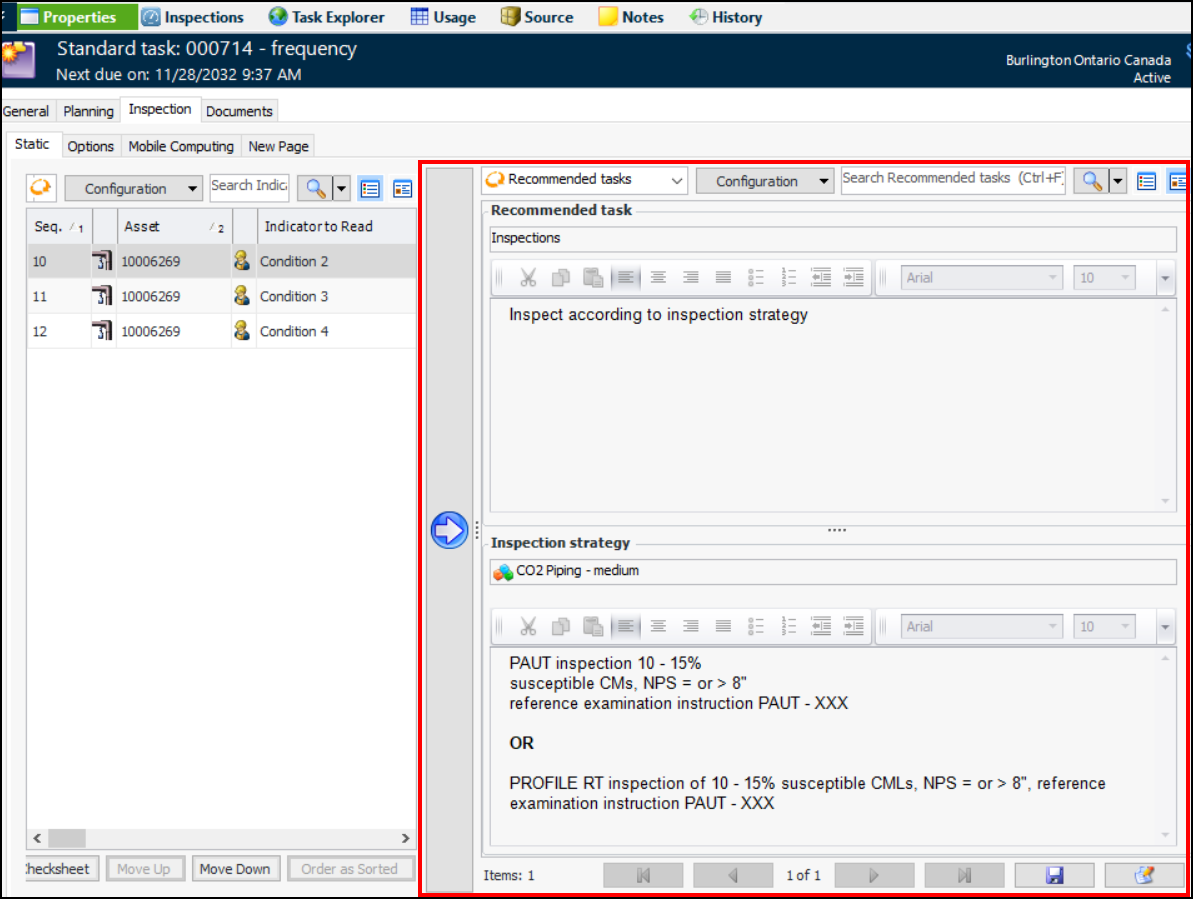
When adding static indicators to a standard task, you can now view the recommended tasks and inspection strategies that have been assigned to action plans that identify the standard task as the inspection task. For example:
The standard task’s work type must support the display of action plan recommended tasks.
See **Setting up Work Types.

Strategy Development Analysis

This release introduces the following improvements.

Practical RBI – Risk-Based Inspection Enhancements

APM 7.21 introduces the first phase of enhancements to improve quantitative RBI in your workflow. These incremental improvements include:

Evaluate Indicator Inspection Effectiveness

You can now set up APM to evaluate the inspection effectiveness of a site’s indicators. This provides a measurement of the thoroughness, sensitivity, and efficiency of the inspection strategy, which can then inform your assessments of confidence and probability of failure.
The Evaluate Inspection Effectiveness scheduled action identifies processed readings that specify an inspection effectiveness value and that were recorded within a specified time period. Using the rules set up for the site, the process calculates the inspection effectiveness value for each indicator.
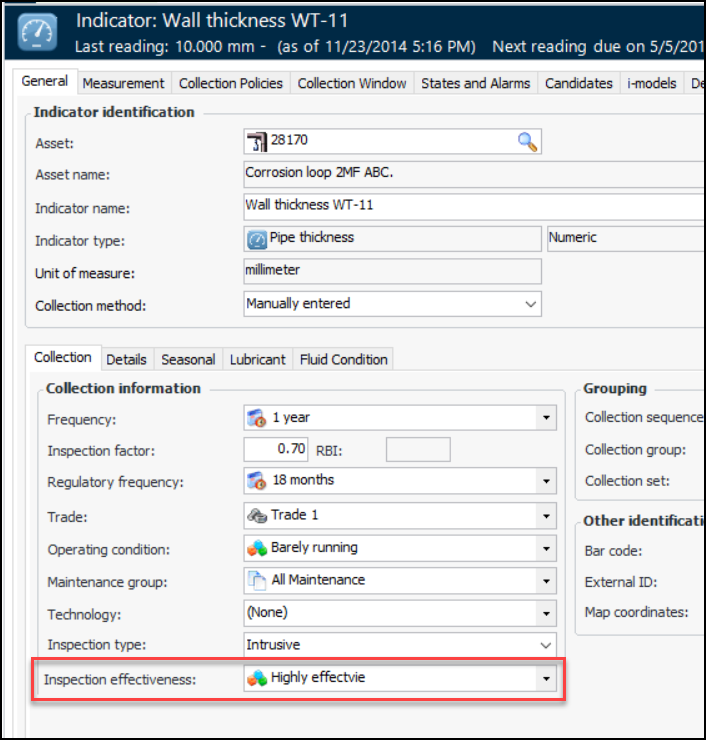
Inspection effectiveness values are displayed on indicators, templates, and readings. For example:
Note: Inspection effectiveness is not supported on measurement point readings or on readings collected using APM Remote or APM Mobile Inspections.
Data loaders for indicators, indicator readings, and failure modes have been updated to include inspection effectiveness values.
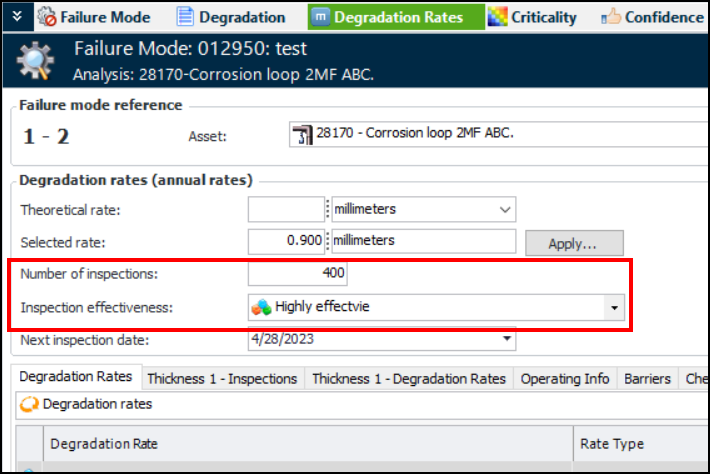
Inspection effectiveness and number of inspections are also shown on RBI failure modes with degradation rates that reference the indicators. Look for these values in the Degradation Rates, Confidence, and Implementation views. For example:
Setting up APM to evaluate inspection effectiveness involves the following tasks:
For more information, see Setting up Inspection Effectiveness Tracking.

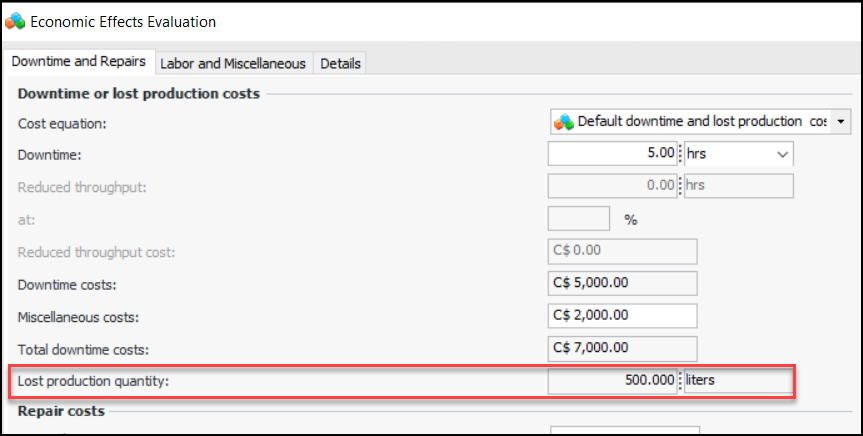
Production Loss Quantity Added to Economic Evaluations

Previously, the economic evaluation on failure modes dealt only with monetary costs. With this release, you can also enter lost production quantity on basic and detailed evaluations. For example:
The lost production value is shown in the Maintenance Action Plan window, Failure Information view.
Like downtime costs, lost production quantity is calculated based on the cost equation’s intervals, which specify monetary values and quantities per duration (for example, hours).
Lost production quantity does not change the economic consequence severity in the failure mode risk analysis, which is still based on monetary loss.
Lost production quantity and unit of measure have been added to the FMEA data loaders, under the Strategy Development tab in the Data Loaders view on Enterprise.

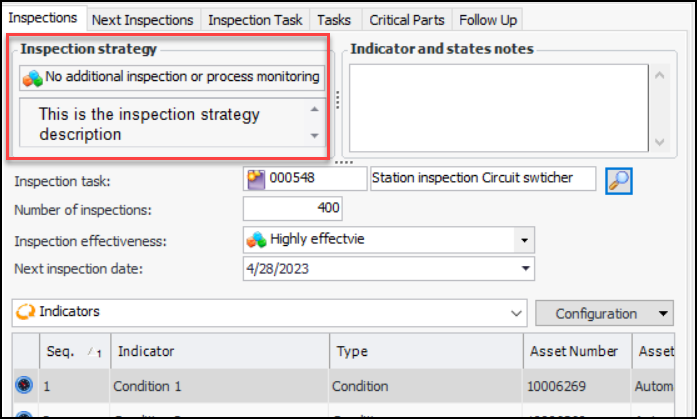
Inspection Strategy Displayed

In RBI failure modes, you can now view the inspection strategy in the Implementation view, Inspections tab, as long as the degradation type supports inspection strategy. For example:

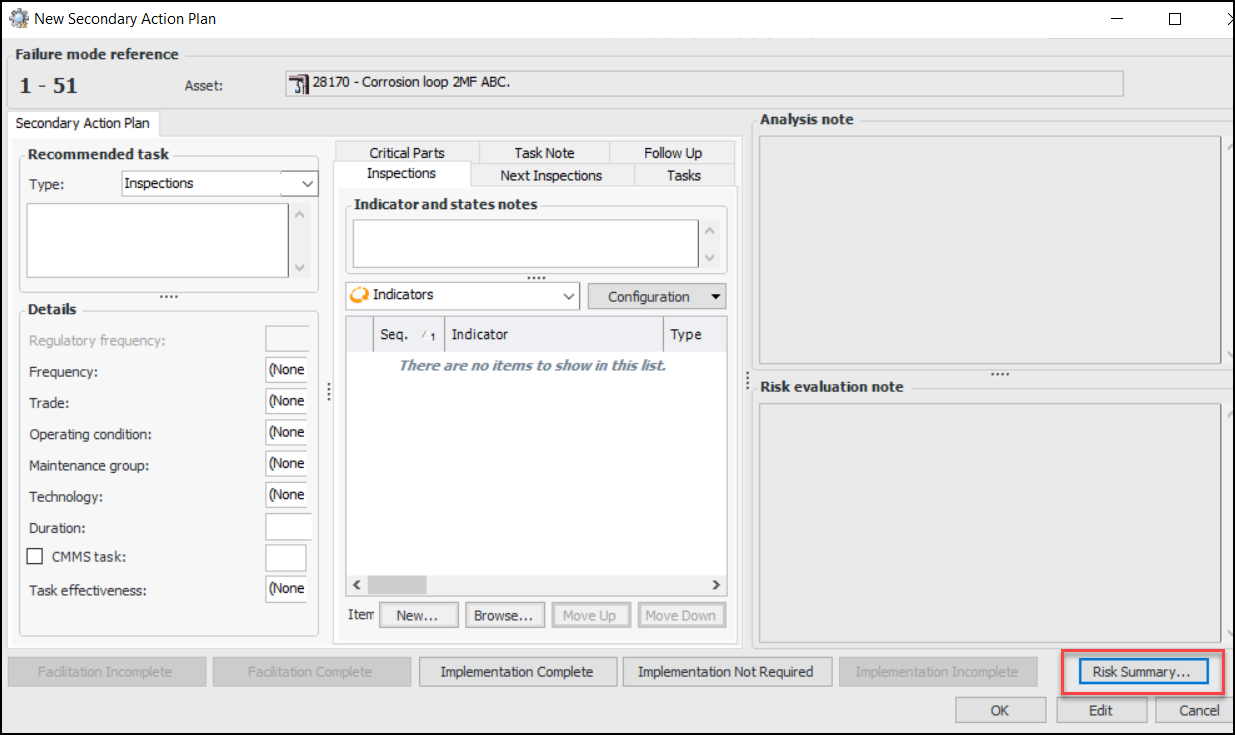
Secondary Action Plans

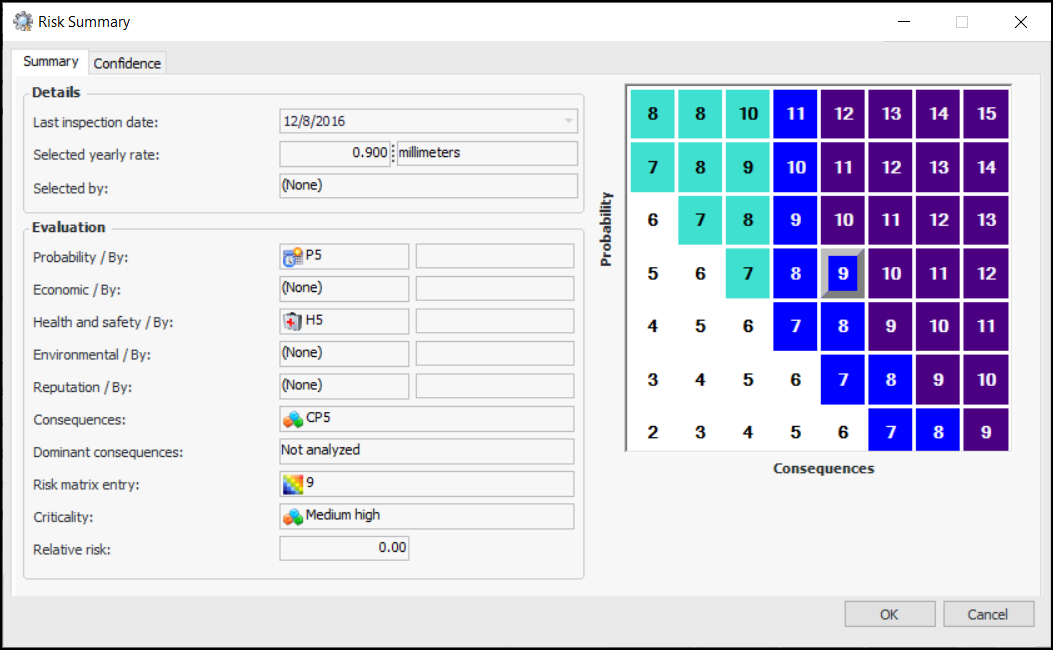
When developing secondary action plans for MTA2, RCM2, or RBI analyses, you can now view the primary action plan’s risk summary. In the New Secondary Action Plan window, click Risk Summary below the Risk evaluation note box:
The Risk Summary window for the primary action plan appears: