
|
Creating a Standard Task for Troubleshooters
For troubleshooting labor charges to post correctly, APM needs to create work orders for each troubleshooting timesheet entry. To set this up, you must create troubleshooter standard tasks or task templates. To create a troubleshooter task, select This task is used by troubleshooters to record their time worked on the task’s Charging Info tab.When a troubleshooter fills in a timesheet, he or she can select from a list of troubleshooter standard tasks or task templates. APM uses the task to create a troubleshooter work order. APM automatically closes work orders created for troubleshooters. You can view the troubleshooter work orders on the Work Orders view, Historical tab.To Create a Standard Task for Troubleshooters
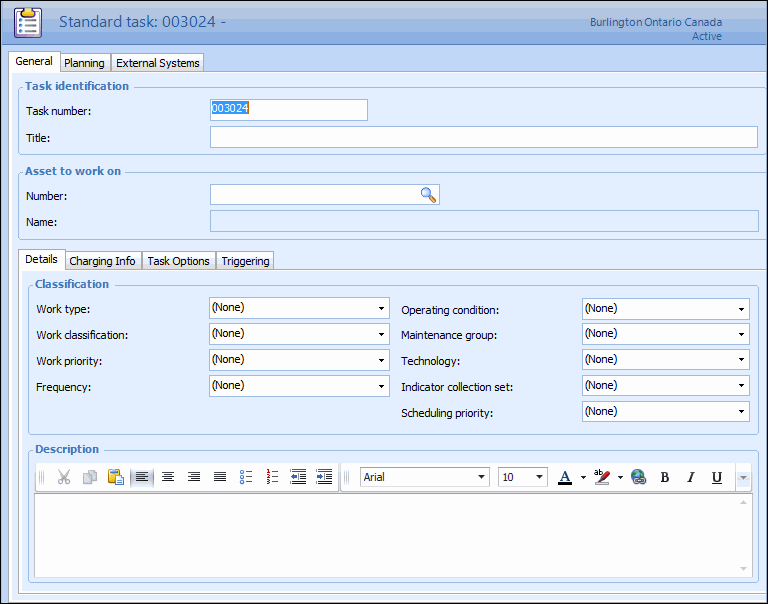
1. Select the site’s Reliability Program view, Program tab. Then select the Tasks or Task Templates tab.
2.
5. For standard tasks, in the Asset to work on group, browse to select an asset, and then click OK. After you save the standard task, it will be included in the Reliability Program view for the asset that you have selected.
6.
7. You can add a detailed description of the task in the Description box.
8. Select the Task Options tab, and then select This task is used by troubleshooters to record their time worked.
9. For standard tasks, if the asset that will be charged is different from the asset that is being worked on, select the Charging Info tab and browse to select an asset in the Asset to charge box and then click OK.
10. Select the Planning tab to add additional planning information, if appropriate. Keep in mind that APM closes this task automatically when the troubleshooter timecard is posted.