Linking Maintainable Assets to Serialized Tool Resources

A tool resource unit can be linked to a maintainable asset. When a tool is linked to an asset, all the normal maintenance functions can be performed on it, such as work requests, work orders, indicator readings, standard jobs, standard tasks. The asset appears in the asset hierarchy.
For example, you could link tool assets such as a fleet of vehicles to serialized resource units if the tools/vehicles are used by multiple operators and you want to track the usage for each vehicle.
Serialized unit support for a tool-type resource allows you to:
You can link a maintainable asset to a serialized tool resource unit from the warehouse or from the asset.

To Link a Serialized Tool Resource to a Maintainable Asset

1.
In the Site window, select the Resource Management view and then the Inventory tab.
2.
Select the Warehouses tab, and then select the warehouse in which the resource is stocked, in the table on left side. The list of stocked resources for the selected warehouse is displayed in the table on the right.
3.
4.
5.
On the Warehouse Item view, select the Units tab. This tab will be available only if the resource is defined as supporting serialized units.
6.
7.
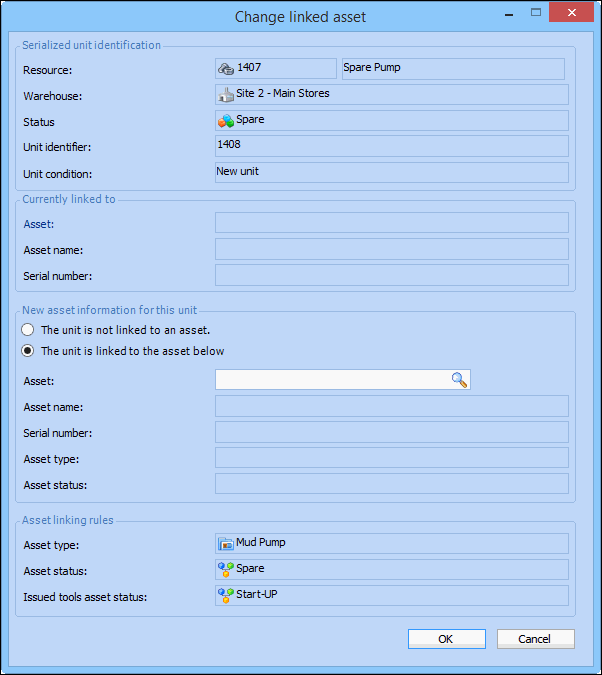
Click Change Asset. The Change Linked Asset dialog appears.
8.
The asset to which the serialized unit is linked. Browse to select an asset, and then click OK. Only assets of a type that can be linked to this resource and with an asset status that matches the unit status are listed.
9.
Click OK to save your changes and close the Serialized Unit dialog.

To Link a Maintainable Asset to a Serialized Tool Resource

1.
Open the asset to which you wish to link a serialized tool. The Asset window appears.
2.
3.
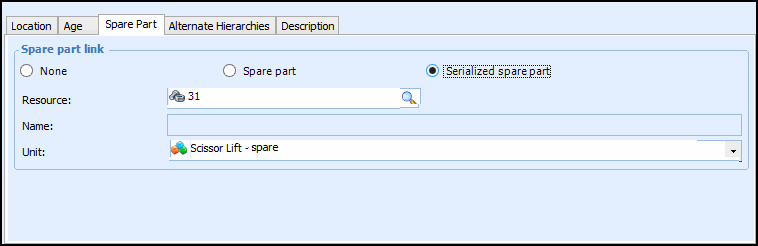
On the General tab, select the Spare Part tab.
4.
The asset is now linked to the serialized unit, and the unit is identified by its unique identifier.