Defining Unit Identification for Tools

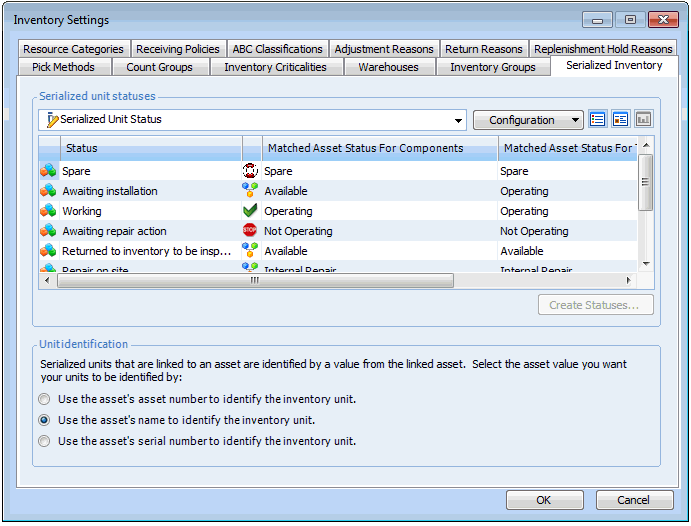
You need to specify how serialized resource units are uniquely identified. When a serialized unit is linked to an asset, the identifier can be the asset number, the asset name, or the asset serial number.
If the name or serial number on an asset record is blank, the asset number is used. For example, if your site uses the asset’s serial number to identify resource units and the asset’s serial number is blank, the asset’s number is used instead.
When a resource unit is not linked to an asset, it is assigned a system-generated identifier. You can change the system-generated identifier to a more meaningful value, such as a serial number.
The unit identifier is used for component assets/repairable spares and for maintainable assets/tools.

To Define Unit Identification

1.
On the site’s Resource Management view, select the Settings tab. Select the Inventory Settings node in the tree.
Tip: You can also select the site’s Administration menu, Resource Management Settings, and then Resources. The Resource Management Settings dialog appears.
Tip: You can also access resource management settings from the Site window by clicking the Administration menu, Resource Management Settings, and then Resources. The Resource Management Settings dialog appears.
2.
Select the Serialized Inventory tab. This tab lists all serialized units for the site.
3.
In the Unit Identification section, select the asset value to use to identify serialized units (asset number, name, or serial number).
4.
Click OK to save your changes and close the Resource Management Settings dialog.