Issuing Serialized Tool Resources

Tools are typically issued to a work order, but they can be issued to an employee and charged to an asset or GL account.
The inventory value on hand is not decreased when a tool is issued because the tool will be returned to inventory. The inventory value for a tool resource includes the value of the tools that are “In use”.
When you issue a serialized tool resource – with or without a linked asset – here’s what happens:
The following updates do not occur:

To Issue a Serialized Tool Resource

1.
Select the site’s Resource Management view, then the Inventory tab, and then the Warehouses tab.
2.
3.
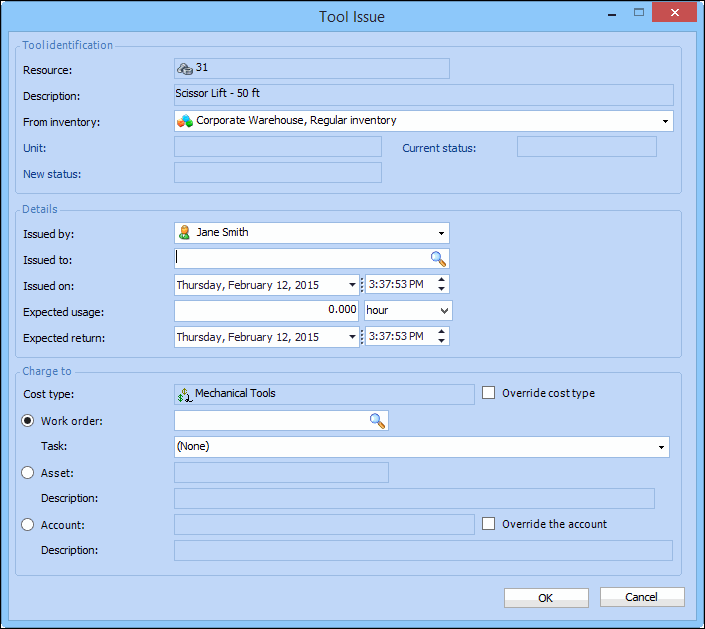
Right-click the tool resource you want to issue and then click Issue Tool. The Tool Issue dialog appears.
4.
5.

Tool identification

Unit: For serialized tools, the specific unit. If you know the unit number, you can enter it here, or select it from the list.
New status: The new status for the issued tool.

Issue details

Issued to: The employee to whom the tool is issued.
Expected usage: The time the tool is expected to be in use.
Expected return: The approximate time and date when the tool will be returned. The expected return must be later than the tool’s issue date.
Charge to: You can charge the costs of the tool usage to a work order, an asset, or directly to an account. If you select a work order, you can charge the costs to an individual task on the work order.
6.
When you are finished entering information, click OK. APM posts the new transaction and makes the appropriate inventory adjustments in the warehouse.