Task Scheduling Relationships

Work planners can create relationships between tasks that determine how the tasks are scheduled. For example, if you have three tasks on a work order, you may want to set up the work order so that task C is not scheduled to start until tasks A and B are finished. You can use task relationships to enter this type of scheduling information.
This section explains how task relationships work and the types of relationships that can be created.

Task Relationships

Task relationships allow you to link the start or finish time of one task to that of another task or tasks. This information is used when creating schedule entries for the tasks.
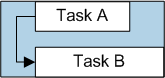
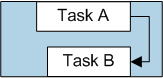
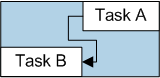
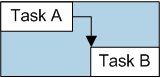
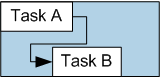
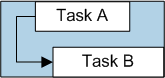
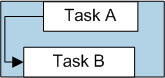
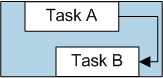
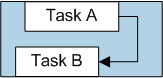
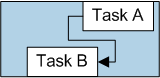
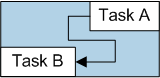
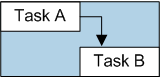
A task relationship links a predecessor task with a successor task. A predecessor is a task that must start or finish before another task can start or finish. A successor is a task that cannot start or finish until another task starts or finishes. For example, if you create a finish-to-start relationship between task A and task B, task A is the predecessor and task B is the successor.
Four relationship types are available:
Note: Task scheduling relationships (predecessors and successors) do not apply when simple scheduling is used.

Default Relationships on Multi-task Work Orders

When you add tasks to a work order, the system automatically enters finish-to-start relationships between the tasks. For example, task B automatically has a FS relationship with task A. If you change the order of the tasks, the system adjusts the relationships to reflect the new order. You can delete or modify the default FS relationship, as necessary.

Lags and Overlaps

For each task relationship, you can enter a lag time. You can use lags to offset the start or completion date of two linked tasks. For example, if two tasks have a finish-to-start relationship with a four-hour lag, task B will start four hours after the completion time of task A.
You can also use lag time to overlap two tasks by entering a negative lag time. For example, to set task B to start four hours before task A is completed, link the tasks with a finish-to-start relationship, and enter a lag of “-4” hours.
The following table shows some examples of how lags and overlaps affect each relationship type.
Note: You can also set lag time on individual trade, service, or tool requirements for a task. See Lag Time on Resource Demands.

When are the Start and Completion Dates Calculated?

When task relationships have been defined for a task, APM re-calculates the task’s planned start and completion dates when:

Which Dates are Used to Calculate the Successor’s Dates?

The date used to calculate the successor’s start or completion dates varies depending on the type of relationship. For example, a FS relationship uses the predecessor’s completion date so the successor cannot start until the predecessor is completed. While the predecessor is in planning, its planned completion date is used. When the predecessor is scheduled, its scheduled completion date and time are used. Finally, when the predecessor is completed or closed the actual completion or close date is used.
The relationship type determines which of the predecessor’s dates are used to update which of the successor’s dates:
Note: For more information on finish-to-finish relationships and how schedule entries are created, see Task Splits and Scheduling Relationships.

Multiple Relationships

When multiple relationships are defined for a task, the start or completion date of one of the predecessor tasks is used to set the task’s start or completion date. Which predecessor task is used depends on the types of relationships created for the successor task.

Multiple Relationships of the Same Type

If there are multiple relationships of the same type, the rules defined in the table below are used to select the predecessor task that is used to set dates on the successor task. When a lag (or overlap) is specified on the predecessor, the lag time is added to (or subtracted from) the predecessor’s completion date before determining which predecessor to use.

Multiple Relationships of Different Types
When multiple relationships of two or more types are defined for a task, the successor task’s start and completion dates are calculated as follows: