Task Splits and Scheduling Relationships

When a work order task is added to a schedule, and the task duration is longer than the schedule duration, the system can “split” the task by creating two (or more) linked schedule entries.
The behavior of split schedule entries depends on the scheduling relationships of the task. This topic provides some general concepts explaining how the system deals with splits and task relationships.

Splitting Schedule Entries

If you have a task that spans two or more schedules or shifts, you can split the schedule entry. When you add a long task to a schedule, the system may automatically split the task into multiple linked entries (called “splits”). For example, if the task extends over two days, the system may create one entry for the Monday schedule and one entry for the Tuesday schedule. To do this, you must select the Entries respect shift and date boundaries option in the schedule’s properties.
If you edit a schedule entry so that the entry extends beyond the duration of the a shift or the schedule, you can choose to have the system split the entry. This means that the system adds a new linked entry on the next shift or peer schedule (if it exists).
Schedule entries that are split can only be edited from the original entry; the split entry cannot be edited directly. Changes to the duration made on the entry apply to the entire task.

Example

A work order task with a four-hour requirement for an electrician is scheduled on the Day 1 schedule. The schedule entry is later edited to change the duration to five hours. A linked split entry is created, as shown in the following graphic:
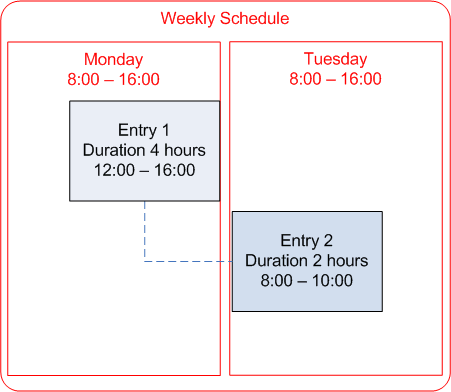
If the duration of the entry is now changed to six hours (with the same start time), Entry 2 will be updated to a duration of two hours, as show below:
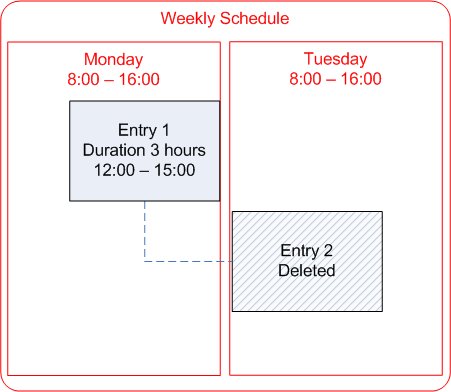
If the duration of an entry is decreased, any split entries that are no longer required will be deleted. For example, if the task duration is changed to three hours, the entries will be updated as shown below:
Note: Split entries that are on expired schedules are not updated with changes, and their information is not included in the task summary information presented to the user.

Preceding Splits

A preceding split occurs when the scheduled task has a finish-to-finish (FF) or start-to-finish (SF) type of relationship to another task. The entry’s finish date and time is based on the finish (FF) or start (SF) date and time of the controlling entry. As a result of the dependency, changes to the entry’s duration cause the start time to be moved back. If the new start time results in the entry spanning two shifts or schedules, a preceding split is created.
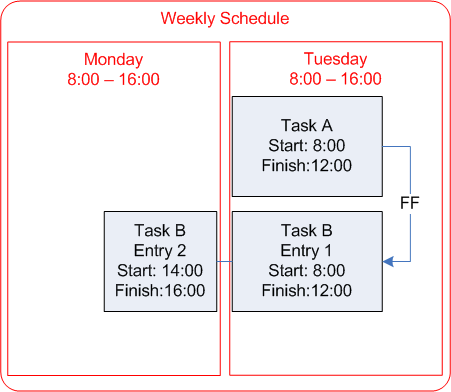
For example, tasks A and B have a FF relationship. Both tasks are currently scheduled for Tuesday, starting at 8:00 and ending at 12:00. The duration of task B is changed to six hours. Since the finish time is fixed at 12:00, the start time is pushed back, creating a preceding split on the Monday schedule:
The behavior of preceding splits is basically the same as with following splits. The difference is that the preceding split’s date and times are earlier than the dates and times of the original entry.

Finish-to-Finish Dependencies with Lags
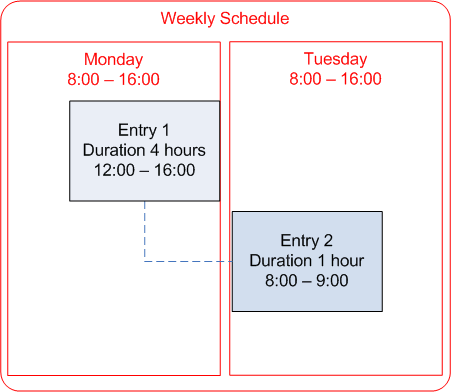
When you schedule a work order that has finish-to-finish (FF) dependencies plus lags, if the finish time for a task is on the next shift, then the system will:
For example, a work order has three tasks:
The work order is scheduled on a weekly schedule that has one shift from 07:00 to 15:00. The following schedule entries are created: