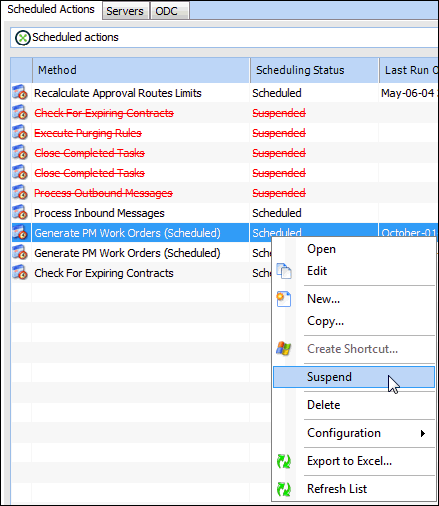
Tasks Suspending a Scheduled Action Rather than delete a configured scheduled action, you can suspend the action so the method will not be executed. Suspending a scheduled action means that when the Action Scheduler polls the method table, it will not run the methods and ignore its defined time and frequency settings. However, the suspended scheduled action will retain its settings, which can be reactivated at a later time. To Suspend a Scheduled Action 1. From the Site window, click on the tool bar. The Enterprise window appears. 2. Select the Services view, Scheduled Actions tab. 3. Right-click the active scheduled action and click Suspend. The Scheduling Status now says “Suspended”. For information about re-activating a suspended action, see Re-activating a Scheduled Action.


 on the tool bar. The Enterprise window appears.