Subtypes

A subtype is a set of object extensions and a view that is used to collect additional information. Subtypes are useful whenever you have different types of items within one class and you need to collect information based on the type of item. For example, you could add a subtype called “AC Motors - Synchronous” to the Asset class. The subtype would include fields that let you capture information about the size and type of motor. You would then associate the subtype with the Motor - AC asset type. Then, whenever you create a new asset of type Motor - AC, all of the fields in the subtype appear in a separate tab in the Asset window. By creating similar subtypes, you can customize APM to handle all of the data for each type of maintainable, system, and subsystem asset in your organization.
You can add subtypes to any class in APM that inherits from the File class. Create a subtype to collect the information appropriate to the specific item type. A subtype control on a view for the class enables you to select the correct subtype and adds the view for the subtype to the object so that you can enter the necessary data. You must launch the product as an APM administrator to create and customize subtypes.

Contents

Subtype Object Model
Run-Time Behavior
Failure Subtypes
Indicator Subtypes
Asset Subtypes and Asset Types
Asset Specifications

Subtype Object Model

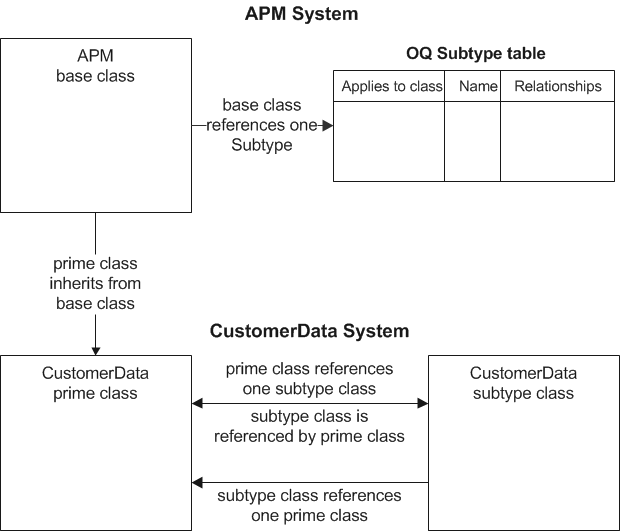
Subtypes are somewhat more complex than other object extensions. A thorough knowledge of the Object Model and customization is required to create subtypes other than asset subtypes. The following diagram shows how elements of the object model relate to each other. The text that follows explains the diagram and describes when the various elements are created.

Before Creating a Subtype

Before you create a subtype, you need to have a customized, or prime, copy of a class that exists in the APM system. All APM base classes include a References One relationship to a database table called OQ Subtype. Your prime class inherits from the base class, so it too can use that relationship to OQ Subtype.

Creating a Subtype

When you create a subtype, the software completes three steps:

Subtype Class

Essentially this class is a standalone class with three references entered automatically to link it to the base class and subtype table. You can add whatever attributes, enumerated lists, and relationships you need to collect data for the subtype.
TOP

Run-Time Behavior

If you add subtypes to any class other than the Asset class, you will need to customize an existing view for that class to add the subtype control. Without the subtype control, end-users will not be able to select the appropriate subtype. The Asset class comes with the subtype control in the user interface.
Note: In order for subtypes to be visible from assets, you must link each subtype to the appropriate asset type.
When the user selects a subtype and enters information in the subtype’s view, APM adds columns to the table for that item and stores the data in those column rows. If the user then changes the subtype, APM deletes the columns for the first subtype and adds the columns for the second subtype. All information specific to the first subtype will be lost. The only way to prevent this loss of information is to back up the database before changing the subtype. To prevent accidental loss of information, APM displays a warning message when a user changes the subtype.
Note: To avoid this type of data loss, you can restrict the ability to change subtypes in user security profiles.
Similarly, if you choose to delete a subtype from the object model that you are no longer using, all tables and columns associated with that subtype will be deleted. Any historical information stored in those tables and columns will be lost. We strongly recommend that you make a backup of your database before making any changes to the object model.
TOP

Failure Subtypes

APM comes with two failure subtypes: Loss of containment and Material corrosion and damage. You can customize these subtypes or add new ones.
For more information, see Creating Failure Subtypes.

Indicator Subtypes

APM ships with 14 indicator subtypes for recording subsea survey information on measurement point readings. Two of these may be used for recording subsea survey information on measurement points.
For more information, see Creating Indicator Subtypes.

Asset Subtypes and Asset Types

The APM Install database comes with 14 asset subtypes. These can be customized, if desired. You can also create your own custom asset subtypes. APM subtypes are designated with the APM logo for the icon. Custom subtypes have a different icon . You can edit the properties (Name and Icon) for custom subtypes, but not for APM subtypes.
You can associate one or more asset subtypes with an asset type. This controls which subtypes are available for assets that use that asset type.
When you select an APM subtype for an asset, the specifications tab for that subtype is added to the Asset window’s Properties view. The tab contains the subtype’s attributes. These can be filled in to record information about the asset.
Each APM subtype also has relationships to one or more value lists. Value lists are simple classes with a few attributes, and a references-one relationship to the subtype. They are displayed as drop-down lists in the subtype’s specifications tab. You can add values to each of these shipped value lists. Each value list can relate to one or more of the APM asset subtypes.
For example, the APM subtype AC motor has a value list called Motor Type. You can add your own values to the Motor Type list (for example, Type A, Type B, Type C). Users will then be able to select one of these values when creating an asset that uses that subtype. The AC motor subtype also has lists called Insulation Rating and Duty Rating. You can similarly populate these lists with the values that you use for your motors.
You can use these value lists in custom subtypes, but you will first need to customize the value list class (for example, the Motor Type class).
For more information, see Creating Asset Subtypes and Adding Values for Asset Subtypes and Specifications.

Asset Specifications

An asset subtype is a means of recording additional information about a type of asset. Asset specifications have a similar purpose, but they are designed to record extensive information about an asset subcomponent, for example, a tank roof or shell, typically for use in RBI analysis.
When an asset specifications panel is assigned to an asset type, the Asset window’s Properties view displays an additional tab with the label “Asset Type Specifications”, where Asset Type is the name of the asset type. If the asset is assigned a subtype, the specifications tab follows it in the tab order.

APM supplies specifications panels for atmospheric storage tank subcomponents. You can create additional panels by designing and adding them to the Asset specifications class. You can copy and edit the Generic Asset Specifications panel control, use an existing specifications panel as a model, or create your own from scratch.