Setting Smart Mapping Options for Failure Mode Copying

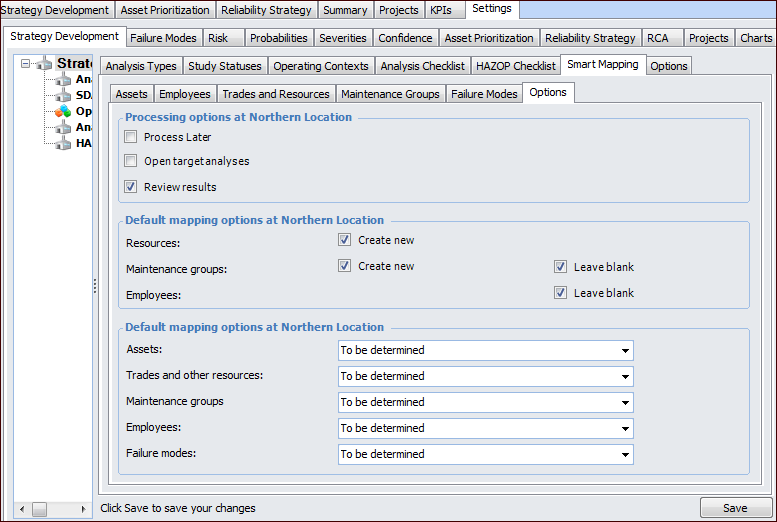
Some options that you set for smart mapping determine what types of failure mode copies can be performed for the site. For example, you can specify whether or not new maintenance groups can be created as a result of a copy request. Other smart mapping options that you set at the site level appear as default selections when users create failure mode copy requests. They can override the default values in the Copy Failure Mode wizard.

To Set Smart Mapping Options

1.
From the Site window, select the Strategy Development view, Settings tab and then the Strategy Development tab. Select the Strategy development settings node in the tree.
Tip: You can also select the Administration menu, Strategy Development Settings, and then Strategy Development. The Strategy Development Management Settings dialog appears.
2.
Click Edit to modify the site settings. The Edit button is replaced by the Save button.
3.
Select the Smart Mapping tab and then the Options tab.
Review and change the copy options:
4.
Create New – If this option is selected at the site level, the mapping options for the object include Create new. When Create new is selected, a copy of the source object is created when the copy request is processed.
Leave Blank – If this option is selected at the site level, the mapping options for the object include Blank. When Blank is selected, no mapping is suggested if a match is not found. The object can be mapped manually.
5.
Exclude – the source asset is excluded from the copy, as well as any failure modes, indicators, and standard tasks and jobs that refer to it
Map to primary target asset – the source asset is mapped to the target asset selected as the starting point for the structure
New – a copy of the source asset is created when the copy request is processed. The appropriate indicators, standard tasks, and standard jobs are created on the new asset
Same – the source asset is used as the target. The source object’s existing objects are referenced on the target failure modes. For example, the indicators identified on the source are also referenced on the new failure mode.
To be determined – the user determines the mapping method in the wizard
New – a copy of the source objects is created when the copy request is processed
Same – the source object is used as the target
To be determined – the user determines the mapping method in the wizard
Blank no mapping is suggested if a match is not found. The object can be mapped manually.
New – a copy of the source objects is created when the copy request is processed
Same – the source object is used as the target
To be determined – the user determines the mapping method in the wizard
Blank no mapping is suggested if a match is not found. The object can be mapped manually.
Same – the source object is used as the target
To be determined – the user determines the mapping method in the wizard
New – a copy of the source objects is created when the copy request is processed
To be determined – the user determines the mapping method in the wizard
6.