|
Site Accounting
GL Accounts
Deriving Account Numbers
Whole Account Numbers
The GL accounts that you enter for temporary accounts (for example, a warehouse’s In-transit account) or for special accounts (for example, the RNI account) must be valid, whole account numbers.Matching Derived and Whole Account Numbers
Maintenance Account Derivation
• GL account derivation for maintenance costs: This setting controls how maintenance accounts are derived for resource transactions when the cost is charged either to a work order task or directly to an asset. You can use any of the following for maintenance accounts:For example, you could choose to combine segments using Asset for the first part, and Cost type for the second part. If a user creates transactions on a work order charged to asset Cooling Water Pump 3761, the accounts are derived as follows:
GL account segment: 1000 - Material: RegulatorResource category: Valves - ControlCost type: MaterialsGL account segment: 9099 GL account segment: 1000 - Trade: ElectricianLabor rate type: Labor regularCost type: RegularGL account segment: 8000
• GL account derivation for labor charges: This setting controls how the offset account is derived for timecards. If you will be transferring APM generated transactions to your general ledger system, it is a good idea to set up labor offset accounts. You can use any of the following for labor offset accounts:For example, you could choose to combine segments using Maintenance Group for the first part, and Category for the second part. If a user in the Electrical maintenance group creates a timecard for the Electrician trade, the labor offset account is derived as follows:
GL account segment: 2012 - Trade: ElectricianResource category: LaborGL account segment: 8001Inventory Account Derivation
• GL account derivation for inventory: this setting controls how inventory offset accounts are derived. You can use any of the following for inventory offset accounts:For example, you could choose to combine segments using Warehouse for the first part, and Category for the second part. If a user creates a material issue from Warehouse 1, the offset account is derived as follows:
GL account segment: 3001 - Material: RegulatorResource category: Valves - ControlGL account segment: 9090
• Resource-specific GL account derivation for inventory: this setting controls whether users can override the derived inventory offset account on individual resources (GL Account Derivation tab, Inventory Accounts tab). When the derived account is overridden, users can select:For example, you could choose to combine segments using Site account segment for the first part, and Resource account segment for the second part. If a user creates a material issue for a resource with an override, the inventory offset account is derived as follows:
Site inventory account segment: 5001 - Material: RegulatorResource account segment: 9095Site Accounts
Maintenance Account or Segment
Inventory Account or Segment
Enter a segment here if the Site account segment option is selected in the Resource specific GL account derivation rules (in the enterprise accounting settings). This site account segment will be combined with the resource account segment to derive the inventory offset account number.Special Purpose Accounts
Received Not Invoiced Account
The Default Offset Account for Maintenance Cost Adjustments
Serialized Inventory Account
Tools Account
Consignment Account
Accounts Payable Account
Invoicing Self-Balancing Account
Cost Types
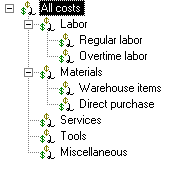
In order to view accurate cost summaries on views such as the Costs view on the Work Order window you must:Financial Periods
A financial period is an enterprise setting used to group and summarize objects such as costs and indicator readings for a period of time. Financial periods group and summarize costs by cost type. You can create financial periods for each year, quarter, or month.APM enables you to select the start and end dates for financial periods. For example, if your department managers report their costs each month, it will make sense for you to create a financial period for each month. You can have multiple financial periods overlapping; for example, one month could be included in the yearly period, a quarterly period, and a monthly period.Posting Costs
Setup
Transactions
Viewing Costs
You can view costs in APM from the Costs view on the work order, work order task, asset, and site objects. Costs are always displayed by cost type and financial period in a table and as a chart. Note that if a financial period does not display in the chart, there were no costs posted to it. Double-clicking a cost type row in the table displays all of the transactions that are summarized in it, enabling you to view the asset and the account number charged. Double-clicking a transaction displays the original transaction entry that created the charge.