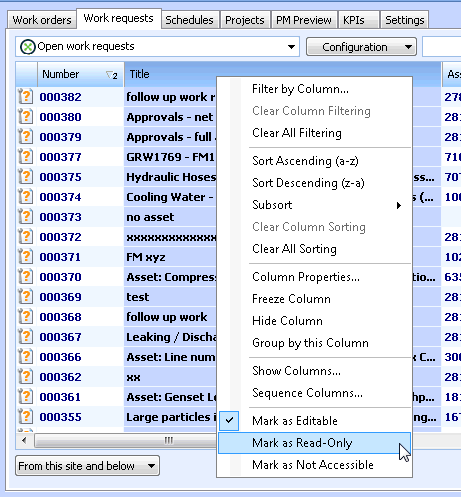
Securing Table Columns

In Security Setup mode, you can set security in individual columns in a table. When you do this, the attribute or relationship represented by the column is secured, as well as the relationship represented by the table that contains the column.
Note: The attribute or relationship represented by the column will have the same security level wherever it appears in the user interface.
Tip: If you have the Control Paths option turned on in your registry settings, you can see which table relationship you are editing in the status bar (in the bottom-right corner of the active window).

To Secure a Table Column

1.
2.
3.
The system automatically adds the required overrides to the active security profile.
4.
To review the overrides that were added, navigate to the Enterprise window, Security view. Double-click the active profile to open the Security Profile window. You can open any class security by double-clicking it.