|
|


Securing Data
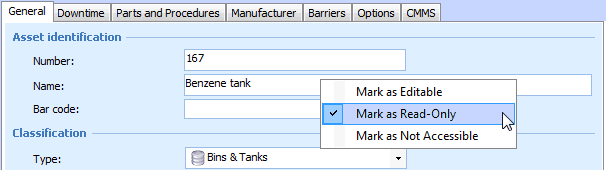
When you are in Security Setup mode, you can directly change the security settings for any attribute or relationship by right-clicking the field that represents that data and selecting the appropriate Mark as option. For example, to change security for the Asset Name attribute, open any asset, select the Properties view, General tab, and right-click the Name field.Note: Secured data may still be accessible in some reports. If this is the case, you will also need to secure the report. See Securing Reports.If you set some attributes or relationships to enabled in a class that has a read-only or not accessible default security level, you must also enable the Check out action in order to allow users to edit those fields.To Secure an Attribute or Relationship