
Adding a Process Parameter to a Provision Version
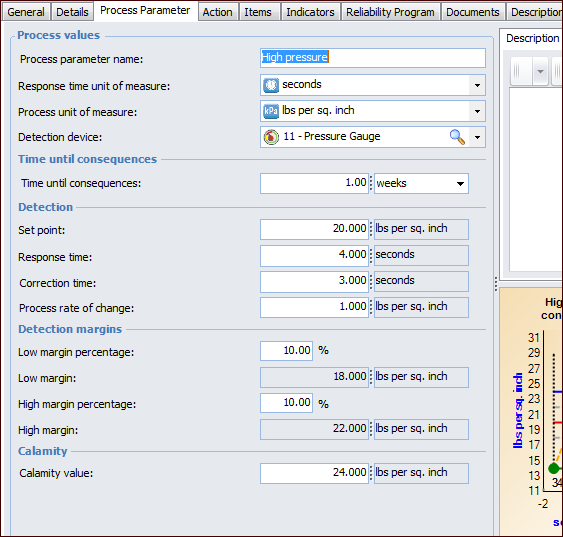
A process parameter defines the amount of time that is needed for the safety process to go into action after a problem is detected. It includes a “calamity value” to determine whether the process will take place in time to avoid the most unfavorable scenario. After you have entered values, the results are shown in a chart.
Note: The provision’s safety type determines whether the Process Parameter tab is available. For more information, see Setting up Safety Types.
This topic explains how to add a process parameter to a draft version of a safety provision.

To Add a Process Parameter to a Provision Version
1.
2.
In the Properties view, select the Process Parameter tab. This example shows a completed parameter:
3.
4.
In the Time until consequences boxes, enter the amount of time between the event that caused the problem and its consequences. This value is for informational purposes; it is not shown in the chart.
5.
6.
7.
8.
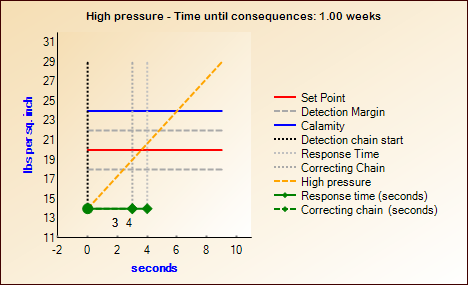
When you have filled in the values and saved the provision version, the result is shown in the chart, for example:
The Correcting chain (seconds) shows the amount of time it takes for the correcting chain to respond to the situation and perform the necessary action (for example, the time it takes for the relief valve to open and release pressure).
Note: If you make changes to the values and save the version, you might need to close and reopen the Safety Provision Version window to refresh the chart.
9.