Overview of SIF Analysis

APM safety management functionality helps organizations analyze and monitor equipment systems and processes with the goal of protecting the health and safety of their workforces, local communities, and the environment. It is designed to help companies remain compliant with current local, national, and regional legislation, as well as with industry best practices.
Safety management includes safety instrumented function (SIF) analysis, safety provisions, and override incidents. Version and approval functionality is included for SIF analyses and provisions.

SIF Analysis

Safety instrumented function (SIF) analysis is one of the strategy development methodologies available in APM. The safety analysis team studies system-level and related assets to determine loss of containment scenarios, identify risk levels, and identify the safety provisions that protect against, or mitigate, loss of containment.
Risk analysis of a SIF failure mode takes into account the severity of the consequences and the probability of the failure occurring. In a typical implementation, the analysis team chooses answers to questions for each of the relevant consequences (safety, environmental, economic, and/or reputation). The system calculates the severity and risk level for each of the consequences. The highest risk level is identified as the failure mode’s overall risk level. The team can then select one or more safety provisions, and each provision’s safety integrity level (SIL) is included in the calculation to reduce the risk level.
Optionally, the team can develop action plans for each failure mode. A recommended action is selected for the failure mode, for example, failure-finding maintenance or scheduled restoration. By adding indicators, corrective tasks, procedural documents, and follow-up work, the team develops reliability programs for preventing asset failures.
SIF analyses can be created from scratch or from a template. A SIF analysis template is a group of settings that can be used as the basis for a new analysis. You can create a template from scratch or based on an existing analysis.

Safety Provision

The safety design team identifies the safety processes, systems, and procedures that prevent or mitigate hazards. Safety provisions record the actions to be performed, the checklist of items, and instructions.
The design team assigns a safety integration level (SIL) to each safety provision. This numeric value, usually on an ascending scale from 0 to 4, is a measure of the amount of risk inherent in the failure that the provision prevents or mitigates. The provision’s SIL is used in SIF analyses to calculate the impact of a possible failure.
Provisions maintain active links to indicators that monitor assets and the standard tasks and jobs that maintain equipment safety.
For more information about safety objects, see Safety Management.

Versions and Approvals

If the analysis supports versioning, each failure mode is developed in three versions: draft, current, and historical.
When a draft failure mode has been reviewed, it is ready to be promoted to the current version. If a current version already exists, its status changes to “Historical”. In the Maintenance Action Plan window, the History view, Versions tab lists the draft version, current version, and any historical versions.
If your organization uses the APM formal approval process, it is usually employed to vet the analysis when implementation has been completed for all failure modes. Employees on the approval route review the analysis in turn and approve, reject, or forward the request. When the analysis has been approved, it is then typically marked “Closed”.
As an alternative to the formal approval process, companies can choose to have analyses reviewed and marked as “Accepted.” The analysis status is changed manually.

SDA Study

Strategy development analysis (SDA) studies are simple values used to group and filter analyses. The study can be referred to in MTA2, RCM2, RBI, SIF, and HAZOP analyses that share the same analysis type, as well as asset prioritization, reliability strategy selection (RSS), and root cause (RCA) analyses. As the analyses and failure modes are developed, you can open the study to review them.

Referencing SAP Plant Maintenance Objects in SIF Analyses

When APM has been configured to interact with an SAP Plant Maintenance system, the SAP Portal view is added to sites. Additional or replacements tabs are available on the Assets, Reliability Program, and Work Management views.
The SAP Portal view provides the following tabs and sub-tabs:
Task ListsGeneral, Functional Locations, Equipment, and Operations
Maintenance ItemsMaintenance Items, Functional Location Object Lists, and Equipment Object Lists,
NotificationsNotifications, Items, Causes, Tasks, and Activities
Maintenance OrdersOrders, Operations, Object Lists - Functional Locations, Object Lists - Equipment, and Costs
Planning SummariesFunctional Locations and Equipment
Monthly planning summaries list functional locations and equipment and provide counts of their downtime, recorded and completed notifications, planned and unplanned maintenance orders, and more. Summaries tabs are available in the Assets, Work Management, and SAP Portal views.
When an APM asset references either an SAP equipment or functional location, information about the SAP object is available in the Asset window. Select the Properties view and SAP tab to view the reference. Select the SAP Properties view to see detailed information about the SAP object. Similarly, in the SAP object’s window, the Asset Properties view displays information about the asset that references it.
Similar information is available in Standard Task and Maintenance Item windows. And when a checksheet is created from a standard task linked to an SAP maintenance item or task list, the standard task’s SAP information is copied to the checksheet. You can view it in the Properties view, Source tab.
For several SAP objects, the property window’s Usage view contains tabs that list associated APM objects: checksheets, standard tasks, action plans, and proposed tasks. These tabs are available for maintenance items, maintenance plans, general task lists, equipment task lists, and functional location task lists.
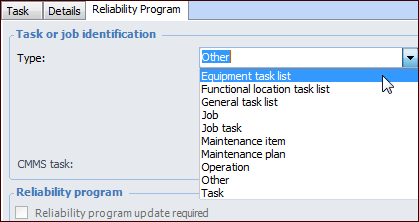
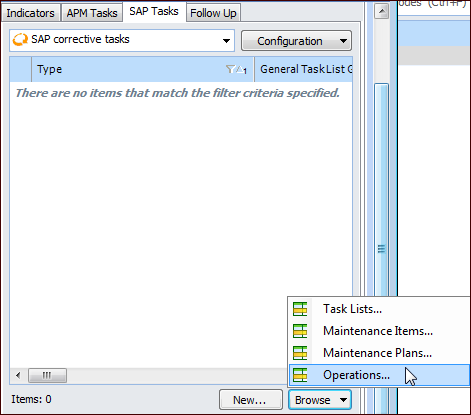
For example, a reliability engineer can reconcile the action plans developed in a strategy development analysis with actual maintenance items in SAP. When creating action plans, the engineer browses the SAP data, using filters to narrow the search for a maintenance item that matches the action plan. When the item is selected, its number is recorded in the action plan for later reference, and the engineer can then mark the action plan as “Implementation completed”. At any time, APM users can view details about the referenced maintenance item by double-clicking its icon to open a properties window. These interoperability features help users to quickly and accurately ensure that their action plans are properly implemented in SAP, without having to flip back and forth between systems.
Tip: Interoperability settings at the enterprise and site levels determine the SAP information available on sites. In the Enterprise window, Integrations view, you can create interoperability profiles to be assigned to individual sites. Profile settings determine if SAP objects, APM objects, or both are available in the site’s Reliability Program and Work Management views. In the site’s interoperability settings, you can select the plants used to filter lists of SAP objects.

Referencing SAP Objects in Analyses

In a strategy development analysis, SAP Plant Maintenance objects are available in three locations:
When action plans are updated from the Feasibility evaluation, the proposed task is referenced in the SAP Tasks tab.
In the action plan’s Details area, SAP information (System condition and Work center) can replace APM information (Operating condition and Maintenance group).
For information about viewing, filtering, and browsing SAP objects, see Viewing SAP Plant Maintenance Data in APM.
For information about setting up interoperability, see APM Interoperability Guide for SAP Plant Maintenance.