Developing Primary SIF Action Plans

An action plan in a strategy development analysis identifies an asset’s failure mode and recommends an action to prevent the failure or mitigate its consequences. SIF action types are condition-based maintenance, failure-finding maintenance, scheduled restoration or discard, modification or redesign, and no scheduled maintenance (run to failure).
Developing an action plan involves describing and setting options for the action. Depending on the action type, you can assign indicators, corrective tasks, or a standard document to the plan. If a failure mode requires more than one type of action, you can create secondary action plans for it.
This topic explains how to develop action plans using the Maintenance Action Plan window.
Tip: You can also quickly add action plans from the Strategy Development Analysis window’s Implementation view, Action Plans tab. Select a failure mode in the table view and press F2 to open the row for editing. Press Tab to move to the next editable field. When you are done, press Enter to close the table to editing.

To Develop Action Plans

1.
Open the Maintenance Action Plan window. In the Failure Mode view, ensure that a strategy has been selected. This makes the Implementation view available in the window.
2.
3.
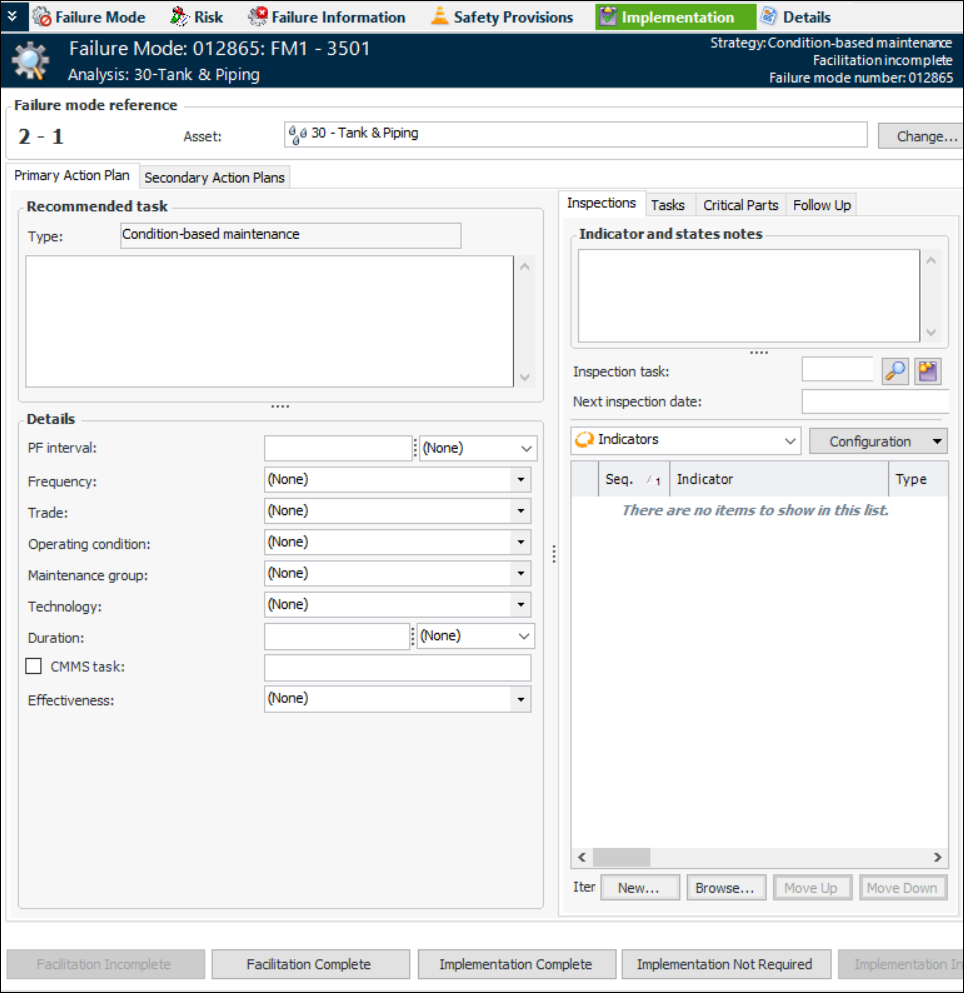
Select the Implementation view and the Primary Action Plan tab. For example:
4.
In the Recommended task area, provide a description of the recommended task in the text box.
5.
In the Details area, set the options for the task.
Note: If APM is configured to interact with a SAP Plant Maintenance system, System condition and Work center are available in the Details area.
The following table describes the details for each of the types.
Tip: To create a modification type, click in the box and press F3. The Modification Type dialog appears, where you can provide a name and icon for the type.
Note: For information about using the Calculate Failure-Finding Interval utility, see Calculating a Failure-Finding Interval for a SIF Action Plan.
6.
For more information, see:
7.
8.