Creating Unwanted Situations

An unwanted situation describes the result of a hazard scenario such as loss of containment. Examples are “Explosion in venting system” and “Emission of toxic gases”. In SIF and HAZOP analyses, the team identifies an unwanted situation, along with the HAZOP checklist item and inspection regime, on each failure mode.
This topic explains how to create an unwanted situation.

To Create an Unwanted Situation

1.
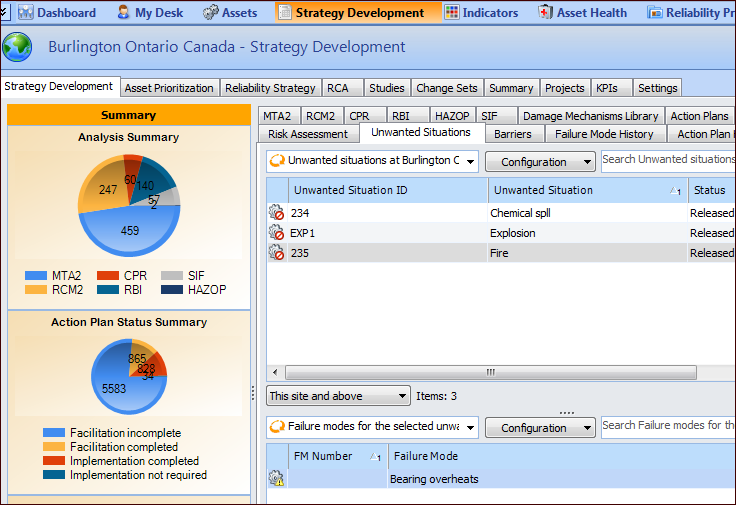
Select the site’s Strategy Development view, Strategy Development tab, and the Unwanted Situations tab. This tab shows the situations defined for the site. For example:
Tip: Select an unwanted situation in the top table to view the failure modes that use it in the bottom table.
2.
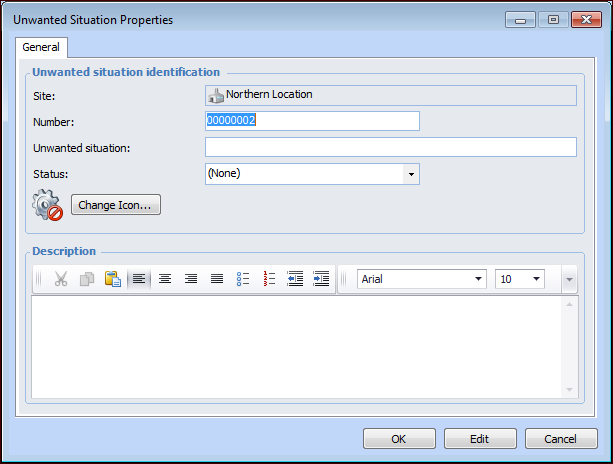
Click New. The Unwanted Situation Properties dialog appears.
Tip: After the unwanted situation has been used, the Failure Modes tab is available in this dialog. It lists the failure modes that reference the unwanted situation.
3.
4.
5.
6.
7.
Click OK. The situation is added to the Unwanted Situations tab.