|
Reviewing and Removing Overrides on a Standard Task
To Review and Remove Overrides on a Standard Task
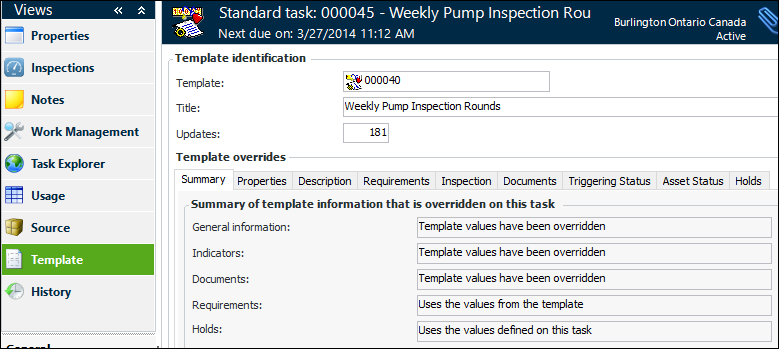
3. Select the Template view and the Summary tab. This tab shows which types of information have been overridden on the standard task. The other tabs compare the standard task with the template.
5. To reset the standard task’s detail information, click the Tools menu, Overrides, and then Remove Detail Overrides. A confirmation message appears. Click Yes. The information on the Properties, Description, Triggering Status, and Asset Status tabs returns to the template values.
6. To reset all overrides, including detail information, indicators, procedures, requirements, and holds, click the Tools menu, Overrides, and then Remove All. A confirmation message appears. Click Yes. The values return to the template’s.To Remove Overrides from the Task Template
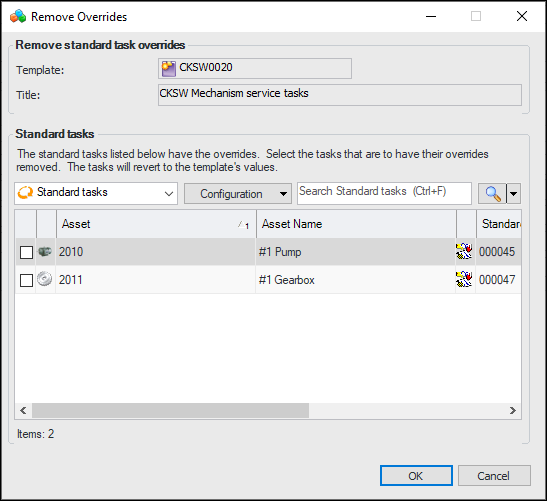
1. Open the task template, click the Tools menu and then Remove Overrides. The Remove Overrides dialog appears listing only standard tasks that were created from the template and that have overrides. For example:
2. Select the standard tasks that you wish to change and click OK. Their overridden properties will be returned to the template’s values.