
Reviewing Price Tolerances for a Resource

The invoice price does not always match the expected price from the purchase order line. There are a number of reasons why prices might differ, for example, if the purchase order was not updated when the supplier provided the correct price.
When you create an invoice line, the system sets the invoice line price to the purchase order line’s current price. If the invoice price differs from the default price, you can change the price to match the price on the invoice.
Price tolerances allow you to control what is an acceptable price change and what is an unacceptable price change. An invoice with an acceptable price change can be entered and accepted by the invoicing clerk. No further approval is required.
An unacceptable price change occurs when the difference between the purchase order price and invoice price exceeds your tolerances.
You can define separate price tolerances to control situations where the invoice price is higher than the purchase order price, and where the invoice price is lower than the purchase order price. To be within your tolerances, the change as a percentage and value must both be within your site’s tolerances.
You can also define tolerances for tax and extra charge lines. The expected amount on extra charge lines is the sum of the expected amounts from all of the invoice line extra charges for the same extra charge. For each individual invoice line, the expected extra charge amount is calculated from the purchase order line’s extra charge (if one is referenced). If there is no purchase order line referenced then the expected value is zero.
If you do not enter price tolerances for an invoice line type, the system allows any difference for that line type and does not require approval of that type of invoice line.
Note: The tolerances used are those entered for the site that owns the invoice. These may be different than the tolerances for the site at which the transaction was originally entered. Site tolerances can also be overridden at the resource level.
The price tolerances are defined as:
Percentage: the percent by which the invoice line price can differ from the purchase order line price.
Amount: the amount by which the invoice line can differ from the expected line price based on the purchase order price and quantity being invoiced.
For example, a purchase order line has an order quantity of 10 at a price of $2. An invoice line is entered for a quantity of five at a price of $2.25. In this case the price differences are:
If either the percentage or amount exceeds your tolerances, the line and invoice cannot be posted until one of the following occurs:
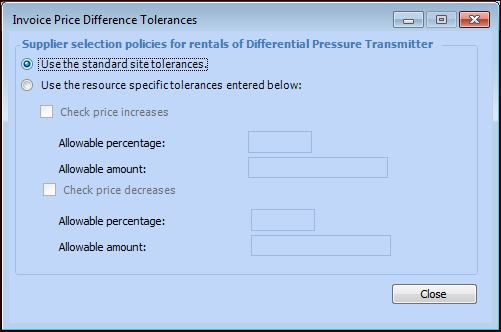
Price tolerances are defined at the site, but can be overridden on an individual resource. You can review the price tolerances that are being used on any resource.
Because a resource can be used at the site where it was created and lower-level sites, it could be used at a site with a different currency. In this case, APM converts the resource’s allowable price increase and decrease amounts to the invoice line’s site currency when it checks that the amount is within price tolerances.

To Review Price Tolerances for a Resource
1.
Select the site’s Resource Management view.
2.
3.
On the Properties view, select the Procurement tab.
4.
In the Invoice price tolerance policies area, click Details. The Invoice Price Difference Tolerances dialog appears.
5.