
|
Replenishing a Warehouse
If selected on the supplier resource price (the Replenishment review not required option), purchase orders can be automatically created for warehouse items being replenished.For information on replenishing consignment resources, see Replenishing Consignment Inventory Using Purchase Orders and Receipts or Replenishing Consignment Inventory Using Inventory Adjustments.This topic explains how to create replenishment requisitions for warehouse items using system review. To create a manual replenishment requisition for a single warehouse item, see Creating a Manual Replenishment Requisition.To Replenish a Warehouse
1.
2. On the Warehouses tab double-click the warehouse that you want to replenish. The Warehouse window appears.
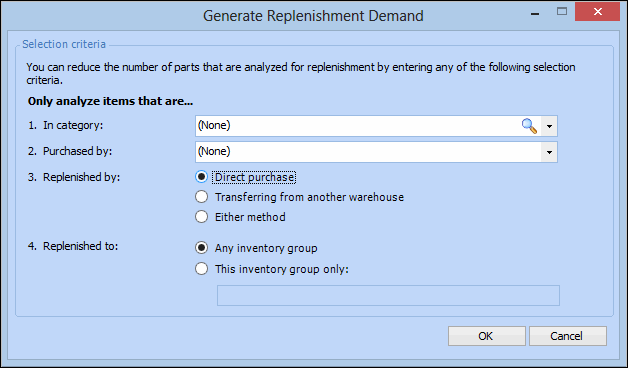
3. From the Tools menu select Generate Replenishment Requisition. The Generate Replenishment Demand dialog appears.
• Purchase: The replenishment demand is reviewed by purchasing and used to create a P.O. line.
• Transfer: The item is replenished by transferring stock from another warehouse. Transfer demands become warehouse transfer transactions.If you select one of these methods, the system only analyzes warehouse items that are set to use this method. If you select Either method, warehouse items with either setting are analyzed.
5. When you are finished, click OK. The system analyzes each item that meets the selected criteria to see whether or not replenishment is required. If replenishment is required for any item, the system displays a message and asks if you want to review the new requisition.
6. To review the items suggested for replenishment, click Yes. The Requisition window appears.
7.