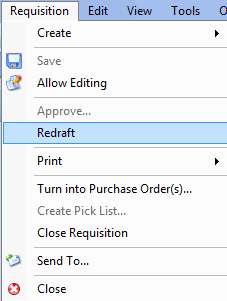
Concepts Tasks Settings Redrafting Manual and Replenishment Requisitions You can redraft manual and replenishment requisitions if necessary. Once a requisition is approved or planned, you cannot add to or change the items included on it unless you redraft the requisition. Redrafting a requisition changes the status from ‘Planned’ to ‘In planning.’ Requisitions created from work orders share the status of the work order task. When the work order task’s status is ‘In Planning, the requisition’s status is ‘In planning.’ Once the work order is marked as ‘Planned,’ the requisition ready for processing. To Redraft Requisitions 1. From the site’s Requisitions view, select the Requisitions tab, and then the Requisitions tab. 2. From the Open Requisitions configuration list, double-click the requisition that you need to redraft. The requisition opens. 3. Select the Requisition menu, and then select Redraft. The status changes from ‘Planned’ to ‘In planning.’ You can now make changes to the requisition.