Concepts Tasks Removing Text from Multi-part Fields In order to perform mathematical operations on a report that has multi-part fields such as quantity and unit of measure, you must extract the text values from the multi-part fields. For example, you might want a report that shows a quantity but not its corresponding unit of measure. Formatting configuration can only be defined for quantity, duration and price data types, and only for fields that are on the primary relationship of the report. Because fields that are included on the report header are not included in a configuration, there are no columns in the header for which formatting can be defined. This topic explains how to configure a column for multi-part formatting. To Remove Text from Multi-part Fields 1. Open the APM Report designer and click Edit Layout. The Forms Editor appears. 2. Right-click the quantity, duration or price field that you want displayed as numeric-only and select Show Magnitude Only. When this menu option is selected, an icon appears in the report field on the layout panel. When the report is generated, the multi-part field will be set as separate columns. Note: This method should be the only way to separate the data parts of a multi-part field. If you make the change directly to a configured column, it will be overwritten by the Show Magnitude Only option. 3. Save the report.



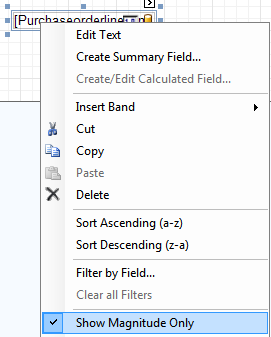
 appears in the report field on the layout panel. When the report is generated, the multi-part field will be set as separate columns.