|
Linking a Subreport to a Main Report
You must first define the subreport before it can be linked to the main report. For more information, see Creating a Subreport.To Link a Subreport to the Main Report
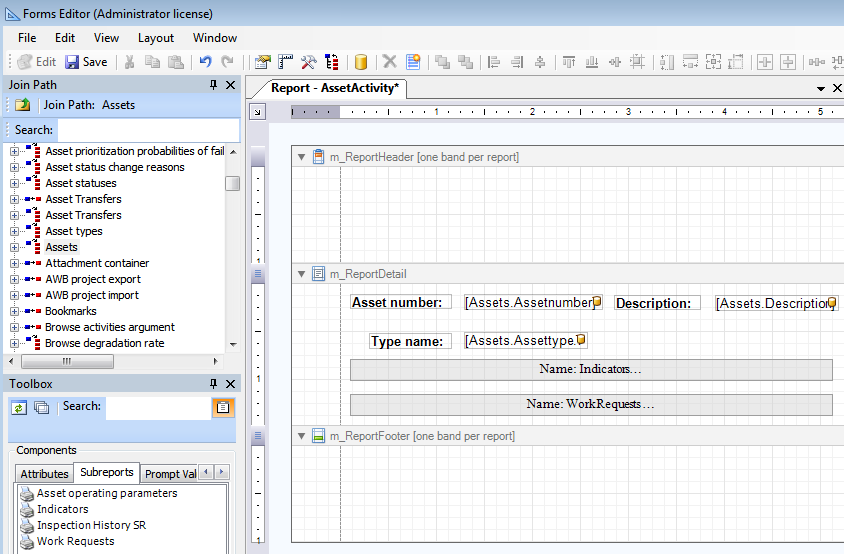
3. From the Toolbox panel, Subreports tab, drag the subreport into the Report Detail band. The subreport appears as a grey-colored label. For example:
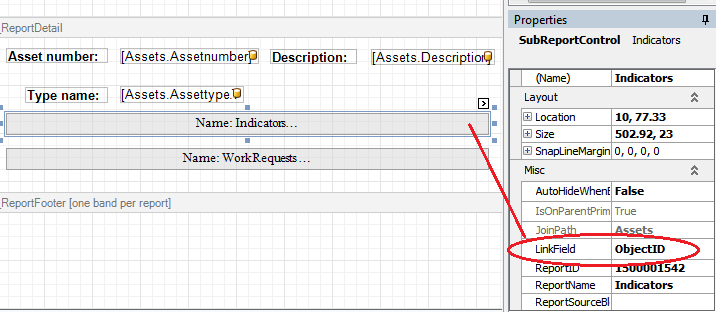
4. Select a subreport in the Report Detail band and then, in the Properties panel, scroll to the Misc section and select LinkField. The DataFieldEditorForm dialog opens. Select ObjectID as the field that will link the subreport to the main report.Note: When linking subreports that were customized from a standard APM report, the ReportID and ReportName in the Properties panel, Misc section displays the ReportID and ReportName of the original APM report, rather than the customized report name. Likewise, the Report definition window, Sub Reports tab displays the ReportID of the APM standard report, not the name of the customized report. This is reference only and does not affect functionality.
6. Save and close the report.