Report Bands

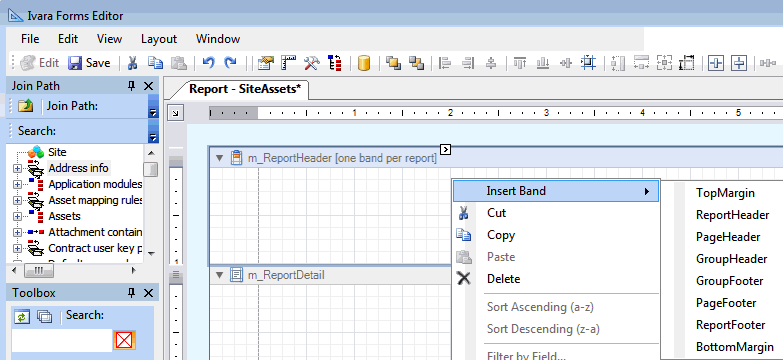
Report bands are used to structure APM reports into an organized layout. A report band represents a specific area on a report. In APM, three report bands are standard: the Report Header, Report Detail, and Report Footer.
Additional report bands can be inserted as needed. To insert a report band, right-click in the APM Forms Editor layout panel, click Insert Band and then select the band type.
Properties such as font, background color, or border style are defined from the Forms Editor Properties panel.
The standard report bands that are available are listed below.

Report Header

This band is located at the beginning of the report, and typically is used as a cover page. There can only be one report header for each report.

Report Detail

The detail band displays a single record, such as an asset or work order record.

Report Footer

This band appears at the end of a printed report, and often includes summary information for the report. For example, the report footer may include the total number of pages, or a report total. Only one report footer is permitted for each report.

Top Margin

This band is located at the top margin of every page, above the Page Header or Report Header bands.

Page Header

The page header band, when included on a report, is located at the top of each page. Typically it will include the report title or page numbers.

Group Header

The group header band is located at the beginning of each group. It specifies grouping criteria and is used to display information at the beginning of a group of records. An example is the asset name and number, grouped with its corresponding indicators.

Group Footer

The group footer band is located at the end of every group or at the bottom of the page if the group is split across pages. Typically, the summary information for the group is shown. For example, a group footer may include the number of indicators for an asset.

Bottom Margin

This band is located at the bottom margin of every page, below the Page Footer band.