Repairable Spares

Using APM’s serialized inventory support in addition to tracking inventory balances, you can track information about the individual resource units. You can uniquely identify each unit of the serialized resource, track the current status of a unit, the condition of the unit, and the installation history.
This topic provides an overview of the serialized resource feature, required settings, and the repair process.

What is a Repairable Spare?

A repairable spare is any inventoried unit that can be restored and reused after it fails. The opposite of a repairable spare is a consumable item. Examples of repairable spares are cylinders, PC boards, and small motors. Each repairable spare unit is uniquely identified in the inventory system so that it can be tracked. Another term for repairable spare is “serialized inventory unit”.
Repairable spares can be linked to component assets. By linking component assets to resources in inventory, you can:
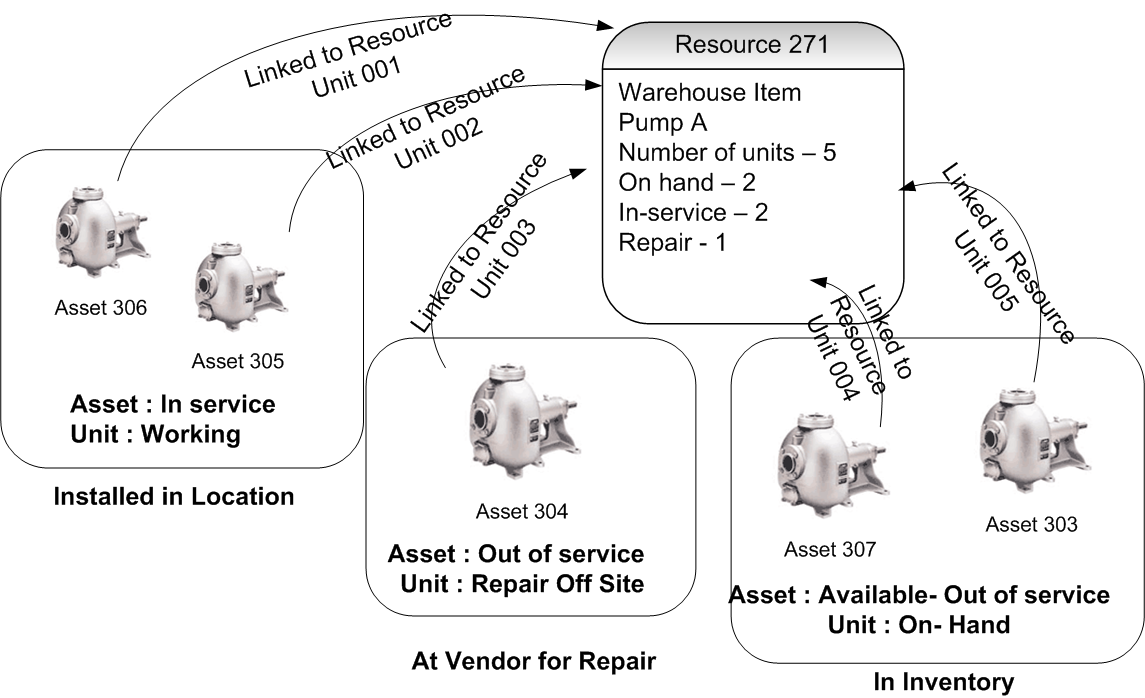
For example, you could have a number of general-purpose pumps. Each pump is identifiable by its unique serial number. The resource “general purpose pump” is created, and each pump is set up as a resource unit in inventory. Each pump can be requisitioned from inventory, installed as a component asset into an assembly, and its unique repair history can be tracked. This inventory link is illustrated below.
You can plan component swapping for serialized component resources, plan work order requirements for resource units, create repair shop tasks, install serialized components into assemblies, transfer them, view serialized unit information, report work activity, change the status, and start a new asset life for a serialized resource unit.
You can create supplier resources for component resources, create supplier resources for repairs, issue component resource units, return them to inventory, track inventory balances, count the number of resource units, create replenishment reports, adjust inventory, change the unit’s status, and decommission serialized resources.
You can create repair purchase orders, shipping transactions for off-site repairs, requisitions for component resources, and off-site repair requisitions. You can receive serialized resources, inspect vendor-repaired serialized resources, and view information for serialized resources.
TOP

What is a Serialized Inventory Resource?

A serialized resource is a material or tool type resource that is stocked in inventory and has units that are identified and tracked individually.
For most resources, you track inventory balances of the number of on-hand units, the number in transit, and so on, by warehouse and resource. You don’t normally keep information about the individual units. This is appropriate for most resources. But, if you want to track information about each of the resource’s units, you can use serialized inventory support. Using this feature, you can uniquely identify each unit, track the current status of a unit, the condition of the unit, and the installation history.
Units can be linked to component or maintainable assets.The link serves a number of purposes: It provides additional status information about the asset, synchronizes asset status updates and unit status changes, and provides manufacturing information about the unit.
For example, component assets, such as general-purpose 40hp motors, could be set up as a material-type serialized resource. You could then identify each 40hp motor and track information about repairs for maintenance purposes. Maintainable assets, such as tower cranes, could be set up as a tool-type serialized resource. You could track the cost of usage for each tower crane.
Several areas of your organization are involved when you set up and work with serialized resources: procurement, inventory, and maintenance.

Setting up Site to Support Serialized Inventory

Before you can define resources as supporting serialized inventory, the following items must be set up for your site:
When you set up a serialized resource, you must do the following:

Tracking Serialized Inventory

You can start tracking serialized inventory when you set up a new resource, or you can convert an existing resource’s balances and asset information to serialized inventory.
You can remove the serialized inventory tracking for a resource at any time. Removing serialized unit tracking for the resource does not actually delete the resource’s units. The units are retained for historical reference on any resource transactions that referred to a unit. However, the historical units cannot be reactivated. If you decide to change the resource back to a serialized resource, a new set of units must be created.
When you create a resource transaction for a serialized resource, you must identify the unit affected by the transaction. For example, when you issue a serialized resource, you must specify the unit that is being issued.
When you post a resource transaction for a serialized resource, the specified unit’s status changes. For example, an issue transaction changes the status of a unit from “Spare” to “Awaiting Installation”. The serialized resource’s inventory balances are updated to reflect the unit’s new status.
TOP

The Repair Process

Any component asset or inventory item can be sent out for repairs. However, if a component asset has been linked to a serialized resource unit, you can track the status and repair history for that particular component. You can also track the status and repair history of inventory units that are not linked to assets.
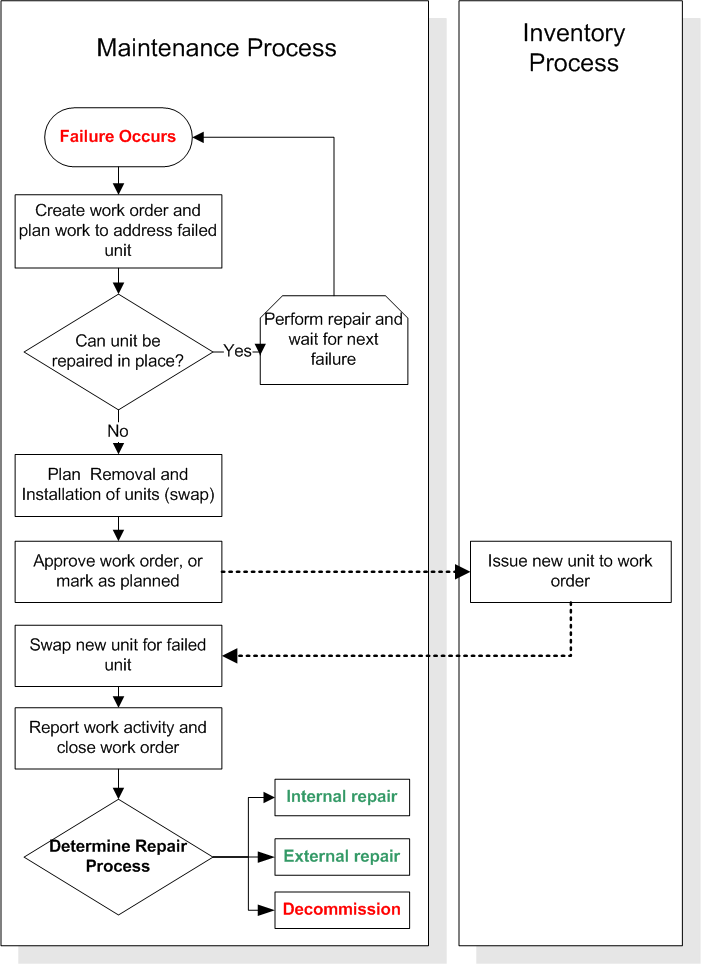
When a serialized resource unit fails, you can repair it in place, or you can remove it from the location for repair and install a working unit in its place. When you remove a serialized resource unit to repair it, you must record the information for the remove and install (swap) in APM. Typically, this is done using a work order.
Whether you are using an internal or external repair process, you should create a work order to manage the repair process. The system can create a repair work order automatically, if this option has been set up on the resource.
If the unit cannot be repaired, you can change the status of the unit to Decommissioned after it has been returned to inventory. You can only decommission “inventoried units”. This is because when the unit is returned to inventory, the cost of the unit gets credited to the holding account.

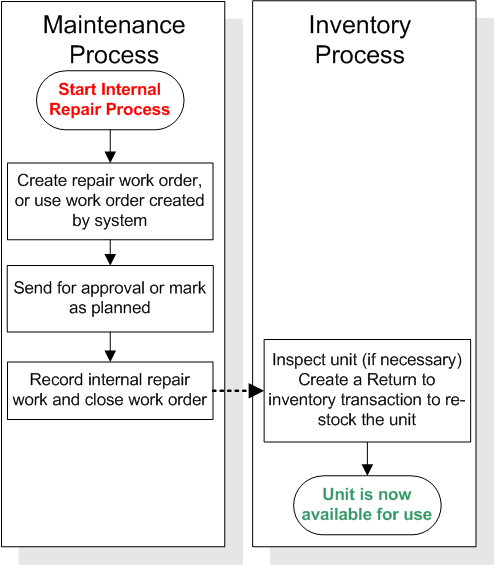
Internal Repair Process — Repair On Site

You can use work orders to plan and track internal repairs. All of the standard work order features, including planning, costing, scheduling, reporting activity, and closing can be used with repair work orders.
The following steps outline the internal repair process both for serialized units that are linked to assets and for units that are not linked. The process shown starts from the point where the unit swap has been completed.

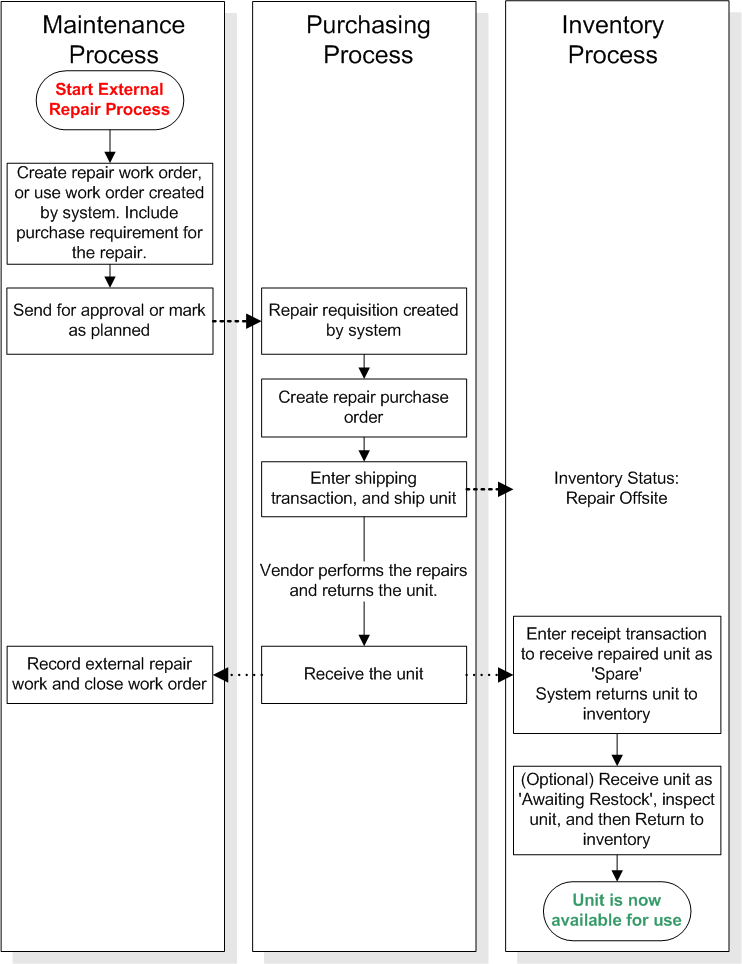
External Repair Process — Repair Off Site

Use requisitions, work orders, and purchase orders to track external repairs. You can indicate that a requisition or purchase order line is a repair order and select the resource and unit to be repaired. You can select only units with a status of Repair On Site, Awaiting Repair Action, or Returned.
Standard purchasing functions such as approvals can be used with off-site repair purchase orders.
The following steps outline the off-site repair process, starting from the point where the unit swap has been completed.
TOP

Automating The Repair Process

When you send a serialized resource unit for repair, you should manage the repair process with an APM work order. This applies whether you are repairing the units internally or externally. You can create repair work orders manually, or you can have APM automatically create work orders whenever a unit of the resource is issued from inventory. Work orders are created following the issue transaction because, usually, a unit is issued to replace a failed unit.
There are two ways to repair a serialized resource unit:
If a resource is repaired externally, when APM creates an automatic repair work order for a unit of the resource, the system includes a purchase demand for the repair on the work order. To automatically create repair work orders, you must designate a task template for the system to use.
When automatically creating a repair work order, the system copies some of the information from the work order to which the unit was issued:
For external repairs, the system includes a resource demand for the repair. The resource demand information includes:
The remaining information for the work order originates from a designated task template.
For external repairs, you can also have the system automatically mark the repair work order as being completed after the repaired unit is received from the supplier. You can select the completion status to use when the repair work order is marked as complete. Work planners can then officially close the work order after reviewing it in their list of completed work.
To set up repair cycle automation, you must enter the automation settings that you want on each serialized resource. Each resource can use different settings.
When APM creates a repair work order, a resource demand to repair the failed unit is included on the work order. The resource demand serves two purposes: to initiate the purchasing process for the repair purchase order and to update the unit’s status to “awaiting repair action”.
The system selects the unit to be repaired as follows (only units with a status of “working” are considered):
For units that are linked to component assets, the process is simpler:
TOP

Asset and Unit Statuses for Repairable Spares

You must define your serialized inventory statuses before you can start tracking serialized units. Define the serialized unit statuses as well as the relationship between the serialized unit statuses and the asset statuses. APM provides the unit condition statuses.

Defining Serialized Resource Unit Inventory Statuses

Serialized inventory statuses track the availability of a unit for inventory purposes.
There are 10 required statuses that track serialized inventory. You can create descriptions for the unit statuses and change the name APM provides. You cannot delete any of the required 10 unit statuses nor add new statuses.
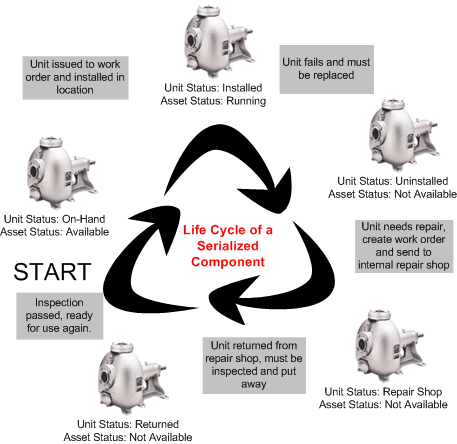
The following diagram gives an example of status changes over a unit’s lifetime.
The following table lists the 10 serialized unit statuses:
At any one time, a serialized unit has only one status. A unit cannot have two statuses at the same time. For example, an unit cannot have a status of “Repair On Site” and also have a status of “Awaiting Repair Action”.
Additional information about the serialized unit is available only if it is linked to an asset. This includes manufacturer information, initial purchase information, and warranties.
Resource transactions and asset status changes change the serialized unit status. For example, issuing the unit from inventory changes the status from “Spare” to “Awaiting Installation”. Installing the unit changes its status to “Working”.

Linking Asset Statuses to Serialized Unit Inventory Statuses

The asset status tracks the status of the unit for maintenance purposes.
For each of the 10 serialized unit inventory statuses, you must specify an asset status that logically corresponds to the unit status. For example, matching the unit status “Working” to the asset status “Being Repaired’ is not logical. The unit status “Working” should be matched to “In Service” or an equivalent asset status.
Typically, there are fewer asset statuses than serialized unit statuses.
You can link one or more unit statuses to a single asset status. For example, the unit statuses “Returned”, “Repair On Site”, “Repair Off Site”, “In-transit”, and “Decommissioned” can all be linked to the asset status “Out of service - unavailable”. Each of these unit statuses represents an asset that is not currently available to be issued to a maintenance job.

The Unit Condition Status

The unit condition status identifies the relative age and condition of a serialized resource unit. APM provides the following three conditions:
TOP

Serialized Component Assets in Assemblies

Parallel hierarchies are used to define asset assembly structures where a component asset has one or more component locations as children. Components are then installed at these locations, creating an assembly of components, locations and component. When you use repairable spares in a parallel hierarchy type of assembly, the system handles asset and inventory status changes differently. The following summarizes how parallel hierarchies work with serialized units:
TOP

Costing for Serialized Resources and Repairable Spares

The costs of repairs for repairable spares/serialized units are always expensed. Repair costs are typically charged to the location (asset) where the unit was installed when it failed. This follows the principle: “You broke it, you fix it”.
Repairable spares/serialized units are issued at zero cost to the work order and asset. New units and repaired units are treated the same way — they are issued at zero cost.
Repair costs are not added to the item’s inventory value and do not affect the item’s average unit cost.
Decommissioned units are charged at the unit’s average cost to a work order task, asset, or GL account — usually to the asset from which it is removed.
The flow for costing is as follows:
New unit is purchased
Unit is issued
Internal repair
Return is valued at the value at which the unit was issued.
Inventory account is debited with the return value. The Holding account is credited with the value.
External repair
The repairs are debited to the maintenance expense account.
RNI is credited.
Repairs include internal and external activities and costs
Unit is decommissioned
Maintenance cost / Inventory adjustment transactions

Tracking Inventory Costs for Serialized Resource Units

Units are issued and returned to inventory at zero cost to the asset and work order task. The site’s Holding Account for Serialized Units is credited and debited for the units. A unit is credited and debited at the cost at which it was issued. For example, if the Holding account is debited $10 for the unit and when it is returned the current inventory value is $15, the Holding account is credited a value of $10.
The Holding Account for Serialized Units account overrides the account that would normally be derived, based on the work order task, asset, and cost type.
An average cost is maintained for a serialized resource unit. The inventory value is recalculated so that it increases and decreases when units are issued and returned. This average “purchase” cost is calculated as follows:
Note: Units that are created with an “out of inventory” status (for example, “Working” or “Awaiting Repair Action”) are not assigned an initial inventory value. This means that when they are returned to inventory, the value of each unit in inventory could be reduced.
For example, serialized resource A was created with two units in inventory and one “Working” unit. The total inventory value was entered as $100 (value per unit = $50). When the “Working” unit is returned to inventory, the on-hand value remains $100, but the unit cost is now $33.33. You can create an inventory adjustment to correct the on-hand value and unit cost.
TOP

Overview of Setting Up or Converting Assets To Serialized Resources
There are different situations when you would convert assets and resources to serialized inventory:
Before you create resources or convert any data, you must first set up the site to support serialized inventory. After the site settings are complete, you can add serialized resources and (if desired) link them to assets.
If you are linking your serialized resources to component assets, the steps must be followed in the correct order. The asset must be linked to the resource before it is turned into a serialized resource. The inventory balances must be correct before the units are created.
For checklists that outline the step-by-step process for completing each type of conversion, see Setting up Repairable Spares.
TOP