
Decommissioning Serialized Resource Units

A serialized resource unit is decommissioned when repairs are not feasible or cost-justified. You can change the status of the unit to “Decommissioned” after it has been returned to inventory and the cost has been credited to the holding account for serialized units.
When you change a unit’s status to “Decommissioned,” the value of the unit is removed from inventory. The unit’s value is set to the item-warehouse’s average unit cost. The value is charged to a work order task, asset, or GL account. If you change a unit’s status from “Decommissioned’ to some other status, the value of the unit is added to inventory. This value is credited to a work order task, asset, or GL account.
For more information on returning serialized units to inventory, please see Returning Serialized Inventory Units to Inventory.

To Decommission a Serialized Resource Unit
1.
In the Site window, select the Resource Management view and then the Inventory tab.
2.
On the Warehouses tab, select the warehouse in which the resource is stocked, from the list on the left side. The list of stocked resources is shown in the table on the right side.
3.
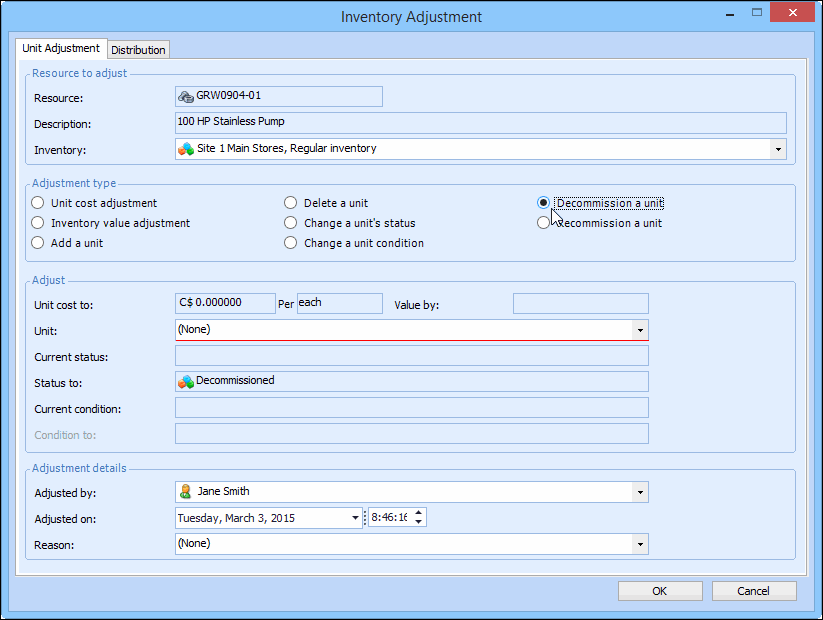
Right-click the resource for the unit being decommissioned, and select Adjust Item. The Inventory Adjustment dialog appears.
4.
Ensure that the Inventory is correct. The Decommission a unit option is displayed. For example:
5.
Select Decommission a unit as the adjustment type.
6.
Select the Unit to decommission. Only units with the status ‘Spare,’ ‘Returned,’ or ‘Awaiting Re-stock’ are displayed. The status is changed to “Decommissioned.”
7.
Select a Reason for adjustment from the list.
8.
Select the Distribution tab, and then enter the work order, asset or GL account to charge.
9.
When you are finished, click OK to post the adjustment.