Issuing Serialized Units

When you issue a serialized resource you must identify the specific unit. Only units with a status of “Spare,” “Returned,” or “Awaiting Re-stock” are available for issue. You cannot issue a “Decommissioned” unit.
Serialized resource units that are linked to an asset are issued at zero cost to the asset and work order task. The task and asset are not charged for the unit — they are charged with the costs of the repairs to the unit that is being replaced. The GL account to charge is set to the site’s “Holding” account for serialized units.
Serialized resource units that not linked to an asset are charged the same way as any stocked material.
Units must be issued from inventory before they can be installed.
When you issue a serialized unit, here’s what happens:
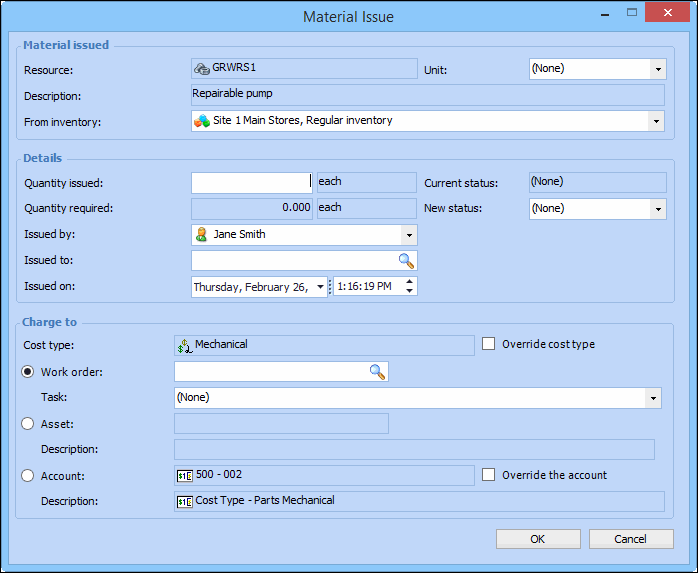
When you issue a serialized resource, the issue quantity is set to 1 and is read-only. The Unit and New Status boxes become available. You must select a specific serialized resource unit, and select a status for the issued unit. Typically, the new status is “Awaiting Installation.”
This topic explains how to issue a serialized inventory unit from the Resource Management view.

To Issue Serialized Units

1.
In the Site window, select the Resource Management view and then the Inventory tab.
2.
3.
Right-click the serialized resource which you are issuing and select Issue Item. The Material Issue dialog appears. For example:
4.
5.
When you are finished entering information, click OK. APM posts the new transaction and makes the appropriate inventory adjustments in the warehouse. For units linked to assets, the component swap information is updated on the work order being charged.