Releasing a Hold on a Work Order Task

This section explains how to manually release a hold on a work order task.
Releasing a hold removes any restrictions on work order task actions that were in place as a result of the hold. Work order task holds can be released manually or at a set date and time. An APM scheduled action releases any holds that have exceeded their release date. Date-based holds can also be manually released at any time.
If a hold has the option Only [employee name] is allowed to modify or manually release this hold selected, only the hold creator, or employees with special authority can release the hold.

To Release a Work Order Task Hold

1.
From the Site window, select the Work Management view and then the Work Orders tab.
2.
Select the Tasks tab. Find the work order task that you want to release.
3.
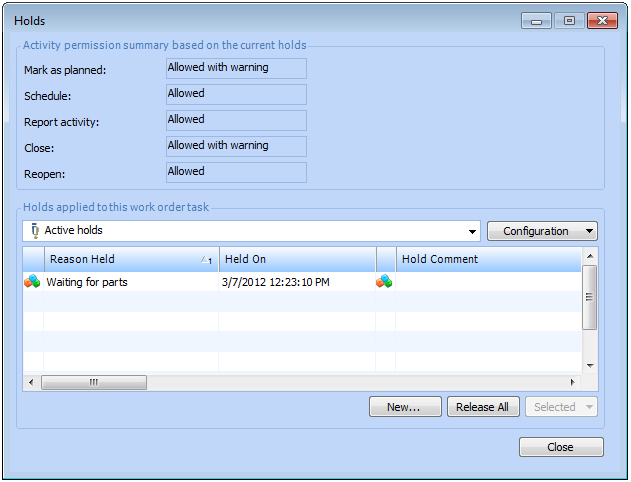
Right-click the task and select Holds and then View. The Holds dialog shows a list of the active holds for the task.
4.
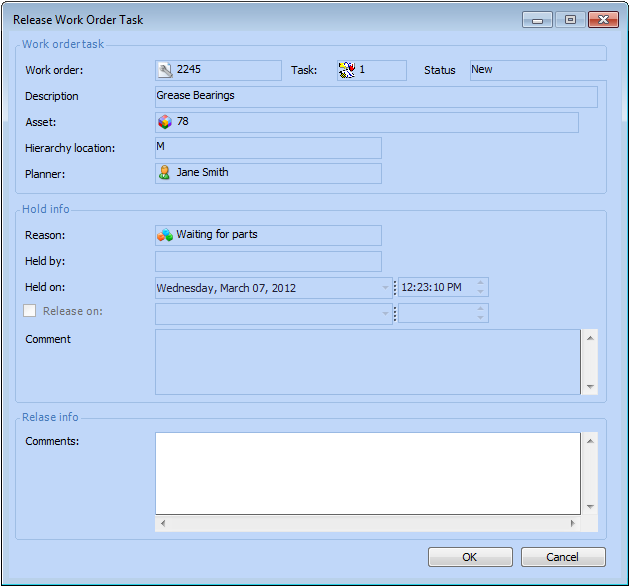
Right-click the hold that you want to release and select Release. The Release Work Order Task dialog appears.
Tip: You can release multiple task holds at the same time by selecting the holds, right-click the selection, and then select Release.
5.
Enter your comments about releasing the hold, and then click OK or OK All (if multiple holds were selected).
Note: If you are releasing multiple holds, your comment will be applied to all of the holds that were selected.
6.
Click Close to close the Holds dialog.