Sending RSS Analyses for Approval

APM supports the approval of RSS analyses. Your site’s approval settings determine if analyses require approval. If the approval process is enabled for RSS analyses, it is typically used to vet the analysis before the strategy is implemented.
The analysis status determines if the analysis is ready to be sent for approval, as well as whether properties can be changed, the questionnaire can be completed, and the recommendation can be implemented. Depending on your site settings, certain actions (such as implementing the recommended strategy) might not be allowed when an analysis is waiting for approval, approved, or rejected.
Tip: To view information about the analysis’ approval requests, select the History view and the Approvals tab. Information about the current and historical requests is displayed.
This topic explains how to send an analysis to be approved.

To Send an Analysis for Approval

1.
From the site’s Strategy Development view, Reliability Strategy tab, open the analysis you want to send for approval.
2.
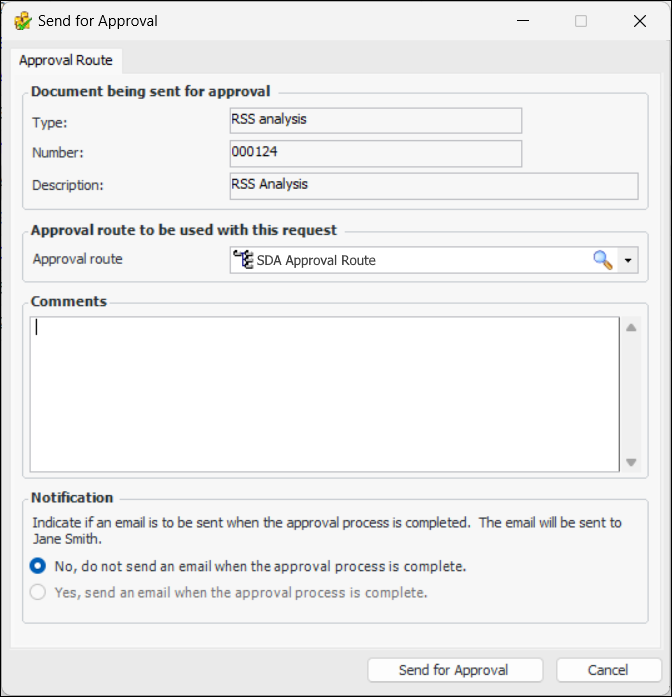
Click the Analysis menu and then Send for Approval. The Send for Approval dialog appears.
3.
Select the Approval Route from the list. Only approval routes that are valid for the analysis are listed.
4.
Enter a comment, if you wish. Requester comments are displayed in the site’s Approvers view, Requests tab, as well as in the Approval Request window in the Request Info tab.
5.
To have APM automatically send an email to the originator when all approvers have reviewed the request, select Yes, send an email when the approval process is complete.
6.
Click Send for Approval. The analysis approval request is sent to the first approver on the approval route selected, and the analysis’ status is updated.