Printing RCA Reports

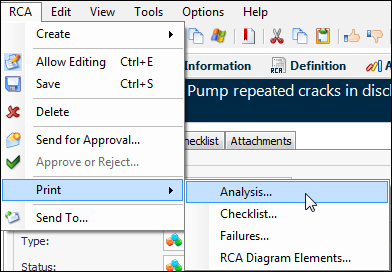
You can print four types of reports for a root cause analysis:
Analysis – General information about the analysis, such as the site, analysis number and title, description, asset, analysis type, status, dates, facilitator, and team members.
It includes unmitigated and mitigated consequences and costs, benefits, and selected classifications for immediate causes, basic causes, and lack of control. Photos are included, as well as potential and root causes, follow-up actions, and the analysis checklist.
Checklist – Analysis checklist items and their statuses.
Failures – General information about each failure in the analysis, as well as its evaluation for RCA.
RCA Diagram Elements – Each element in the RCA diagram, its type, cause statement, parent, status, and failure mode.
This topic explains how to print reports.

To Print Reports About an Analysis

1.
2.
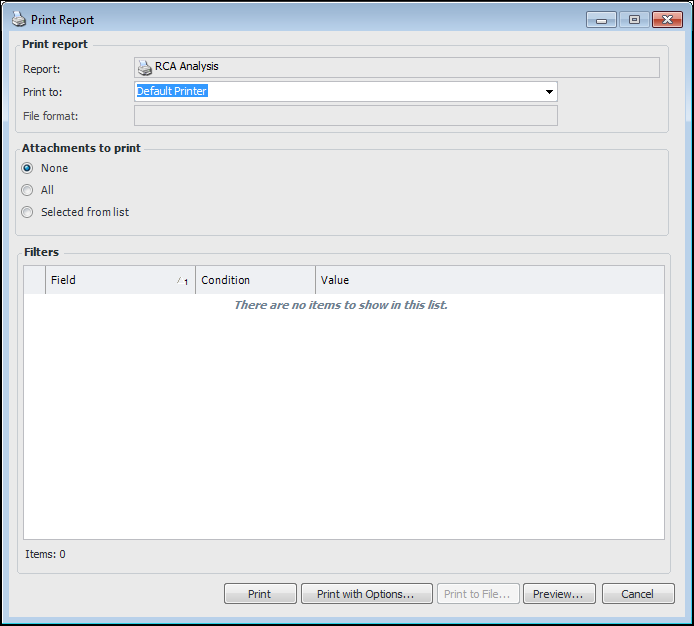
Click the RCA menu, Print, and then the report you’d like to print. For example:
3.
4.
For information about printing attachments, see Printing Documents.