RBI Calculations

The purpose of this topic is to explain the various risk-based inspection calculations and determinations that the APM software performs to arrive at a failure mode’s scores and values, including:
For the most part, these calculations are performed behind the scenes; the formulas are not shown on the screens. This document is intended to help you understand how the software calculates and determines these results.
This topic covers the failure mode criticality (risk), failure mode confidence, resulting risk scores, and the next inspection date calculations. It also provides a list of the Degradation Minimum Value calculations available in the APM install database.
Note: This topic does not cover demand scenario assessments for pressure relief valves (PRVs) or pressure safety valves (PSVs). That said, for PRV RBI analysis, multiple demand scenarios are evaluated, and the scenario with the lowest inspection interval is selected. Probability is defined as a combination of adjusted likelihood and demand scenario rate.
Note: This topic does not cover embedded evaluation forms (used for SIF and HAZOP analysis) nor risk analysis using weighted severities (used for simple analyses of well-documented assets and environments).
For related information, see RBI Concepts and Strategy Development Settings.
This topic covers the following:

Failure Mode Criticality

A failure mode’s criticality or risk score is arrived at by determining the severity of failure consequences and tempering that score with probability of failure and (optionally) failure mode detectability (Risk = Severity * Probability * Detectability).This section looks at the three controlling factors that determine how failure mode criticality is evaluated: degradation type, damage mechanism, and the source of questionnaires. It also explains probability, susceptibility, and consequence severity evaluations.

Degradation Type

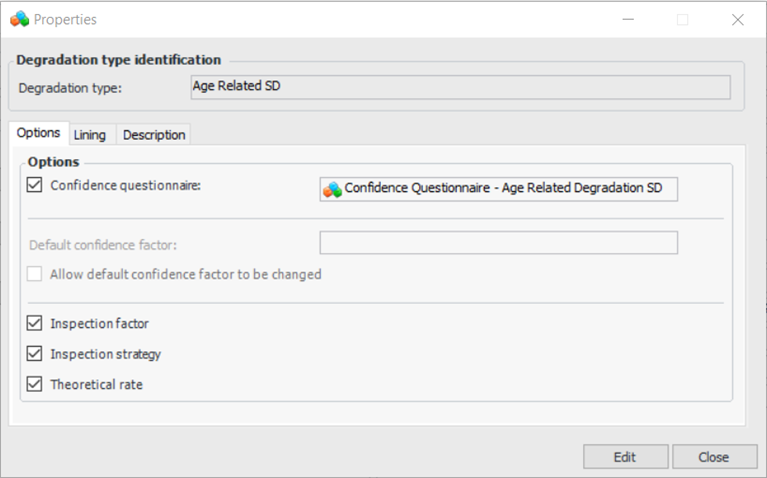
The first controlling detail on a failure mode is the degradation type. Degradation type controls which confidence questionnaire is used on the failure mode and whether one or more of inspection factor, inspection strategy, and theoretical degradation rate are used in the calculations. Similar controls are provided for lined assets.
Here is an example of an age-related degradation type:

Damage Mechanism

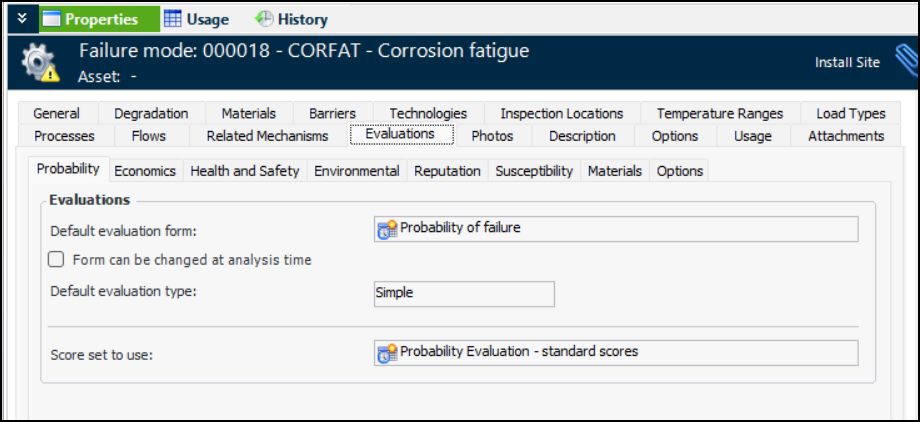
The second controlling factor is the damage mechanism failure mode that is added to the RBI analysis from the Damage Mechanisms Library. It sets the evaluation questionnaires and the score sets for the probability, susceptibility, economic, health and safety, environmental, and reputation evaluations.
Here is an example of a Corrosion Fatigue damage mechanism. The Evaluations tab shows the forms and score sets for evaluations:

Defaulted Questionnaires

The third controlling factor comes from the source of the questionnaires on the RBI analysis. Questionnaires for susceptibility, probability, economic, safety, environmental, and reputation evaluations can be defaulted from:
In the Strategy Development Analysis window, the Properties view, Risk Options tab shows the default questionnaires, if any. The defaults can be changed if desired in individual RBI analyses.

Probability Evaluation

In RBI analyses, a failure mode’s probability of failure can be determined either by simply clicking the cell in the risk matrix or by filling in an evaluation questionnaire. If a multiple-question questionnaire is used, the score from each question is aggregated based on one of the following settings:
There is no aggregation or formula on asset from all its failure modes.

Detectability

“Detectability” refers to the ability of the system or process to detect a hazardous event. Lower scores are used for failures that are easy to detect and higher scores for failures that are harder to detect. When support for detectability is enabled in an analysis, the relative risk calculation becomes:
(Economic severity score + Health and safety severity score + Environmental severity score + Reputation severity score) * Probability score * Detectability score = Relative Risk Number

Susceptibility Evaluation

Susceptibility to failure evaluation examines the asset’s non-age-related degradation patterns. It can provide an alternative to probability analysis for certain failure modes. For example, susceptibility evaluation can be used to determine the vulnerability of atmospheric storage tanks to corrosion under insulation or stress cracking. The evaluation can result in recommended actions, susceptibility ratings, or both. Susceptibility analysis can be set up to automatically update the probability score based on the susceptibility result.
Sometimes susceptibility evaluation is used as a first-level analysis followed by the detailed probability analysis.
We recommend using the pre-set settings and configured evaluations provided with APM, rather than creating custom susceptibility questionnaires. We found that these questionnaires are best treated as customizations and created in the DEV environment first. All the provided forms for non-age-related (cracking) align with API Recommended Practice 581.

Consequence Severities

In the process of evaluating a failure mode, you can quantify the relative risk (criticality) associated with the failure by evaluating the consequences (severity of the effect) and the probability of the failure occurring, assigning values for each factor. APM then calculates the relative risk by totaling the consequence severities and then multiplying the severity number by the probability value.
Severity of each consequence can be determined by either clicking a cell in the risk matrix or by filling in a questionnaire. In the questionnaire, individual questions can determine the following:
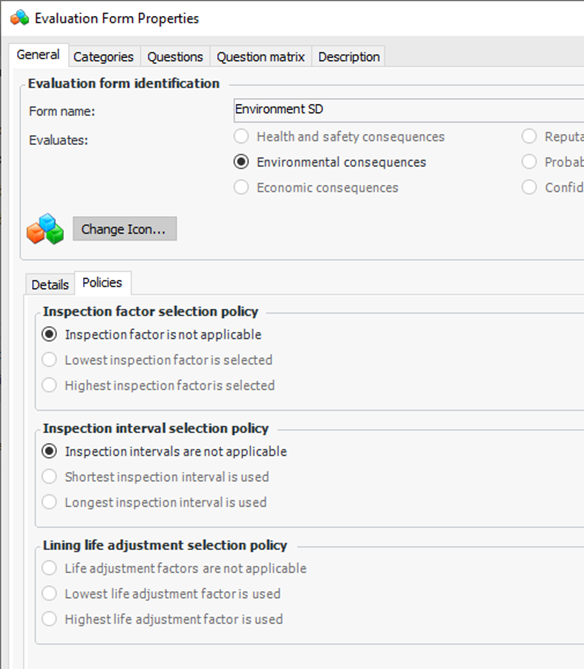
Here is an example of an Environment evaluation form. The Policies determine how inspection factor and inspection interval are used in calculations. Note that the policies are for unlined assets only.
Economic
Simple or detailed forms can be used. Some sections require the user to enter costs. Others derive cost for each item from the quantity and unit cost, and then the total cost is calculated from all the items. Finally, the economic score is calculated by the software from the total cost.
If the production loss calculation section is used, the administrator (based on security profile) can control this section. The calculation is based on time blocks with different costs, and the calculation determines the total cost for the user-entered down time. If you set the cost equation for a unit or circuit, it applies to all of the children.
There is no formula presently provided by the software for the user to manipulate.
There is no aggregation or formula on asset from all its failure modes.
Health and Safety
If a multiple-question questionnaire is used, the score from each question is aggregated based on one of the following settings:
Two built-in calculations are included to use in questions: Fire Volume and Vapor Cloud Explosion. The user enters inputs on the left side of the calculation form and then the software determines the calculated result. The calculations are based on these standards:
There is no formula presently provided by the software for the user to modify.
There is no aggregation or formula on asset from all its failure modes.
Environment
If a multiple-question questionnaire is used, the score from each question is aggregated based on one of the following settings:
One built-in calculation is included to use in questions: Liquid Release. The user enters inputs on the left side of the evaluation form and then the software calculates the result. The calculation is based on this standard:
There is no formula presently provided by the software for the user to manipulate.
There is no aggregation or formula on asset from all its failure modes.
Reputation
If a multiple-question questionnaire is used, the score from each question is aggregated based on one of the following settings:
There is no formula presently provided by the software for the user to manipulate.
There is no aggregation or formula on asset from all its failure modes.

RBI Lookup Tables and Evaluations

You can calculate the probability of failure and consequences for a failure mode based on various lookup tables and calculations to produce criticality evaluation rankings.
Note: Support for criticality evaluation calculations is generally available. However, you must first enable feature 115 to use the functionality in APM. In the Enterprise window, select the Features view and the Enabled Features tab. Click Browse, select “Practical RBI - criticality evaluation calculations” and click OK. If APM is running as a smart client, click Refresh Enabled Features on the server. Then restart the client to use the functionality.
The calculation function supports calculations that determine ranking values for criticality evaluations. In the criticality evaluation, the user is presented with a series of evaluation categories. Each evaluation category consists of a series of questions or impact statements.
Typically, the user would select the appropriate question for the failure mode being evaluated. The selected question has a ranking assigned to it. The ranking is used to select the corresponding probability or severity (health and safety, environmental, or reputation).
The ranking calculation provides an option to automate the determination of the ranking based on one or more inputs and the formula defined for the calculation. In most cases, the formula consists of a lookup table or a series of lookups. Once the ranking has been calculated, APM selects the corresponding question associated with the evaluation category.
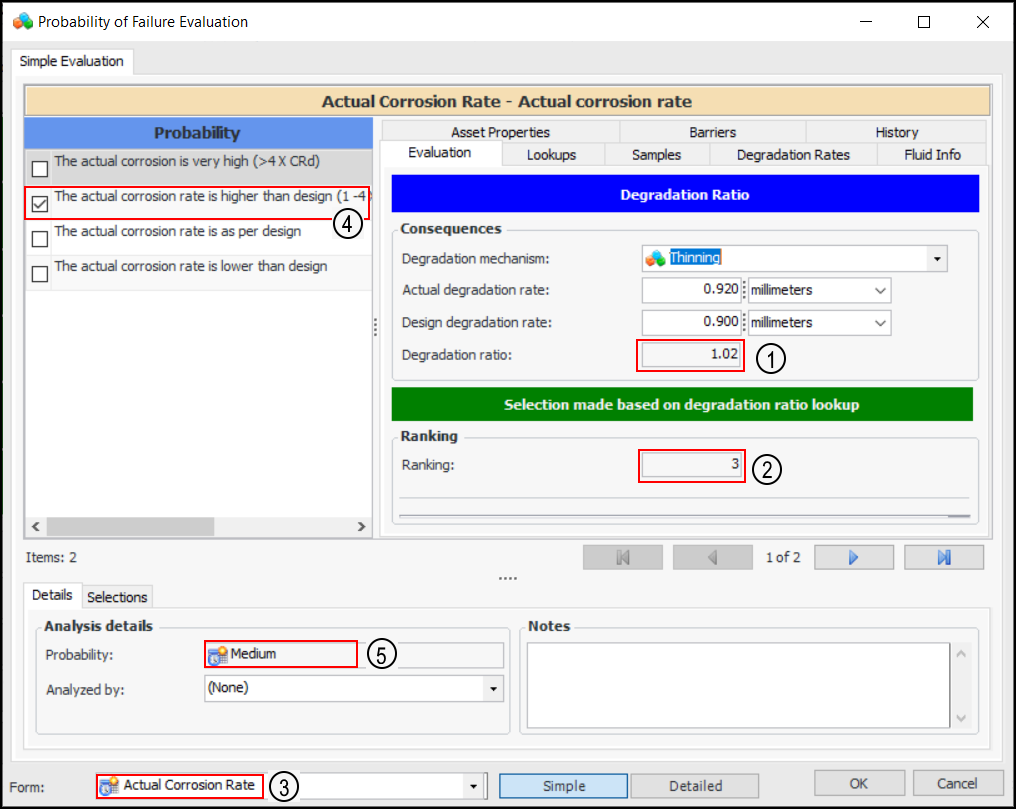
In this example of a probability of failure evaluation, the user selected a degradation mechanism and entered the actual degradation rate. APM then determined:
1.
2.
3.
4.
5.
For more information, see Setting up Consequence Severity Evaluations to use Lookup Tables and Setting up Probability of Failure Evaluations to use Lookup Tables.

Failure Mode Confidence Evaluation

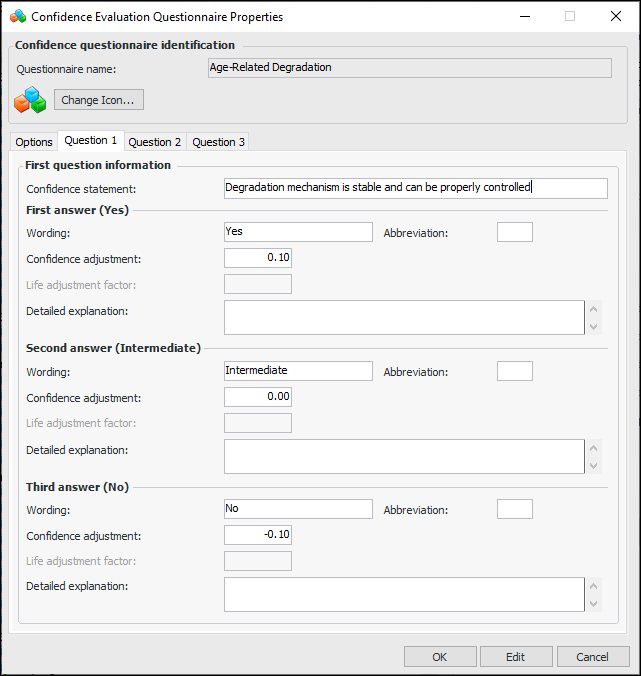
The Failure Mode Confidence score is determined by the user filling out the confidence questionnaire. The failure mode’s degradation type determines the questionnaire that is shown. The user answers each question, and the software calculates the score.
The confidence adjustment sets the response to a confidence statement. For example, 0.10 is the adjustment value for the first answer to question 1 in the sample below.

Confidence Factor

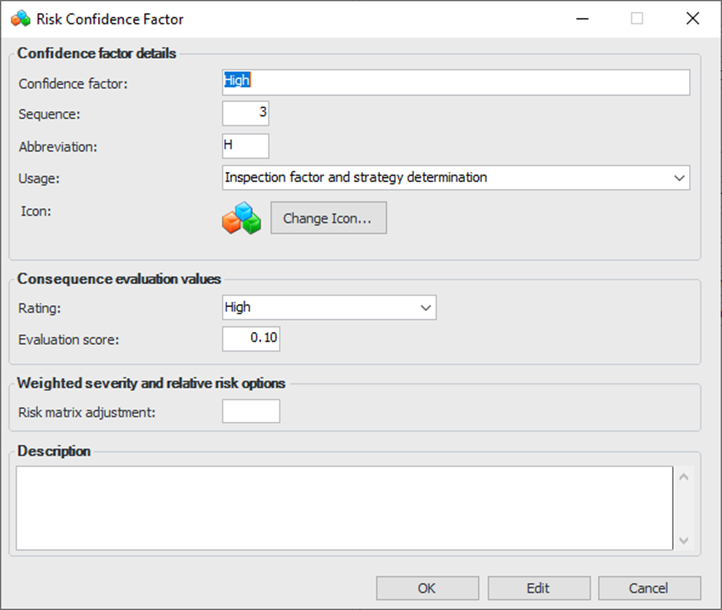
The confidence factor represents the analysis team’s faith in current maintenance or inspection practices to contain the failure mode’s risk. The confidence factor can adjust the inspection factor, the inspection interval, the inspection strategy, or likelihood of failure up or down.
The confidence factor is determined by answering questions in the embedded form, and the score comes from the configured score for the corresponding confidence factor (in settings). The score is used in the calculations performed by the software.
Here is an example of a “High” confidence factor:

Resulting Risk Scores

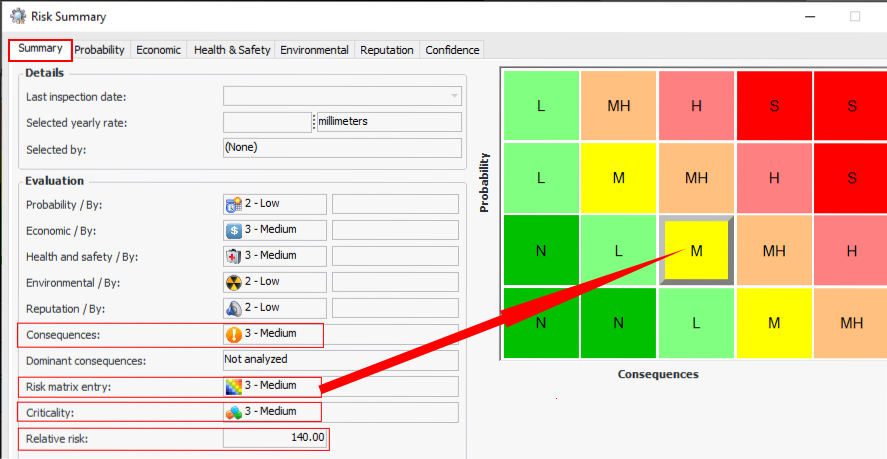
This section describes the risk scores and properties resulting from the calculations and determinations run behind the scenes by the software. These scores and fields are shown in many places but are easily seen on the failure mode’s Risk Summary:

Consequences

The software calculates the overall consequences score so that you can rank and compare an asset’s failure modes according to the severity of the consequences. The Consequences result in the UI (Consequences Priority is the field and the label was shortened for this UI) is determined by comparing a failure mode’s consequence scores to a set of rules. For example, a risk analysis in which any of the safety, economic, environmental, or reputation evaluations result in any severity ranking of at least 3 could be assigned the consequence priority “High”.
The rules and score sets are controlled by the failure mode risk options as described in the Failure Mode Criticality section.

Risk Matrix Entry

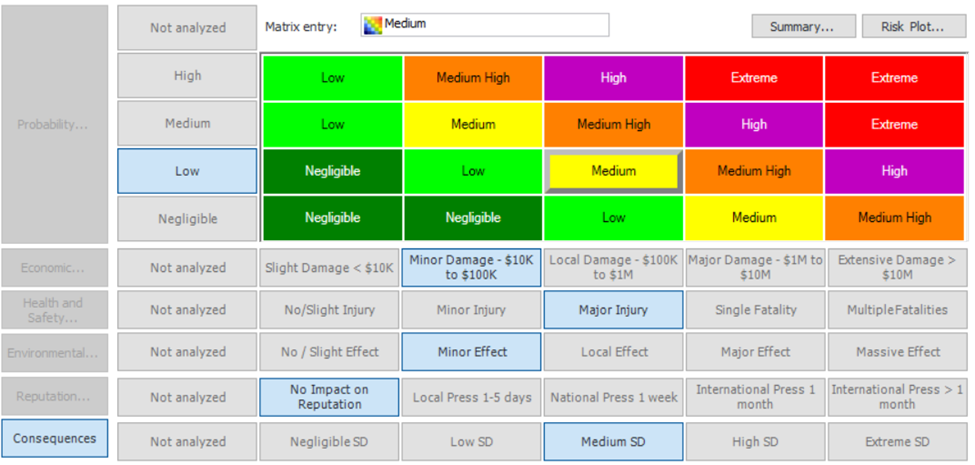
The risk matrix entry is the intersection of the probability and the highest of the consequences. For example:

Criticality

Criticality is based on the risk matrix entry. Indirectly it is based on probability and consequences because they drive the risk matrix entry.

Relative Risk score

The relative risk number is calculated for the failure mode as the product of the total failure mode severity, the failure probability, and (optionally) detectability.
Relative Risk = Severity * Probability * Detectability

Inspection Factor

Inspection factor is used to determine the next inspection date based on the asset’s remaining life calculated for the current degradation rate.
Inspection factor is a decimal number from 0 to 1. For example, an inspection factor of “0.5” means that the indicator reading should be collected at half of remaining life calculated for the current degradation rate. An indicator with 10 years remaining life and 0.5 inspection factor means that the next inspection is in 5 years (50% of remaining life). An indicator with 10 years remaining life and 0.8 inspection factor means that the next inspection is in 8 years (80% of remaining life).
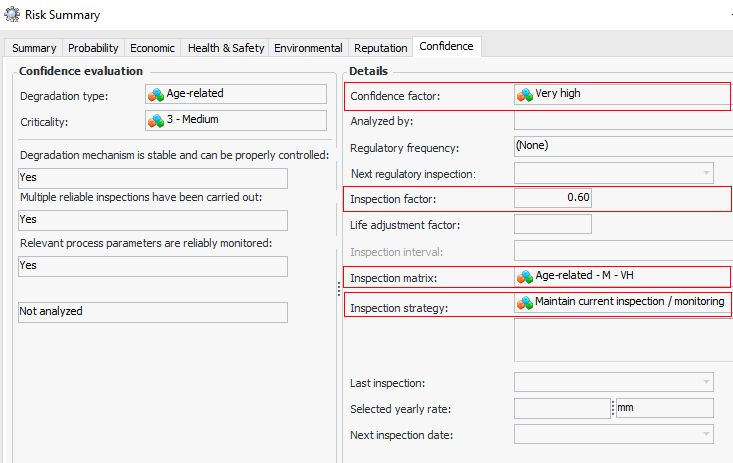
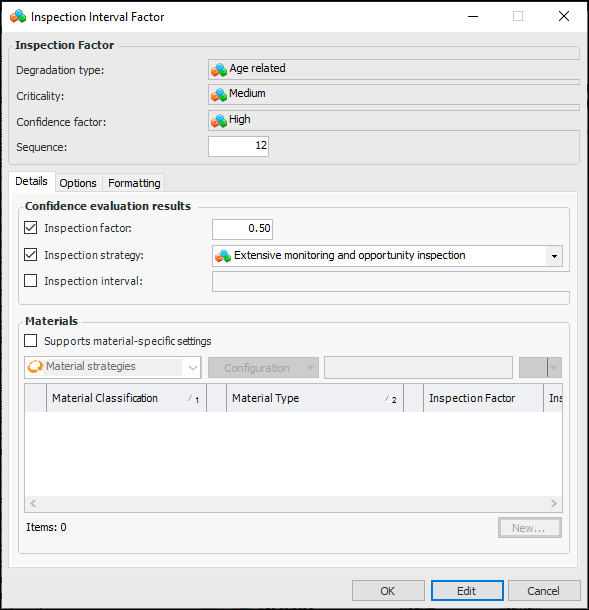
The greater the confidence factor, the higher the inspection factor, meaning that the interval between inspections is greater. The inspection factor is based on the confidence factor, degradation type, and the consequence priority (criticality) of the failure mode. For example:

Inspection Matrix

Inspection interval factor is assigned to the combination of degradation type, criticality, and confidence factor. This factor defines the inspection factor and whether inspections, strategy, or no inspections are allowed.

Inspection strategy

The inspection strategy describes the action to be taken for this combination of degradation type, criticality, and confidence factor. An example is “Maintain current inspection / monitoring”.

Life Adjustment Factor (part of Degradation Rate)

A life adjustment factor is a portion of an asset’s by-design life span, for example, one tenth of its original estimated life. Typically, a life adjustment factor is used to estimate asset lining's remaining life based on its condition at the time of inspection. This information is used to track the asset’s degradation.

Next Inspection Due Date

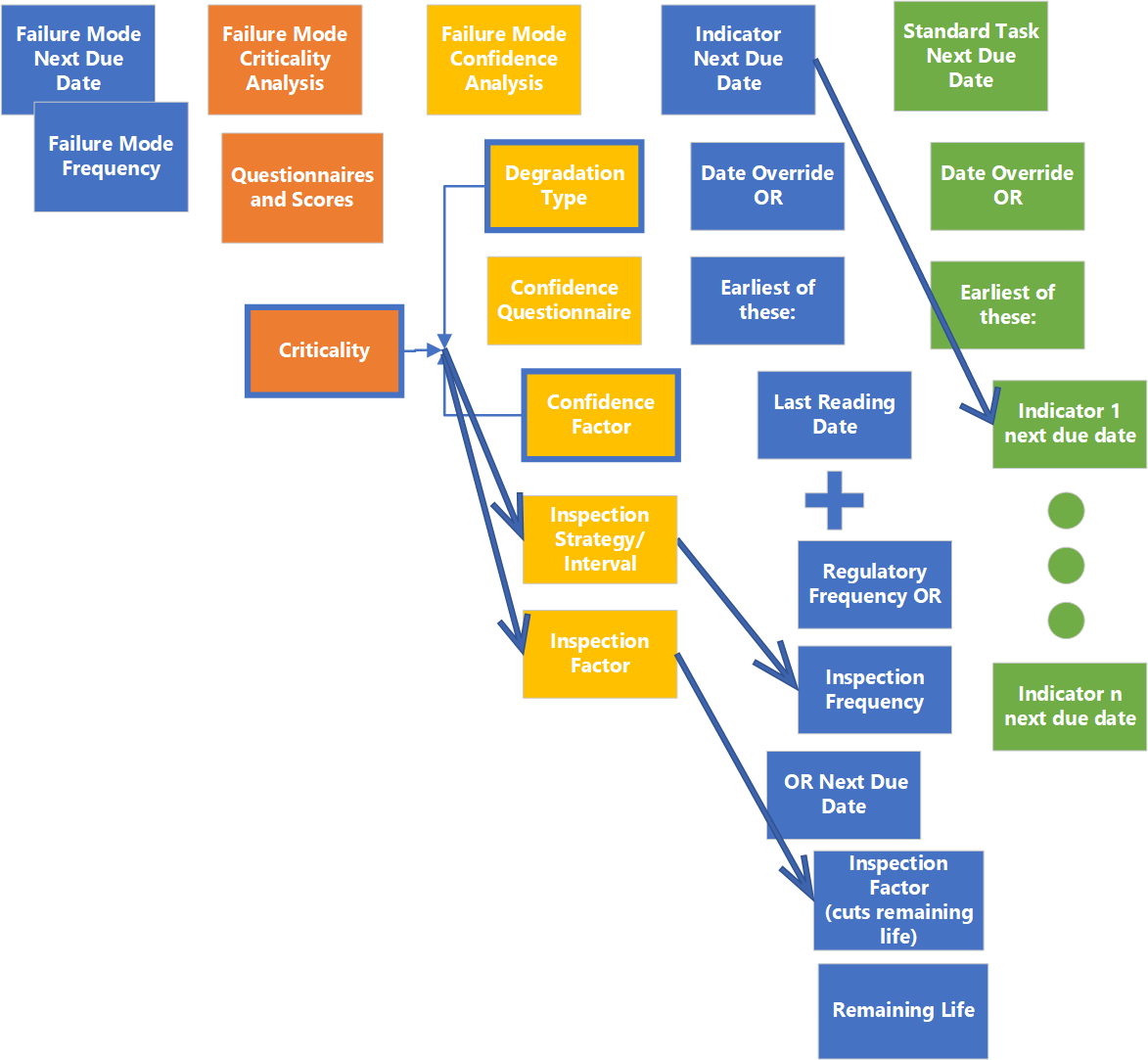
Next inspection due date is calculated by the software and determined from several inputs in an ordered evaluation. The diagram below illustrates the inputs and ordered evaluation.
For RBI, next inspection due date is dependent on the degradation tracking settings on asset, indicator, and indicator type. Indicator type controls the calculated degradation rates (up to 5) and the rate selection criteria/settings. In the site's indicator settings, you can select the default indicator type for degradation indicators.
The degradation rate selected for an indicator depends on the rate selection settings on the indicator type:

Indicator Next Inspection Due Date

An indicator’s next inspection due date is determined as follows:
The earliest of:
Example: last inspection date was July 6, 2020; regulatory frequency is 5 years; inspection interval is 4 years = next inspection due date is July 6, 2024 (4 years)
Example: last inspection date was July 6, 2020; thickness was 10mm; minimum thickness is 8mm; selected rate is .3 mm/yr; inspection factor is .7 = next inspection due date is March 6 2025 ((10-8)/.3 = 6.67 years X .7 = 4.67 years)
Last reading date is the Most recent reading “collected on” date.
Next collection date is based on the date when the checksheet reading was saved, before the checksheet readings have been processed.
The system shows all dates (and how they were calculated) even though the next date is determined by the above rules.
Finally, the indicator next inspection due date can be manually overridden by the user.
For more information, see:

Standard Task Next Inspection Due Date

When setting up a standard task, you can enable due-date calculation based on either the task’s indicators or its frequency. If the due-date calculation is based on the task’s indicators, the standard task next inspection due date is determined by the earliest of the indicator due dates on its list of indicators to inspect.
Also, the standard task next inspection due date can be manually overridden by the user.
More details can be found in the Help topic Working with Standard Task Due Dates.

Degradation Minimum Value Calculations

A degradation minimum value calculation determines the smallest allowable measurement for an asset, for example, the minimum wall thickness of a tank or pipe that falls within acceptable parameters. The formulas that are used to create calculations are provided by industry standards organizations, such as API (American Petroleum Industry), ASME (American Society of Mechanical Engineers), BS (British Standards), and ANSI (American National Standards Institute).

How the Calculations are Used

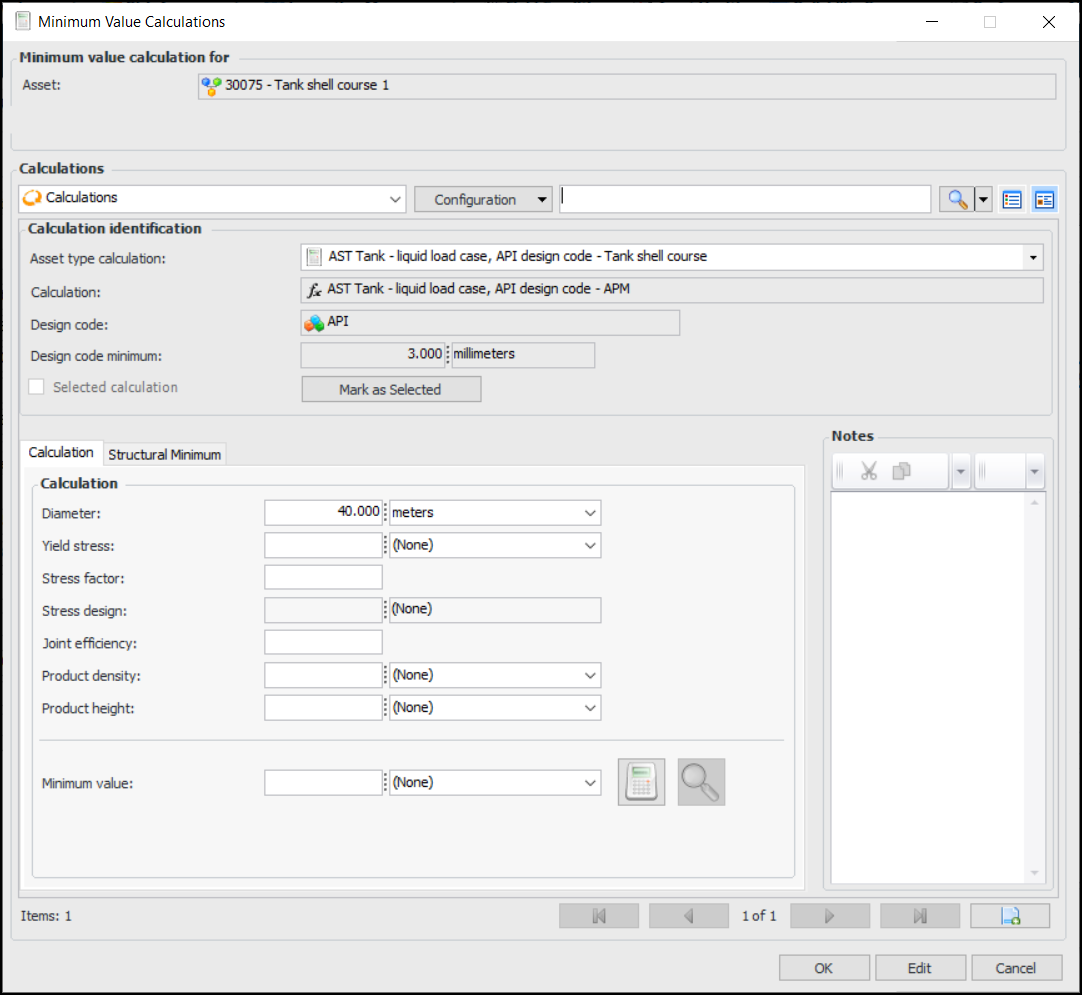
For assets that support it, the Minimum Value Calculator is available on the asset’s design rate, indicator’s rate, and failure mode’s degradation rate. You can open the calculator by clicking the Calculate button. For example:
You can enter values, calculate a minimum degradation value, and view the results of the calculation. Add calculation pages as required to try other formulas and inputs. Finally, mark a calculation as selected and click OK to return the result to the degradation rate. For more information about using the calculator, see Adding Degradation Information to an Asset.
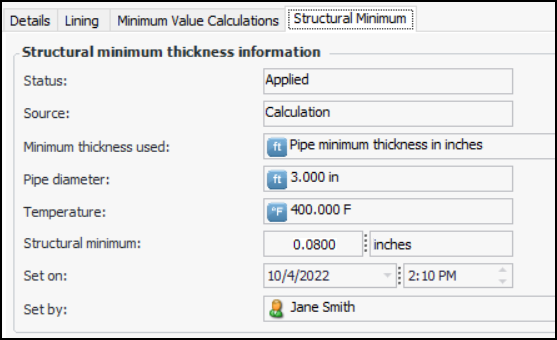
If you are working with a pipe asset, the asset type might support a structural minimum thickness lookup table. After calculating the minimum value, select the Structural Minimum tab to see whether the structural minimum value was applied. For example:
Other possible statuses are Not applicable, Not applied, No applicable structural minimum thickness, and No minimum value found.

Degradation Minimum Value Calculations Provided

As of version 7.19, the following calculations are included in the APM install database. View them with an Admin license in the Enterprise window, Customization Center view, Calculations tabs.
For information about adding your own calculations, see Creating a Degradation Minimum Value Calculation.