Recording Degradation Data on RBI Failure Modes

When recording failure modes on an RBI analysis, the analysis team can record information about the asset’s degradation pattern, mechanism, and so on. This information is often derived from historical data, theoretical analysis, and the informed opinions of team members.

To Record Degradation Data on a Failure Mode

1.
2.
3.
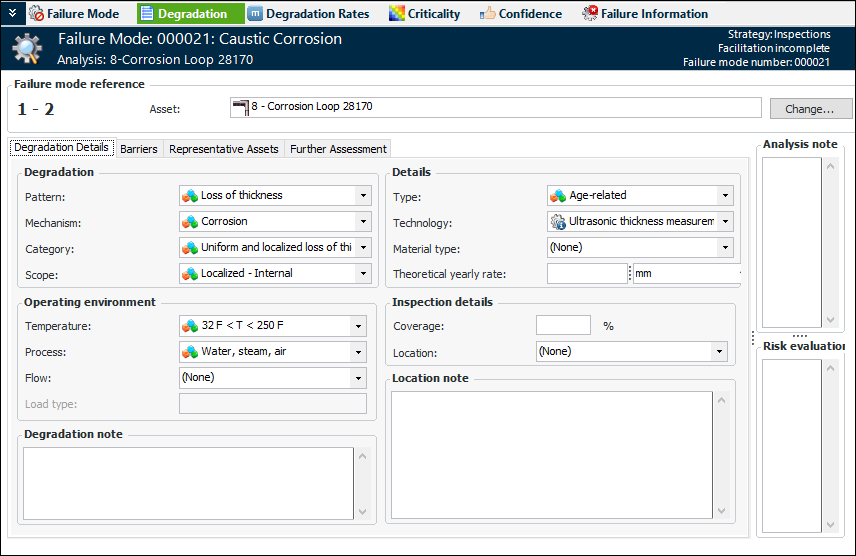
Select the Degradation Details tab. Here is an example from the damage mechanisms library:
4.
A degradation mechanism is the type of deterioration that could lead to asset failure. Examples are corrosion, erosion, mechanical failure, and pitting.
5.
In the Operating environment area, provide the following information:
6.
In the Details area, provide the following information:
7.
In the Inspection details area, provide the following information:
8.
Select the Barriers tab to add means of slowing or preventing the asset’s degradation. For more information, see Adding Barriers to RBI Failure Modes.
9.
Select the Representative Assets tab if the failure mode is assigned to the primary asset. The table on the left displays all of the assets on the analysis. Select one or more assets that best represent the failure mode. When you select an asset in this table, its information is displayed in the right-hand table.
10.
If the team decides that no further analysis is required for this failure mode, select the Further Assessment tab and select Further assessment is not required. Add a note about the reasons for the decision.