Adding Degradation Rates to RBI Failure Modes

When developing a failure mode on an RBI analysis, you can review, add, and update degradation rates on asset indicators. You can also select the next inspection date on a failure mode and then update the indicators’ next reading dates. This allows you to set the next reading date for indicators that do not support degradation or that do not have the required history on which to base the next inspection date.
To help with your review, APM lists degradation rates from the asset and indicators, displays historical information about rates (inspections and degradation rates), and lists checksheets, operating parameters, and barriers. You can create a comparative analysis of indicator readings in preparation for performing the risk analysis.
There are two ways to set the degradation rate and next inspection date on a failure mode:
When an indicator rate is selected, the number of inspections and inspection effectiveness value are copied to the failure mode from the indicator. An indicator’s inspection effectiveness and number of inspections are calculated when the Evaluate Inspection Effectiveness function is run for the site. You can change the values if needed.
Once you have selected the degradation rate, you can update the information on selected indicators by clicking Apply. When an action plan is marked “Facilitation Complete”, its indicators are updated with the next inspection date and inspection effectiveness.
Note: In the RBI analysis’ failure mode options, ensure that Update the indicator next collection date with FM’s next inspection date is selected. This option is located in the Properties view on the Failure Mode Options tab, Indicators tab.
This topic explains:

About the Degradation Rates Tab

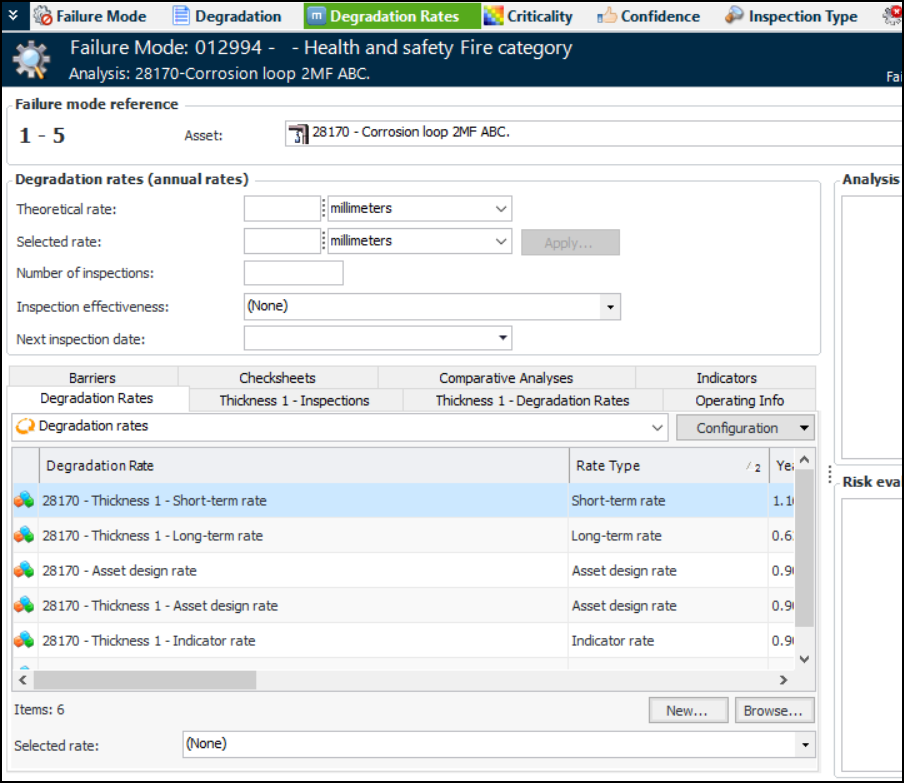
Open the Maintenance Action Plan window and select the Degradation Rates view and tab. For example:
The following information is provided to help with the analysis of the failure mode:
Operating Info tab displays the operating parameters defined for all of the analysis assets
Barriers tab displays the barriers assigned to all analysis assets
Checksheets tab displays the checksheets for the analysis assets.
Comparative Analyses tab is used to compare readings for two or more indicators. For more information, see Creating a Basic Comparative Analysis.
Indicators tab displays the indicators on the failure mode. You can browse for indicators or create them on this tab.

To Manually Add the Selected Rate and Inspection Date

On the Degradation Rates tab, Degradation rates (annual rates) area, add information:
The selected rate and next inspection date also appear on the Confidence tab.

To Select a Degradation Rate

In the Selected rate list at the bottom of the Degradation Rates tab, select one of the asset’s degradation rates. The selected rate and its next inspection date are displayed as read-only in the Degradation rates (annual rates) area. (They are also displayed on the Confidence tab.) The indicator’s number of inspections and inspection effectiveness value are displayed.
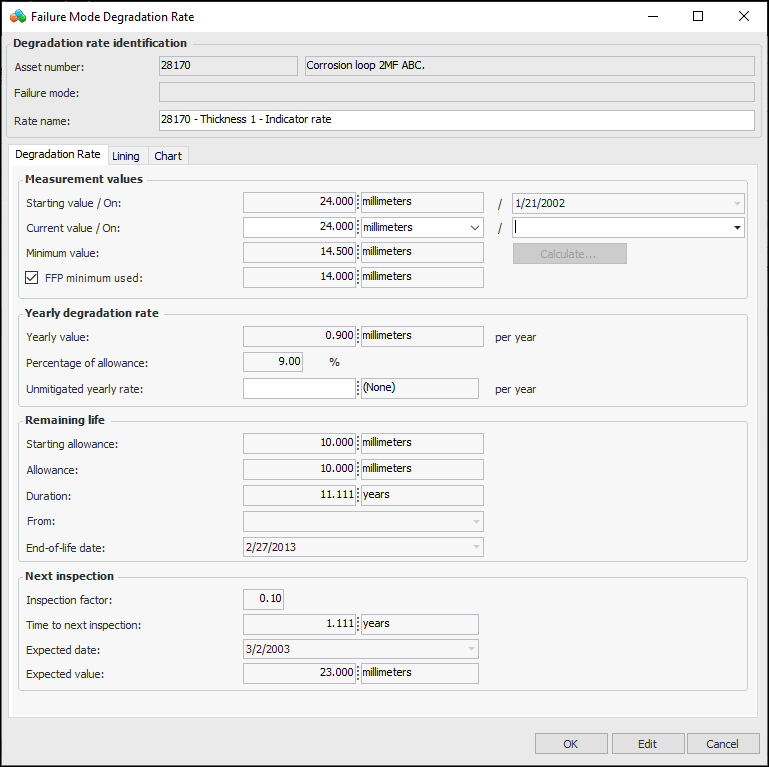
Tip: You can click Browse, select indicators, and add their degradation rates to the failure mode. Click New to create a failure mode degradation rate. Note that, if the failure mode’s inspection factor is greater than or equal to 0, the inspection factor is copied to the new degradation rate. For more information about creating degradation rates, see Creating a Degradation Indicator.

To Apply Degradation Information to Indicators

When you have selected a rate, you can click Apply to add the rate to the indicators that have been added to the action plan. The Apply Degradation Rate dialog appears, where you can select indicators that support degradation and click OK.
Note: If you apply a rate to an indicator that has readings, an inspector rate is created and set as the selected rate on the most recent reading. The selected rate type on the indicator is “Inspector”, and the inspector can change this rate on the indicator, independent of an analysis.

To Update Next Inspection Dates on Indicators

When you have finished defining a failure mode’s action plan, mark it “Facilitation Completed”. APM updates the action plan’s indicators with the next inspection date and inspection effectiveness, if supported. On the indicator, “Next reading due” is set to the failure mode’s next inspection date. The Next reading date source box displays “Failure mode degradation rate”.
If the failure mode includes a confidence evaluation, when the inspection factor is set, APM calculates the estimated next inspection date for degradation indicators listed in the action plan. The calculation uses the failure mode’s inspection factor instead of the indicator’s. In the Implementation view, Primary Action Plan tab, the Next Inspections tab lists the failure mode’s degradation indicators and shows their next inspection details, including estimated next inspection, indicator inspection factor, indicator next inspection data based on degradation, and the next collection date source.

Note: In the RBI analysis’ failure mode options, ensure that Update the indicator next collection date with FM’s next inspection date is selected.