
Setting up Purchasing Delivery and Expediting Rules
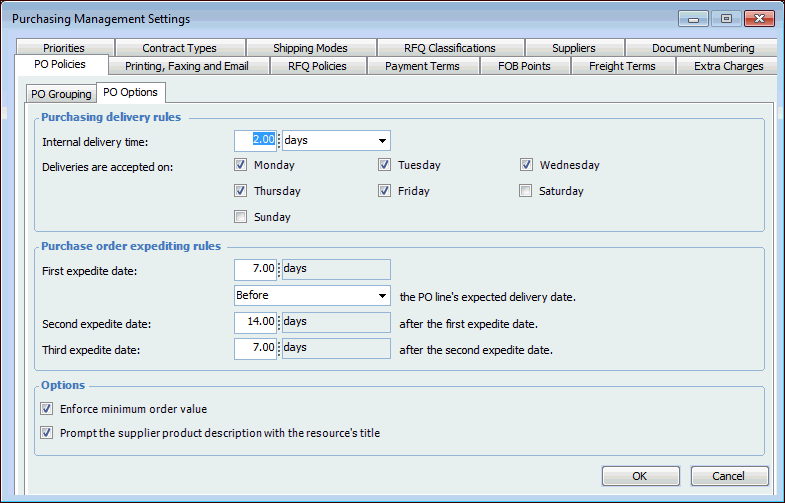
You can set the rules for a site that affect the scheduling of the deliveries of purchased materials, and set the expedite dates for purchases.
You might want to set an internal delivery time; that is, the time that it takes to deliver materials from the receiving area to the job site. When you set the internal delivery time, the system takes this time into account when calculating the date that materials are expected to be delivered for purchase orders.
Note: This setting only applies to new material purchases of resources, and not to replenishment purchases. For replenishment purchases, the system uses the lead time to put away entered on the warehouse item.
You can also set the days of the week that deliveries are accepted at your site. When the system calculates the date expected for a purchase, it then checks to see if deliveries are allowed on that date or not. If deliveries are not accepted on that day of the week, the system moves the date expected back by one day and tries again until the date falls on an acceptable day.
You can use expedite dates as reminders for buyers on when to check on the expected delivery date with the supplier.

To Set up Purchasing Delivery and Expediting Rules

1.
From the Site window, select the Administration menu and then Purchasing Management Settings. The Purchasing Management Settings dialog appears.
Tip: You can also access purchase management settings from the Site window by selecting the Purchasing view, Settings tab, and the Purchase Order Management Settings node in the tree.
2.
Select the PO Policies tab, then the PO Options tab.
3.
Select this option if you want the Product description for new supplier resources to be prompted with the title of the resource from the resource catalog. Users will be able to change the product description on the supplier resource, if necessary.
If this option is cleared, the Product description box will be blank on new supplier resources.
4.
Click OK to close the Procurement Management Settings dialog.