
**Defining Supplier Selection Rules

Any time that a purchase-type resource demand is created (on a work order or purchase order), the system selects a default supplier to fulfill the demand. You can specify the criteria that the system uses when selecting a supplier. The available criteria are:
Preferred Supplier: you can select which supplier is the preferred supplier for any resource. If there are multiple preferred suppliers for a resource at a site, the system selects the supplier with a current price that has the latest (most recent) effective date.
Price: the supplier with the lowest price is suggested.
Lead Time: the supplier with the shortest lead-time is suggested.
Order History: the supplier the resource was last ordered from is suggested.
You can also select the order of importance of the criteria. For example, the criteria selected for use might be ordered as:
1.
2.
3.
4.
Using this list of criteria, when a demand is placed for the resource the first thing the system checks for is the existence of a preferred supplier. If a preferred supplier exists, it is selected.
If a preferred supplier does not exist, the system checks to see with which supplier the previous order was placed. This supplier is selected.
If this is the first time the resource is being ordered, the system checks the suppliers and selects the one with the lowest price.
If there is a tie for lowest price, the supplier with the shortest lead-time is selected.
If criteria order were changed to the following, the selection logic would change accordingly:
1.
2.
3.
4.
This time the first thing checked is the suppliers’ prices. If there is a tie, the suppliers’ lead-times are checked. Again, in the event of a tie, the ordering history is checked. Finally, if this the first order for the resource, the preferred supplier status is used.
You can define the supplier selection rules on each resource. To simplify the maintenance of this information, a default set of rules are also available on each site. You can set a resource to either use the site settings or define the selection rules directly on the resource.

Types of Purchases

Four different purchase types are supported:
Regular purchases: regular purchase refers to an order for new units of a resource. This is the most common purchase type.
Service orders: service orders refers to any order placed for a service type resource. Service orders are only available for service type resources.
Repair orders: a special type of order used for ordering and tracking an external repair. Repair orders are only applicable to resources that are tracked as serialized units.
Equipment rental: a special type of order for ordering and tracking an equipment rental. Rentals are only available for tool type resources.
You can set up different supplier selection rules for each type of purchase. A non-cataloged purchase request, that is a resource demand without a resource, uses the site’s default settings.
This topic explains how to define the default supplier selection rules for a site.

To Define Supplier Selection Rules for a Site
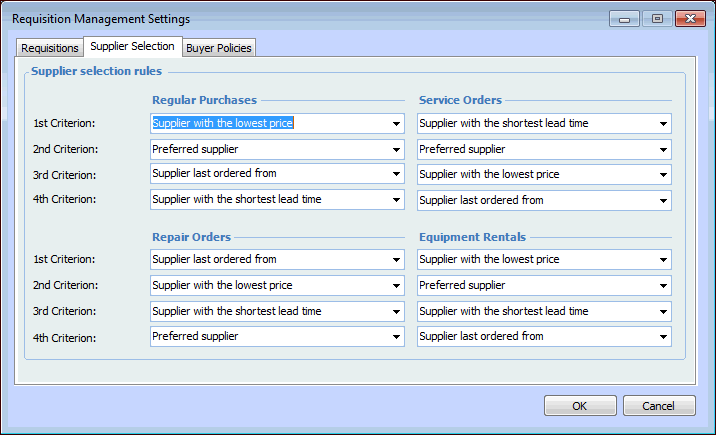
1.
From the Site window, select the Administration menu and then Requisition Management Settings. The Requisition Management Settings dialog appears.
Tip: You can also access requisition settings from the Site window by selecting the Requisitions view, Settings tab.
2.
Select the Supplier Selection tab. This tab shows the current supplier selection rules.
3.
In the Regular Purchases column, select the criteria in the order that you want the system to evaluate them. For example, if you want the system to review the supplier prices first, select that criteria in the 1st Criterion box.
4.
Repeat this process for the Service Orders, Repair Orders, and Equipment Rentals columns.
5.
When you are finished selecting the criteria, click OK to save the settings and close the dialog.