**Setting RFQ Policies

If your site uses APM requests for quotation (RFQs), you can set the site policies for when demand RFQs will be required. The available settings include whether or not RFQs are required for:
In addition, you can select when an RFQ is required for each of the above purchase types:
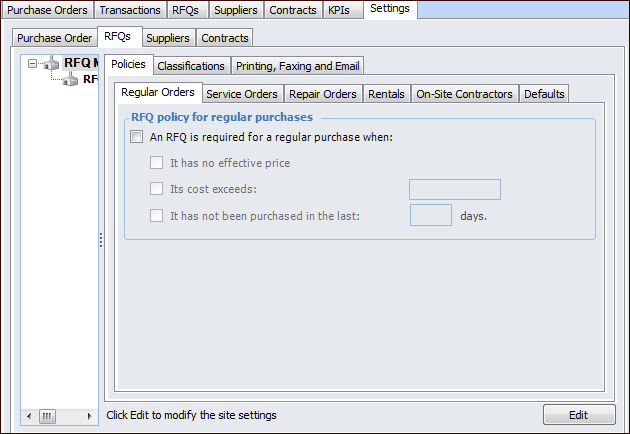
Effective price: If there is no supplier resource price or if the price is expired, an RFQ is required.
Cost: If the estimated cost of the work order requirement is less than or equal to the set cost, an RFQ is not required. If the cost of the requirement exceeds the set cost, an RFQ is required.
Last purchased: If the resource has not been ordered recently, an RFQ is required. You must set the period of time that is considered “recently ordered”. For example, if the resource has not been ordered for 180 days, an RFQ is required. This rule only applies to catalog resources. For non-catalog resources, there is no way to track when the resource was last ordered.

To Set the RFQ Policies for a Site

1.
From the Site window, select the Purchasing view, the Settings tab, and then the RFQs tab. Select the RFQ Management Settings node in the tree.
2.
Click Edit to modify the site settings. The Edit button is replaced by the Save button.
3.
On the Policies tab, Regular Orders tab, select whether or not direct-purchase RFQs will be required for regular purchases, and select when an RFQ will be required. Select one or more of the rules:
 
Note: If you do not select at least one of the rules for a purchase type, an RFQ will not be required for that type of purchase.
4.
On the Policies tab, Service Orders tab, select whether or not direct-purchase RFQs will be required for services, and select when an RFQ will be required. Select one or more of the rules, as appropriate.
5.
On the Policies tab, Repair Orders tab, select whether or not direct-purchase RFQs will be required for equipment repair orders, and select when an RFQ will be required. Select one or more of the rules, as appropriate.
6.
On the Policies tab, Rentals tab, select whether or not direct-purchase RFQs will be required for equipment rentals, and select when an RFQ will be required. Select one or more of the rules, as appropriate.
7.
On the Policies tab, On-site Contractors tab, select whether or not direct-purchase RFQs will be required for on-site contractor requirements, and select when an RFQ will be required. Select one or more of the rules, as appropriate.
8.