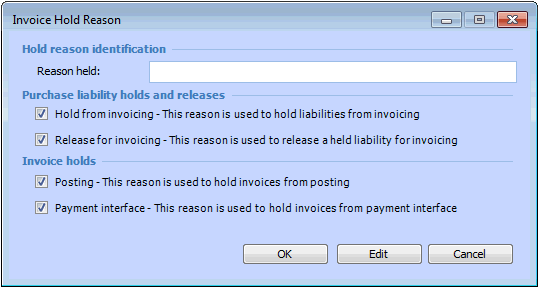
Setting up Invoice Hold Reasons

This topic explains how to create new invoice hold reasons.
Invoices can be held from posting, or from payment. In addition, purchase liabilities can be held from being invoiced. To create a hold, you must enter a reason for the hold. When you release an invoice or purchase liability you must also select the reason for the release.
You can create a list of standard hold/release reasons for the site. For example, you might hold a purchase liability from being invoiced if the material is still being inspected. Or, you might hold an invoice from being paid if you are waiting for your Controller to approve the payment.
When you create a hold reason, you can select the types of holds and/or releases for which the reason may be used.

To Create Invoice Hold Reasons

1.
From the Site window, select the Administration menu and then Invoice Management Settings. The Invoice Management Settings dialog appears.
Tip: You can also access invoice management settings from the Site window by selecting the Invoicing view, Settings tab, and then the Invoice Settings node in the tree.
2.
Select the Hold Reasons tab. This tab shows a list of existing invoice hold reasons.
3.
Click New. The Invoice Hold Reason dialog appears.
4.
5.
6.
Click OK to close the dialog.
7.
Repeat steps 3 to 6 for all of your invoice hold reasons.