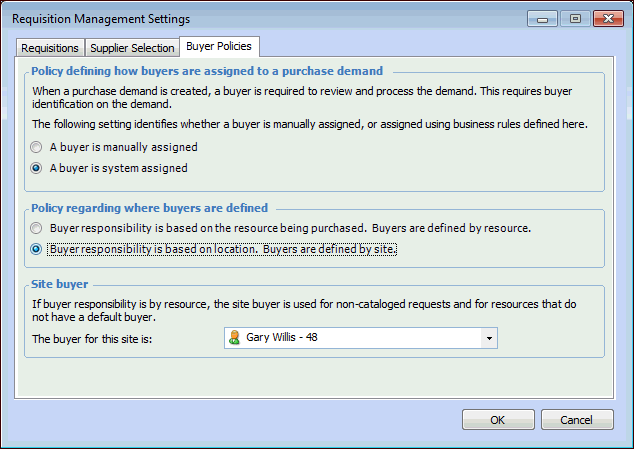
**Setting up Buyer Policies

A buyer assignment is mandatory on all purchase demands. This setting identifies the buyer who is responsible for purchasing the required resource. Planners are not required to identify the buyer when planning a purchase demand on a work order task requirement or a requisition line. In other words, the requestor is not expected to supply the name of the buyer.
However, the system does require a buyer name to process the purchase demand on an RFQ or a purchase order. To simplify setting the buyer name, you can have the system automatically assign a buyer based on business rules set at the site.
You can set following rules for buyer assignment:
Buyer Assignment: Buyer assignment to a purchase demand can be either manually assigned or automatically assigned based on a business rule.
Buyer Responsibility: Buyer responsibility can be assigned for each resource in the catalog, or you can assign one buyer for the whole site.
Site Buyer: The name of the employee who is the buyer for this site.
This topic explains how to set buyer responsibility, buyer assignment and a site buyer.

To Set Buyer Policies

1.
From the Site window, select the Administration menu and then Requisition Management Settings. The Requisition Management Settings dialog appears.
Tip: You can also access requisition settings from the Site window by selecting the Requisitions view, Settings tab.
2.
Select the Buyer Policies tab. This tab shows the current buyer policy settings.
3.
Manually: The system will not set a default buyer on purchase demands. A buyer must be set manually for each purchase demand.
By the System: The system sets a buyer on each purchase demand either using the buyer setting on each resource, or the buyer setting for the site.
Based on the resource being purchased: Different buyers are responsible for each resource in the catalog. If you choose resource assignment and a resource does not have a buyer assigned, or you are purchasing a non-catalog resource, the system uses the site’s buyer.
Based on location: A buyer has responsibility for the entire site. If you choose site assignment, and the current site doesn’t have a site buyer, the system looks up the site hierarchy until it finds a site buyer.
4.