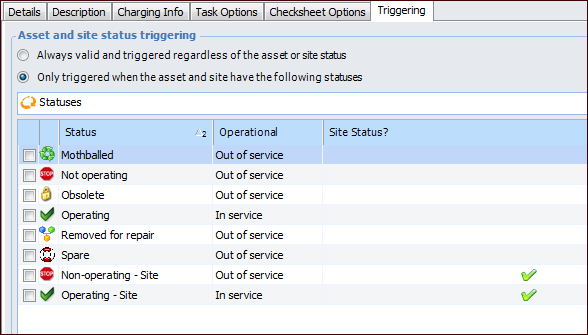
Concepts Tasks Settings Using Asset or Site Status to Control Standard Task Triggers You can prevent standard tasks from being triggered unless the asset, site, or both has a designated status. For example, you might want the task to be triggered only if the asset is shut down. This triggering option does not prevent users from manually creating work order tasks from standard tasks. When the asset or site status changes to one that allows the task to be triggered, APM triggers the standard task on its next planned cycle. You can select one or more statuses for the asset, site, or both. If any of the selected statuses are valid, the standard task can be triggered. If none of the selected statuses are valid, APM will not add the standard task to a work order. This section explains how to set up a standard task so that automatic triggering is controlled by the status of the task’s asset or site. To Select Asset and Site Statuses for a Standard Task 1. Open the Standard Task window. 2. Make sure that editing is enabled. 3. On the Properties view, General tab, select the Triggering tab. 4. Click Only triggered when the asset and site have the following statuses. 5. Select the asset and site statuses that will allow the standard task to be triggered. 6. Save and close the standard task.



 is enabled.