
Pre-selecting Bids to Receive “Preferred Supplier” Status and for Alternate Pricing

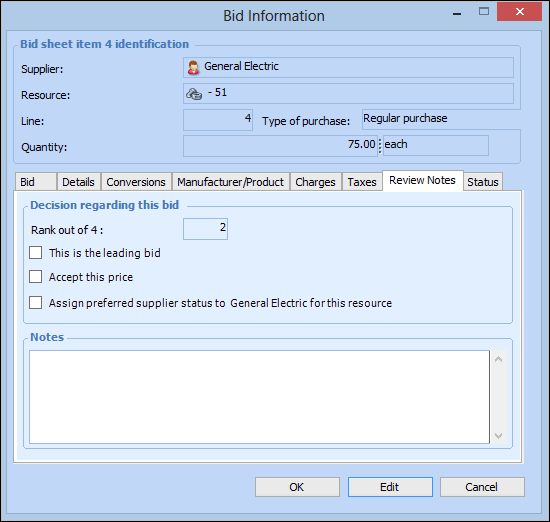
When an RFQ is awarded to one or more winning suppliers, you can also assign preferred supplier status to the winning suppliers for the resources on the RFQ. When a supplier has preferred status, they are the default supplier selected on future purchase requirements for the resource. You can assign this status either to all supplier resources on the RFQ or to selected resources.
In addition, you can have the system enter non-winning bids as alternate prices for the resources on the RFQ. This updates the supplier resource price for non-winning suppliers. You can accept either all supplier bids as valid prices or only selected bids.
This topic explains how to pre-select supplier resource bids to receive the preferred status, as valid prices, or both.

To Pre-select Supplier Resource Bids for Preferred Status and Valid Prices
1.
2.
Select the Analysis view.
3.
Select the Bids and Resources tab. When you select a supplier in the top table, the bottom table shows the supplier’s bids for each resource.
4.
5.
Select the Review Notes tab.
6.
7.
8.
Repeat steps 3 to 7 for each supplier’s resource bid that you want to pre-select.