
Performing Actions on Indicator Readings Shown in a Graph

You can perform actions on indicator readings that are represented by the points on a graph. The actions available depend on the reading status and properties. Possible actions are:

To Perform an Action on an Indicator Reading
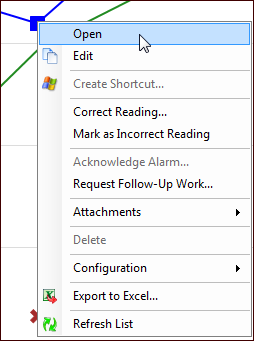
1.
2.
Select the Analysis tab.
3.
The options are:
Open: Opens the Indicator Reading dialog
Correct Reading: Opens the Correct Reading dialog. For detailed information, see Correcting an Indicator Reading
Mark as Incorrect Reading: The incorrect reading is removed from all indicator comparative analyses, future calculations, and future PM triggering. For detailed information, see Marking an Indicator Reading as Incorrect.
Acknowledge Alarm: Only available if the indicator is in an alarm state. For detailed instructions, see Acknowledging Indicator Alarms and Warnings.
New Failure: Opens the New Failure dialog. For detailed information, see Creating a Failure Record From Scratch.
Request Follow-Up Work: Opens the Request Follow-up Work dialog. For detailed information, see Requesting Follow-up Work for an Indicator Reading.
Request Failure Mode Review: Opens the Request Strategy Development Analysis dialog. For detailed information, see Requesting a Failure Mode Review for an Indicator.
Attachments: Select this option to add an attachment to the reading or to view existing attachments. For detailed instructions, see Adding Attachments to an Indicator Reading.